Showing posts with label App. Show all posts
OnePlus, a global mobile technology startup, in association with Servify, the personal device assistance platform which promises to bring brand authorised service to all devices and appliances, has launched ‘OnePlus Care’ app to enable customers to self-diagnose their smartphones and avail free pickup-drop service from their home or office, in case of a need to repair their OnePlus devices. The free pickup-drop service is available across Bangalore, Chennai, Kolkata, New Delhi and Mumbai.
OnePlus is a global startup challenging conventional concepts of technology. Created around the “Never Settle” mantra, OnePlus creates exquisitely designed devices with premium build quality and high performance hardware. OnePlus thrives on cultivating strong bonds and growing together with its community of users and fans.
Servify is a Mumbai-based tech startup founded in late 2015. Servify launched a mobile app that aims to work as a personal assistant for electronic gadgets and appliances where consumers can add their household electronic products and appliance, store the bills, and can access authentic brand authorized service during in-warranty and as well as out of warranty scenarios.
To further provide value to OnePlus customers, Servify is offering a 12 months complementary ‘Accidental Damage Protection Plan’ for all customers buying OnePlus 3 devices. Anyone buying a new OnePlus 3 device in India from Amazon.in can register for this plan within 30 days of purchase by downloading the OnePlus Care app and registering the purchase details on the app.
Elaborating on this customer-friendly initiative, Vikas Agarwal, General Manager at OnePlus India said, “Customer experience is a key focus area and we are proud to offer the OnePlus Care app. We are bringing differentiated superior support structure to our users to elevate their after-sales smartphone experience.”
This association will also enable OnePlus customers to keep their ownership data safe, get proactive service alerts and help them choose the most convenient service mode.
With a common goal of providing exemplary after-sales assistance to all its customers, OnePlus and Servify are confident that this innovative new platform will bring about an exciting change in the way customers use their favorite devices.
Eyewatch, an emergency alert application that has been designed for security of the citizens in India. Developed by Indian Eye Security Pvt. Ltd. With the inputs from security experts from USA, UK, France, Israel, and India. This app has already crosses half a million downloads.
At the click of a button, immediately the system informs guardians with the exact Audio/Video displaying the details of the emergency & location with the help of GPS and network triangulation on the “Guardians Dashboard”. Alerts can be viewed by guardians via smart phone or computer.
This is the only application in the world today, which when activated records a 60 second pre-alert audio which helps the guardians to hear exactly what is causing the perceived threat. A 20 second video is sent which provides environmental details.
It has different alert types so as to ensure the right kind of help can be provided at the right time. The broad categories are A) personal alert, where only known people (ERC’s) are contacted so as to avoid embarrassment or exposure in personal situations. B) travel alert, where you may additionally contact Car breakdown services, etc. C) Security alert where the police are also intimated about the emergency so that they may respond and provide immediate assistance and lastly D) medical alert where your doctor or primary healthcare provider may be contacted.
The app requires the user to add details of all the Emergency Response Contacts along with a family doctor’s information, medical information, employer’s details and insurance details for effective use.
The alert can also be activated by pushing the power button 4 times or with the help of an accelerometer which measures the motion of the phone.(These need to be enabled in the settings menu first) The app also provides a 6 second countdown to deactivate the alert therefore reducing false alarms when the accelerometer trigger is involved.
After Extensive testing by the Army Signals Corps, The app was launched by in 2012 by the then army Chief General V. K. Singh for the Indian Army Veterans and their families.
Having won the ‘Best Safety App’ in 2015 Eyewatch currently has a preinstallation Agreement with 2 Indian Mobile Manufacturers. This app is already available on Google PlayStore, iTunes, Blackberry, Microsoft and Symbian.
Various Police Commissionerates in India, namely Gurgaon (Haryana), Kolkata (West Bengal), Amravati (Maharashtra), Nashik (Maharashtra), Nagpur (Maharashtra), Bagalkot (Maharashtra), Belgaum (Karnataka), State of Goa, State of Uttar Pradesh ‘Shakti 1090’ have successfully launched the Eyewatch police application.
Eyewatch police app has been designed in such a way that when an alert is activated, it automatically provides the police with critical details and location about the person who has activated the alert.
Website: https://www.eye-watch.in/
YuppTV is one of the world’s leading over-the-top (OTT) content providers for South Asian Content, as live TV, Catch-up TV, and Unlimited Movies.
YuppTV's products provide a combination of technologies that provides:
- Consumers the convenience of a virtual home environment anywhere and anytime.
- Companies with maximum global reach
- Content providers with ideal platforms and services to launch their content effortlessly and efficiently.
- Provides a reliable, resilient and scalable platform for all Broadcasters & Content Providers to reach their target audience globally over 6 screens of Connected TVs, STBs, PC, Smart Phones, Tablets and Social Networking sites.
YuppTV has headquarter in Atlanta, GA. YuppTV offers 200+ Indian TV Channels in 13 languages that include Hindi, Tamil, Telugu, Malayalam, Kannada, Marathi, Bengali, Punjabi, Oriya, Gujarati, Sinhala, Urdu and Bangla and continues to revolutionize the way TV is viewed across the world.
The mission of the company is to make it simple and instant for Broadcasters to deliver and consumer to view; live TV, Catch-up TV and Movies anytime and anywhere in the world to any internet enabled device.
Features
• Content partnerships with 200+ channels in South Asia with rights to key geographies globally.
• Access through 25 devices to six screens i.e. Connected TVs, Internet STBs, Smart Bluray players, PCs, Gaming consoles, Smart Phones and Tablets.
• 5000 hours of new on-demand content is added to YuppTV platform everyday
• Average Viewership duration on subscription model: 5 hours/day/paid subscriber
• Bollywood movies from big production houses
• Live TV | Catch-up TV | Movies | TV Shows
• In-house New Media player: YuppTV Media Player: (set top box)
• 10 days of Catch-up TV
• Available in 13 languages
• No cable or no satellite
• 24x7 Customer centric support
YuppTV App Analytics
- More than 5M visitors per month
- Peak traffic of 20M visitors monthly on the platform (Google Analytics)
- Average Viewership duration on subscription model: 5 hours/day/paid subscriber
- More than 2 Million YuppTV Apps downloaded on Samsung TVs worldwide
- More than 400,000 YuppTV fans on Facebook
- 100,000+ YuppTV apps downloaded on LG Smart TV
- More than 1.5M Nokia App downloads from OVI Store
India
- 2nd most downloaded App among Android TV Apps
- 29th most downloaded App in Entertainment in Android Market Place
- 4th top downloaded featured App in Nokia Mobile Phones
Worldwide
- Boxee Player: Among top10 Apps
- Samsung: Among top 5 most downloaded Apps
- YuppTV app pre-installed in Samsung Smart TVs and bluray players in US & UK
- Only South Asian app available in PS3
Paris: The French government has created an emergency alert application intended to send swift warnings to smartphone users in the event of a bombing, shooting or other disaster.
The app, called 'Alert System and Information of Population', developed after last year's bloody attacks on Paris, is being released ahead of the European Championship soccer tournament starting June 10.
The app is available in English and French, it can be configured to release a smartphone alert if an attack occurs nearby.
Officials demonstrating the app showed a smartphone screen turning crimson along with the words "ALERT," and gave a brief description of what was happening and advice on how to react.
Initially it was configured to alert only armed attacks and bombings, but then the
French officials eventually plan to update the app so that it can flag industrial accidents, floods and other emergencies.Reliance Jio has not yet officially launched its 4G services, but it seems wait is soon coming to end, as company has started taking registrations from interested people for network trials. The company's official site Jio.com is now live and has started taking registrations.
The official website also tells about apps from Reliance Jio, i.e. JioChat, MyJio, JioPlay, JioOnDemand, JioBeats, JioMags, JioXpressNews, JioDrive, JioJoin, JioMoney, and JioSecurity. Notably, all these apps are now available to download via Google Play and App Store.
The JioChat Messenger app: It is an instant messaging app.
JioSecurity app: It offer mobile security.
JioPlay: With this app tv Channels Programs will offer content from tv.
Jio XpressNews: It is a news and magazine aggregation app.
The JioMoney: It is the company's own wallet app which will allow users to recharge and do other payment related functions. It is like PayTM.
Reliance's JioJoin: It is the company' video chat app that enables non-VoLTE smartphones to make HD voice as well as video calls. It is like Skype.
Earlier this year, Mukesh Ambani had announced that Reliance Jio would be ready to commercially launch its 4G telecom services in second half of 2016. So far, Reliance Jio's 4G services are available to roughly 120,000 employees, their families and business partners.
Smartphones are all about making our lives easier than ever and those Smartphone Apps are helping us in every aspect to manage our day to day life tasks. Like we can play, learn, chat and lot more. In that category, we have so many payment Apps that help us to recharge our mobile or DTH or utility bill payment on the go all you have to do is just activate your bank facilities like debit cum ATM card or credit card or net banking and many more. So let us take a closer look at two Best of the Best Apps PayTM and Freecharge.
PayTM
PayTM is a huge mobile-based e-commerce website undoubtedly the most popular among all others of its category. It started off with mobile recharging platform and then extended to DTH, electricity, gas etc… later entered into the shopping platform. Now they offer services in Recharge, Booking tickets and online shopping.
The App is well structured with easy and simple user interface. PayTM lets you pay through online and through PayTM wallet. The wallet can be refilled by credit card or by net banking prior and can be used for later transactions.

Recharge through PayTM is just few clicks away and the service is instant for which you earn cashback offers and many other profitable deals. It supports almost 15 Mobile operators and for DTH it supports Airtel, Dish, Reliance, Sun direct, Tata sky and Videocon. Similarly, it has lot of options to be discovered. You can even book tickets for movies, Bus, Flights, Hotels.
PayTM offers weekly deals and coupons, through which you can get offers and discounts from your payments. You will have atleast offer of 5% everytime. We can transfer PayTM money between PayTM users.
One last thing about PayTM is you can use it at IRCTC(not during tatkal hours) and with Uber.
FreeCharge
FreeCharge is new in market for recharge and bill payments, but it is catching up quickly. When the company announced about 'FreeCharge Wallet', it has crossed 10 million registered active users within 60 days of its rollout. you can pay from your FreeCharge wallet across 50 merchants.

It is famous to get discount coupons for recharging mobile, bill payments and DTH connection. You can choose coupon codes for many stores like Amazon, Jabong, eBay, Dominos, CCD and lots more. These coupon codes will be of equal value as your recharge so it means you are recharging for free.
Freecharge is keeping it simple by just concentrating on Mobile recharges. And most of the coupons are related to restaurant and movies. But we cannot recharge through IVRS or SMS.
It has offered a new service by transferring Freecharge wallet money through one WhatsApp message.
Verdict
If we compare Paytm with Freecharge, most of the options are similar. Even though Freecharge entered the market much later than PayTM, it is so quick and so focused on what it does. While PayTM has wide spread of functions where it lacks merchants for its products but still it tops the market.
Maths is not strong suit for everyone. It is said that maths is tough for those who do not apply their whole brain or lack practice. I am not criticizing maths strugglers as people living in glass houses shouldn't throw stones on others.
Literally my way of doing maths:
- Write down the problem.
- Cry
But god has shown mercy. Thanks to the wonders of IRT (Image Recognition Technology). Now we have MATHPIX, an iOS app that lets you point your phone camera at a problem and calculates solutions in seconds which is first technology that can solve handwritten maths problems. Mathpix was envisioned by Stanford PhD student Nico Jimenez. This app provides a step-by-step guide to reach the correct solution.
The interfere looks like any standard camera app. Simply drag on-screen reticle over the equation and the app solves it. It also provides you with multiple methods to reach a solution, making it a divine educational tool. It uses image recognition to process problems and pings its servers to do the mathematical heavy lifting, so it requires internet connection to work.
WhatsApp brings in new updates with more features. Here Snapdeal owned Freecharge in India has introduced a new feature of sending money to their contacts through WhatsApp.

Freecharge team has said that, this new feature is the next level of ‘Chat n Pay’ (social payments). Chat n Pay basically allows the user to transfer Freecharge wallet to another Freecharge account using chat based communication.
Freecharge is using instant messaging as a medium to allow users to transfer money faster.
Social payments is a key pillar for a great customer experience and a stepping stone to building habit commerce. We have taken social payments to the next level by enabling consumers to pay via social platforms like WhatsApp. We are confident that this step will make digital payments a part of daily life of Indians and Freecharge will be at the heart of it as the Payments Operating System for a Digital India. – Govind Rajan, COO, Freecharge
To send Freecharge money via WhatsApp, users have to
- Open FreeCharge Android app and go to "FreeCharge on WhatsApp" from the left-side menu and Enable it
- After this step, they can simply open WhatsApp and type the amount followed by FC (for example, 100FC).
- After sending the message, Freecharge window will open asking for send/request money. Confirm to send the amount and they are good to go.
Now overspending will cost you an electric shock to warn you that they have entered the red zone. Heartfelt gratitude to British Technology firm that invented this technology. This "shock" might sound harsh but people might welcome that idea over exceeding their limits.

The banking platform is developed by Intelligent Environments, which said it hoped to see the technology made available to the public “in the near future”.
The platform, called Interact IoT (internet of things), involves linking some smart web-enabled devices to a bank account. These include Pavlok, a wearable device that gives users mild electric shocks to help them break bad habits, and which claims to have already helped hundreds of people quit smoking, nail-biting and unhealthy eating.
The “zap” that the wristband delivers supposedly ranges from “pleasant to slightly uncomfortable”.
The link-up between the platform and the Pavlok wristband would involve customers logging into their bank or credit card account, connecting the device and setting a spending limit. When they get near their spending limit, their phone will display a notification. But if that did not work and the individual exceeded their limit, they would get an electric shock.
Interact IoT also works with Google’s Nest smart thermostat, which learns and manages the heating patterns of a house. Intelligent Environments claims it will help people save money on their utility bills. If a customer’s account balance drops below their self-imposed spending limit, the technology will automatically turn their thermostat down to a pre-decided temperature.
Pavlok and Nest are opt-in services, so customers can decide whether to switch them on or not. But Intelligent Environments claims: “With the Pavlok integration, users have told us they love it.”
The firm, which specialises in digital financial innovations, said it was responding to demand, pointing out that contactless payment methods had made it more difficult for people to keep track of their spending, thus increasing the risk that some will get into financial trouble.
It said its research had found that one in three millennials were “too scared to check their bank account”. It also found that only a third of 18- to 24-year-olds felt their banks provided them with the digital budgeting tools they needed to stay on top of their debt and finances.
Intelligent Environments added that it “anticipates many discussions with banks and credit card companies to bring the Interact IoT platform to their customers in the near future”.
The company has previously worked with a number of UK financial services companies including HSBC, Lloyds Banking Group and Atom Bank. In 2013, it launched the “world’s first” smartwatch banking app, while in 2015 it developed an emoji-only passcode, enabling customers to log into their financial services app using only emojis.
The platform, called Interact IoT (internet of things), involves linking some smart web-enabled devices to a bank account. These include Pavlok, a wearable device that gives users mild electric shocks to help them break bad habits, and which claims to have already helped hundreds of people quit smoking, nail-biting and unhealthy eating.
The “zap” that the wristband delivers supposedly ranges from “pleasant to slightly uncomfortable”.
The link-up between the platform and the Pavlok wristband would involve customers logging into their bank or credit card account, connecting the device and setting a spending limit. When they get near their spending limit, their phone will display a notification. But if that did not work and the individual exceeded their limit, they would get an electric shock.
Interact IoT also works with Google’s Nest smart thermostat, which learns and manages the heating patterns of a house. Intelligent Environments claims it will help people save money on their utility bills. If a customer’s account balance drops below their self-imposed spending limit, the technology will automatically turn their thermostat down to a pre-decided temperature.
Pavlok and Nest are opt-in services, so customers can decide whether to switch them on or not. But Intelligent Environments claims: “With the Pavlok integration, users have told us they love it.”
The firm, which specialises in digital financial innovations, said it was responding to demand, pointing out that contactless payment methods had made it more difficult for people to keep track of their spending, thus increasing the risk that some will get into financial trouble.
It said its research had found that one in three millennials were “too scared to check their bank account”. It also found that only a third of 18- to 24-year-olds felt their banks provided them with the digital budgeting tools they needed to stay on top of their debt and finances.
Intelligent Environments added that it “anticipates many discussions with banks and credit card companies to bring the Interact IoT platform to their customers in the near future”.
The company has previously worked with a number of UK financial services companies including HSBC, Lloyds Banking Group and Atom Bank. In 2013, it launched the “world’s first” smartwatch banking app, while in 2015 it developed an emoji-only passcode, enabling customers to log into their financial services app using only emojis.
What’s up? People now when you have taken out time to visit our website and read our articles and daily blog’s. Here are top 5 apps that may help you to solve your daily problems.
Paytm
Paytm
Now what paytm really is? Paytm is an e- commerce website that helps you with your daily problems. This Noida based company provides instant bill payments, DTH recharge, metro card recharge and has a huge virtual market place with lots of offers and discount. Now what is paytm know for? Paytm provides cashback on your purchases.
Now tell me who doesn’t likes cashback + discount paytm has been leading app that provides lot of schemes with you debit or credit cards to. What if you are stuck somewhere and there is this emergency and you need money. You don’t have your wallet with you. What will you do? Paytm has a simple solution for this you can store your money in your paytm wallet.
There are even restaurants and bars who have started accepting bills from your paytm wallet. Over all paytm can improve your daily life you don’t have to go and waste your precious time to pay bills like electricity and mobile bills. Paytm is available for both platforms Android as well as iOS.
Spending tracker
Spending tracker is a very useful app for people like me. I mean I usually lose track of how much money I have been spending in the month or sometimes I think I lost money! But the actual problem is I don’t remember where I have been spending money.
So basically what spending tracker does is it keeps track of you’re out flow and inflow of money. All you have to do is every time there is an outflow or inflow of money you will have to open the app and record the transaction. Now you must be thinking who has the time to do it every time you spend some cash but once you bring this in routine it will help you a lot.
Spending tracker has different categories like petrol expense, food expense and other expense so you can even manage how much money you have spent on which category.
Shuttl
Are you a daily commuter? Do you face problems like heavy rush in the bus train’s? Do you have to travel with crowd you are not comfortable with? Shuttl is the answer to all your commuting problems.
Shuttl
Are you a daily commuter? Do you face problems like heavy rush in the bus train’s? Do you have to travel with crowd you are not comfortable with? Shuttl is the answer to all your commuting problems.
What really does the shuttl app does it gives you the opportunity to travel with luxury at the cheapest available rate. All you have to do is open shuttl and choose your nearest pickup point. The best part of shuttl is you don’t have to pay money in cash you have to recharge your shuttl wallet through paytm that is the only way you can use shuttl.
Now this option leaves us with better quality business and travelers. User will not have to face problems like stinky bus, overloaded crowd etc. Shuttl also gives your first 2 rides free and you can even suggest route’s where you want shuttl to start operating. Shuttl app is available on both android and iOS.
Evernote
Evernote
Are you busy enough to remember what all small work you have to do today? Evernote is a simple solution to this problem you can save your daily work routine set reminders, save memos, you can even save pictures, voice notes, and even you can hand-write on your phone’s screen and save it.
Now the question is what if your phones battery die? You are at work and there is this important note you have saved so what you can do is you can access your evernote account from computer as well and bam! You have your notes with you.
Please comment what else apps are helping you with your daily problems?
By-vatsal sakaria
Please comment what else apps are helping you with your daily problems?
By-vatsal sakaria
Interior design and decorating resource Houzz is the overall best Android app of the year, according to Google, which announced the results of the first-ever Google Play Awards at its developer conference, Google I/O. While in previous years, the company had rounded up large numbers of apps for “Best of” lists, the new Google Play Awards instead follows Apple’s model of selecting winners across a variety of categories.

But where Apple chooses best apps for phone, tablet, and watch, along with selections like “most innovative,” Google took a somewhat different path. It selected 5 nominees across 10 categories, and didn’t differentiate between those built for tablet or phone.
Google also nominated apps that reflected a group of developers who were taking the best advantage of Google’s services, like “Best Use of Google Play Game Services,” plus those who did the best job of implementing Google’s newer design language, Material Design.
And Google didn’t limit itself to only one category focused on innovation, but chose several angles – including not only the “most innovative” app, but also “Standout Startup” and “Early Adopter. The move was likely meant to signal that not all of the best and most creative new apps are exclusive to iOS, or launched on iOS first.
The company live-streamed the ceremony this evening from Google I/O, which was also a change from previous years.
On stage, the company spoke of Google Play’s evolution and noted that the online storefront now reaches over a billion users daily. Apps are obviously a huge draw for this store – earlier this week, Google said that app installs from Google Play had reached 65 billion in the past year.
The winning apps were chosen by a panel of experts at Google, and rated on several factors, including app quality and innovation. To be considered, the apps either needed to have launched or had a major update over the last 12 months.
Houzz ended up winning the “Best App” title, beating out BuzzFeed News, Colorfy, TuneIn Radio and Yummly.
Meanwhile, the hugely popular Clash Royale walked away with the “Best Game” crown, topping Alphabear, Clash of Kings, MARVEL Future Fight, and Star Wars Galaxy of Heroes.
From the startup world, the smart airfare prediction engine Hopper won “Best Standout Startup” and millennial-focused investing app Robinhood grabbed the win for “Best Use of Material Design.”
Google also nominated apps that reflected a group of developers who were taking the best advantage of Google’s services, like “Best Use of Google Play Game Services,” plus those who did the best job of implementing Google’s newer design language, Material Design.
And Google didn’t limit itself to only one category focused on innovation, but chose several angles – including not only the “most innovative” app, but also “Standout Startup” and “Early Adopter. The move was likely meant to signal that not all of the best and most creative new apps are exclusive to iOS, or launched on iOS first.
The company live-streamed the ceremony this evening from Google I/O, which was also a change from previous years.
On stage, the company spoke of Google Play’s evolution and noted that the online storefront now reaches over a billion users daily. Apps are obviously a huge draw for this store – earlier this week, Google said that app installs from Google Play had reached 65 billion in the past year.
The winning apps were chosen by a panel of experts at Google, and rated on several factors, including app quality and innovation. To be considered, the apps either needed to have launched or had a major update over the last 12 months.
Houzz ended up winning the “Best App” title, beating out BuzzFeed News, Colorfy, TuneIn Radio and Yummly.
Meanwhile, the hugely popular Clash Royale walked away with the “Best Game” crown, topping Alphabear, Clash of Kings, MARVEL Future Fight, and Star Wars Galaxy of Heroes.
From the startup world, the smart airfare prediction engine Hopper won “Best Standout Startup” and millennial-focused investing app Robinhood grabbed the win for “Best Use of Material Design.”
Google today at I/O conference announced a new Messaging Allo, Allo is a smart messaging app that makes your conversations easier and more expressive. It’s based on your phone number, so you can get in touch with anyone in your phonebook, very similar to WhatsApp but with deeply integrated machine learning, It has smart features to keep your conversations flowing and help you get things done.
![]() |
| Google Allo on Playstore |
The company still has an entirely separate platform, Hangouts, which is built in to Android phones, as well as a number of lesser-used predecessors including Gchat and the now-defunct Wave. But Allo also represents a fresh start for Google, allowing the company to offer end-to-end encryption for the first time. That decision will throw it headfirst into conflict with the FBI, standing alongside Apple and Facebook against the US government’s desire to read the text messages of criminal suspects.
It’s still less secure than iMessage or WhatsApp, however, requiring users to actively opt-in to end-to-end encryption through an “incognito mode”. But security isn’t the main selling point of Allo. Instead, that’s the built-in chatbots, including Google Assistant itself: Allo users will be able to use Assistant to find extra information or send auto-generated replies. Impressively, it can even parse images, leading to the (perhaps overly specific) suggestion of “Nice Bernese mountain dog” as one such reply.
Allo also features the Google assistant, bringing the richness of Google directly into your chats—helping you find information, get things done, and have fun. You can chat one-on-one with the assistant, or call on Google in a group chat with friends. Either way, you no longer have to jump between apps to do things like book a dinner reservation with friends, get up-to-date sports scores, settle a bet, or play a game. The assistant in Allo lets you bring things like Search, Maps, YouTube and Translate to all your conversations, so that you and your friends can use Google together.
We will post a video reviewing Allo as soon as it will be available on play store, so don't forget to subscribe our youtube channel.
We all have been there, trying to type a text and getting frustrated how slow this crazy app works, after a while we eventually get used to it, and think that typing on smartphone keyboards is one of impossible task (apart from waking up at 5:30 in morning), Smartphone keyboards are never fast enough, never autocorrect properly and often lead to frustration. Can you relate to these problems? Then check out our tips to increase your typing speed on keyboard apps for Android.
Using One Hand Mode
Trust me with one, you can type faster with one hand compare with two on your smartphone, just for that reason Google have released one hand mode for its app. Its simple to you and keeps your other hand free for other tasks.You also have the choice of sharing "small snippets" of input with Google to "improve Google Keyboard for everyone." Presumably that ties into the keyboard's suggestions and making word prediction smarter. The keyboard's height can be adjusted between five different choices ranging from short to tall, with "normal" as the middle point between them.
What do you need to do ?
- Update your Google keyboard to latest version from here .
- Open any app, say WhatsApp and open your Google keyboard, Once it start press and hold Enter for a while.

- Tap on third icon that float out.
- Boom you are ready to use your keyboard with one hand.

Let your word do typing for You
If your hands aren’t free — or you just feel like dictating — you can tap the microphone button on the keyboard and enter words just by speaking them.

This feature sends your voice input to Google’s speech recognition service, where it’s examined, converted to text, and sent back to your phone. This means that it requires an Internet connection, but the approach of using Google’s massive computing power makes it surprisingly accurate.
What do you need to do ?
To enter punctuation marks while using voice recognition, just say “period,” “comma,” “question mark,” “exclamation mark,” or “exclamation point.” Android will enter the appropriate punctuation mark instead of the words.
Swipe to Type
The default keyboard in Android 4.2 gained the ability to type words simply by swiping your finger over them.

What do you need to do ?
To type a word by swiping, simply touch the first letter and glide your finger over the letters — for example, to type Geek, touch the G, move your finger to the E, and then move your finger to the K. Android will try to guess what you’re typing, displaying it above the keyboard. Lift your finger and the word will be typed. You can do this to type many words in sequence quickly, lifting your finger from the screen in between each one.
Sharing from one platform to another isn't an easy task. Sharing simply means we have to copy link from one app then paste it to another. Now, as we all know Google has most creative mind and a big bunch of innovative ideas. Spaces is one key to sharing problem from that big bunch.
Spaces provides platform where we can find and share articles, videos and images without leaving the app, since Google Search, YouTube, and Chrome come built in.
When we are having a group conversation with lot of chit chat type friends, then leaving conversation even for a minute simply means losing complete track of conversation. Also in these types of conversations important notes get lost in endless threads.
With Spaces Google has tried to build a platform with better group sharing experience. When something new is shared by anyone to Spaces, the conversational view lets us see what the group is talking about without missing a beat. Spaces lets people get together instantly to share around any topic.
And if we want to search for some image, video, article or even comment which was shared many days before, its easy to find it with Spaces.
Spaces is very easy to use, with just one tap on '+' you can create new space. After creating assign it title then start inviting your friends via messaging, email, a social network, or whatever way you like. For different topics we can create any number of space.
Google in its blog has written "We’ll also be experimenting with Spaces this week at Google I/O. We’ve created a space for each session so that developers can connect with each other and Googlers around topics at I/O, and we've got a few surprises too. If you’re joining us in person at I/O, make sure you install Spaces on Android or iOS before you arrive!"
Spaces was rolled out yesterday, i.e. May,16th. Spaces can be used on Android, iOS, desktop, and mobile web for all Gmail accounts. Give it a try and create your first space today.
Frontline commando: D- Day is one of the most successfully launched 3D Freemium action game from Glu Mobile available in Android and iOS. This D- Day is the follow-up of 2011’s Frontline Commando. This is follows the World War II theme shooters, but this is way different from the numerous contemporaries.
This D-Day is a third- person point to point shooter game throughout the Normandy countryside. This game features almost 145 missions with three set of goals for the players to accomplish. Each mission is rewarded with cash and other freebies sometimes; this cash is used to purchase new weapons. Also every time when the level goes up the player gets gold. This gold can be used to buy a small set of premium weapons.
Frontline commando is completely free with usual in-app purchase (to purchase the gold and war cash which is not necessary). Even without using these in-app purchases we can still enjoy the game to the fullest.
And the best part of Frontline Commando: D- Day is its Gameplay, this part is going to be very simple and more similar to other shooting games like you have to take cover, pop your head up to fire a few rounds, crouch down to avoid bullets and chuck some grenades but the best part is the graphics and the touchscreen control in this game is extremely good, with wonderfully striking off the soldiers with headshots. At times you need to take cover, when you need to move around, you’ll need to roll to your left or to your right, which gives you a better angle to knock your enemies off.
Each mission includes three bonus objectives for you to complete, like one will be scoring from headshots, other will be completing the mission within 2 minutes, and the last will be completing the mission successfully.
The game varies itself nicely by offering different ways to take a break from shooting like you’ll get a chance to fight off tanks, hop in an anti-aircraft gun to knock down the enemy planes, jump into a mounted gun and roll off the full battlefield with ammos. At times you’ll feel the missions and levels are repeatedly same but somehow it is going to be fun.
This Free D- Day game also does put a strict limit on the weapons you can use and makes it difficult to purchase 3 stars in most of the later levels. If you are to earn 3 levels, then you need to own a super weapons and explosives which can only be purchased with that in-app purchase things called the gold and war cash. But I have been playing this game for few hours every day and I only managed to save a total of 35 golds. But an average rifle cost 120 gold in the game store and merely 2 bazooka shots will eat of 10 gold from you.
Luckily, you will be able to take those tanks with grenades too but with a higher number, say if one bazooka takes off a tank then you need to have 4 shots for grenade. You can earn these grenades by playing the previous completed missions again to scoop up more grenades.
Finally, as a conclusion I would like to say that, I don’t know much about World War II, but this game D-Day made me feel like I was one among the battalion on the frontlines of Normandy. This gave me a perfect experience and whoever is looking for a more hardcore experience on the field on a handheld device, then this is going to be a treat for them.
The game is really worth playing for its free price tag and make sure you keep your wallet at a secure place before you get into the game. It is going to be damn addictive. Be prepared for the war.
Download Game From here :
WhatsApp will soon roll out video calling feature for beta testers on latest v2.16.80 for Android devices. The APK file, which is ready for download from APK Mirror as well, has the new feature live on it.
The latest beta for Android shows an option to video call whenever you try to call someone. Unfortunately, as of now it seems the feature is not enabled to all users, with some getting the 'Video Calling is unavailable at this time' error message, however, some other users are reporting using it.
The feature is currently in testing phase then, and it probably won't be too long before we see it being enabled for everyone across platforms.
The latest beta for Android shows an option to video call whenever you try to call someone. Unfortunately, as of now it seems the feature is not enabled to all users, with some getting the 'Video Calling is unavailable at this time' error message, however, some other users are reporting using it.
The feature is currently in testing phase then, and it probably won't be too long before we see it being enabled for everyone across platforms.
For starters, WhatsApp has close to 1 billion monthly active users, claims to be totally end-to-end encrypted and we’re assuming that given their obsession for privacy, they will extend the same to their video-calling feature. It also remains to be seen how they will optimise video-calling on WhatsApp given that the app is so popular in India where network connectivity remains patchy. Also will video-calling be supported on WhatsApp groups is another big question.
Google recently introduced a new feature known as " Tap to Translate " earlir today for Google Translate app. This updated feature now allows you to translate language inside of any other android apps after you've Selected text in a differnt language,a little Translate icon will appear which is very similar to Facebook's chat heads — through which you can read the translated text. This pop up will also allow to revert text from your first language back into the other language.
This new feature for sure will save lots of time and effort, whether they frequently need to translate text or just do so on occasion. According to Google will work with app, ie chat app, a browser, or so on, so long as you can highlight the text. Microsoft added basically the same exact feature to its Android translation app last month, but it placed the translate option in the cut / copy / paste menu, which is maybe a bit less convenient than a giant bubble (or maybe less annoying, depending on how you look at it).
Google is bringing a couple of other updates to Google Translate today, too. An offline mode is rolling out on iOS, with each offline language only requiring a small 25MB of space.
Launcher Apps – What’s the point of having it? There are hundreds of launchers available for android and only a few can be considered efficient – which one will suit your phone? To answer these questions, Let us take a look at the 5 best Android Launchers for your smartphone or tablet which you can try without a second thought.
These Apps helps the customers to customize their smartphone and tablet to have a better experience that fit into their daily usage. Launcher Apps can work to every aspect of the phone’s looks and performance like changing screen transitions, icons, fonts, themes and wallpapers. Few apps acts very similar to the one that is present as default in your phone, few others can entirely change the way you interact with your device. So with this Launcher Apps you can have your screen as simple or as complicated as you wish. Here it goes…
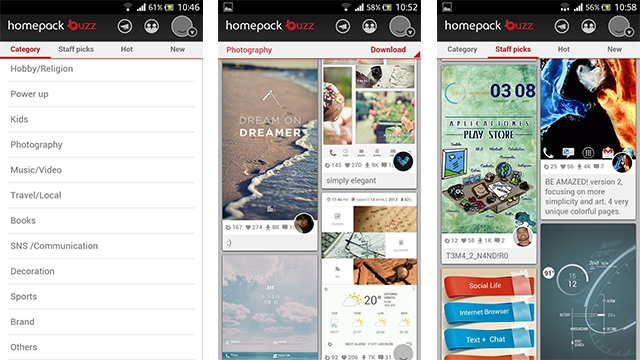
1. Buzz Launcher - Personalisation
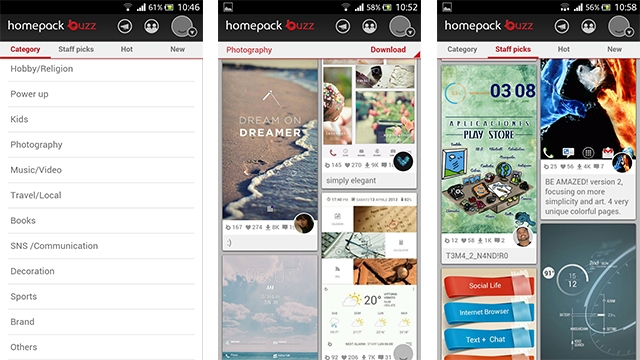
Buzz Launcher is one of the popular launcher which showcases some versatile functionality and rich community of themes. It has 17 categories for themes including Music/Video, Sports, Photography, Education and so on.
![]() |
| Buzz Launcher |
Download it here:
https://play.google.com/store/apps/details?id=com.buzzpia.aqua.launcher&hl=en
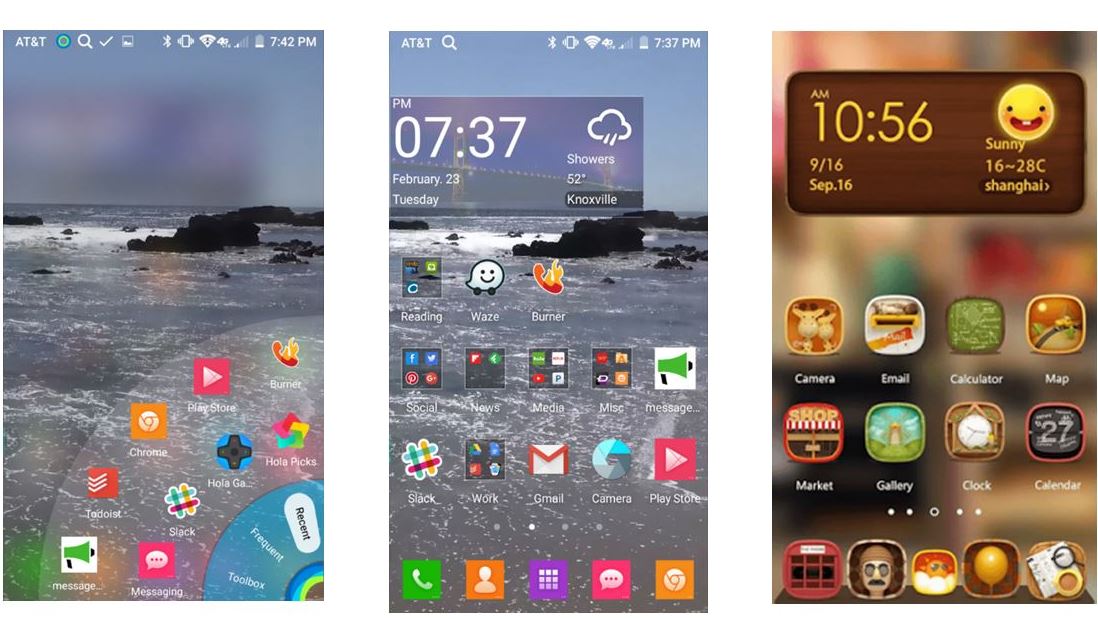
2.Hola Launcher – Simple and feature-rich
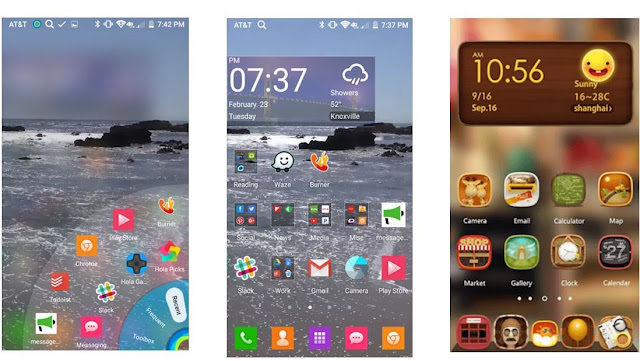
Hola Launcher is new on market targeted for low space consumption apps, it just requires 1 MB for installation. May be it takes low space but when it comes to features, it doesn’t go any low when compared to other custom launchers.
| Hola Launcher |
Download it here:
https://play.google.com/store/apps/details?id=com.hola.launcher&hl=en
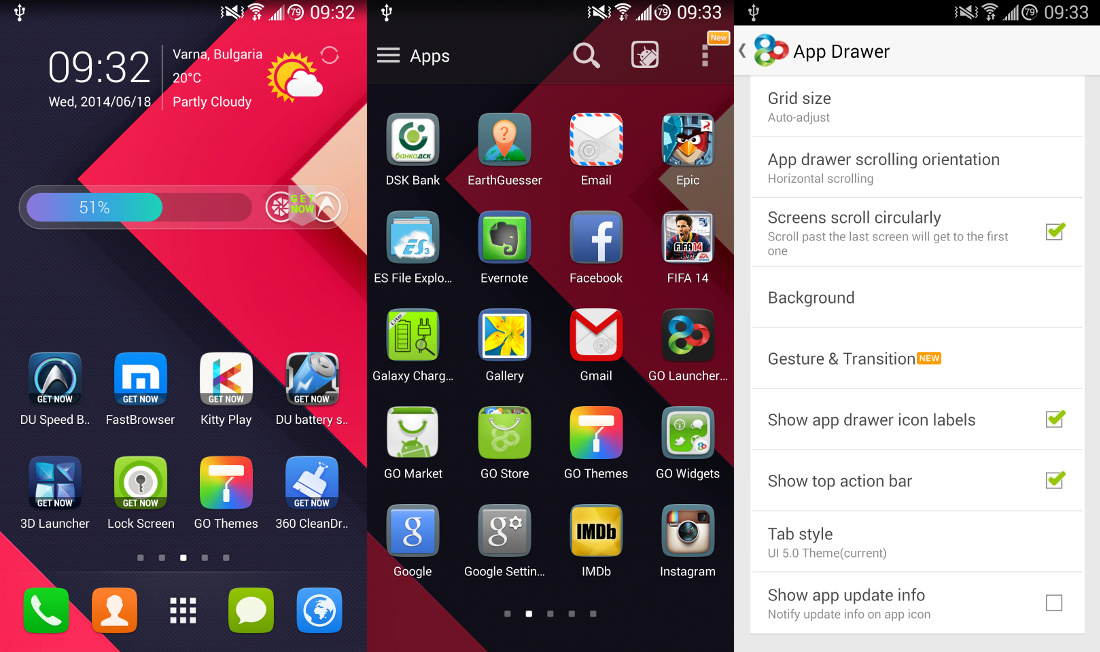
3.Go Launcher EX
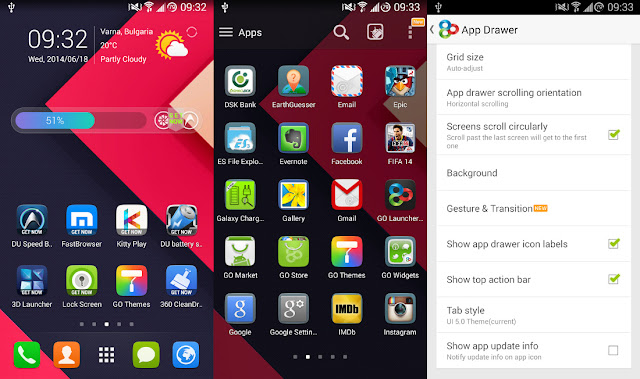
Go Launcher Ex is a completely free Android app which has tons of options like having a customised app drawer like you can have vertical or horizontal app drawer, changing the transition effect, editing background by changing themes and wallpapers, kills the running apps to boost the speed of the device, it can even lock and hide the apps, Uninstall and install apps, search apps within app drawer and so on.
![]() |
| Go Launcher FX |
Download it here:
https://play.google.com/store/apps/details?id=com.gau.go.launcherex&hl=en
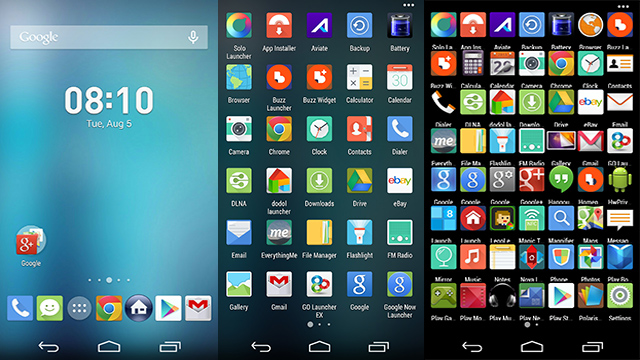
4. Apex Launcher – Hardcore App installer
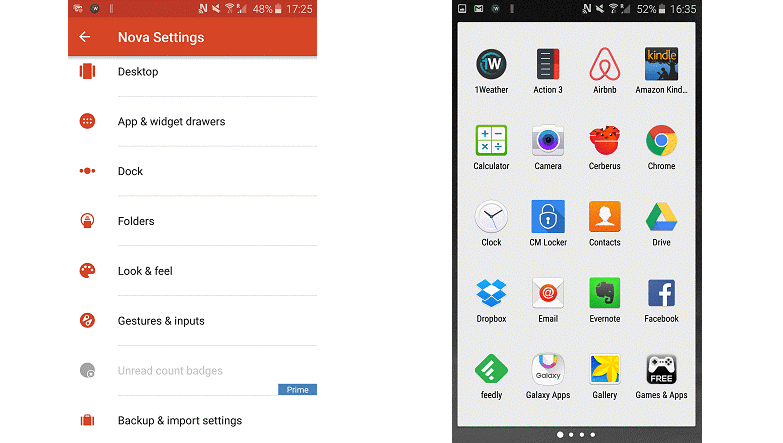
Apex Launchers is quite different from other launchers, means it just holds more important on the control you have over your home screens and the apps menu. See, this app can ridiculously hold a 10 x 10 grid of icons in a single screen (looks like teeny-tiny icons)and lets you seriously supercharge how much you can make use of your phone or tablet’s screen pixels.
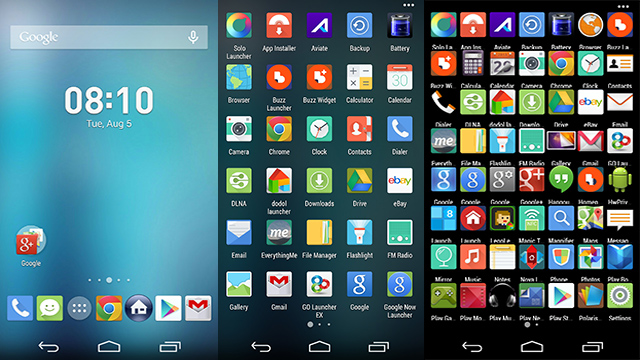
![]() |
| Apex Launcher |
Download it here:
https://play.google.com/store/apps/details?id=com.anddoes.launcher&hl=en
5. Nova Launcher
Nova Launcher is the most customizable launcher ever available in the play store. This is said so because we can choose different colored themes, icons, app drawers and more, if you don’t like any of the nova icon then you can apply Go launcher or other launcher’s theme to this launcher. Along with this, it has fun scroll effects, scrollable docks and infinite scrolling features.
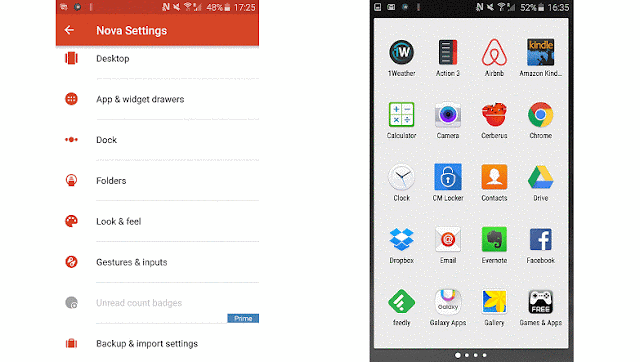
![]() |
| Nova Launcher |
Download it from here:
https://play.google.com/store/apps/details?id=com.teslacoilsw.launcher
There are few other Launchers like Google Now Launcher, Smart Launcher, Next Launcher which is also worth a try. I have shared my Views on these apps, if you have another best apps based on your experience please do share.
Subscribe to Our YouTube Channel for watching these launchers in action.
https://www.youtube.com/channel/UCOKK7q3ylDVPZ_kw4eF93dg