ABOUT US

Our development agency is committed to providing you the best service.

OUR TEAM

The awesome people behind our brand ... and their life motto.

  • Radha Roy

    Country Head

    I long for the raised voice, the howl of rage or love.

  • Shruti Das

    GM,India

    Contented with little, yet wishing for much more.

  • Divya Narayan

    Branch Head, Banglore

    If anything is worth doing, it's worth overdoing.

OUR SKILLS

We pride ourselves with strong, flexible and top notch skills.

Marketing

Development 90%
Design 80%
Marketing 70%

Websites

Development 90%
Design 80%
Marketing 70%

PR

Development 90%
Design 80%
Marketing 70%

ACHIEVEMENTS

We help our clients integrate, analyze, and use their data to improve their business.

150

GREAT PROJECTS

300

HAPPY CLIENTS

650

COFFEES DRUNK

1568

FACEBOOK LIKES

STRATEGY & CREATIVITY

Phasellus iaculis dolor nec urna nullam. Vivamus mattis blandit porttitor nullam.

PORTFOLIO

We pride ourselves on bringing a fresh perspective and effective marketing to each project.

Showing posts with label CPU. Show all posts
  • GPU vs CPU simplified


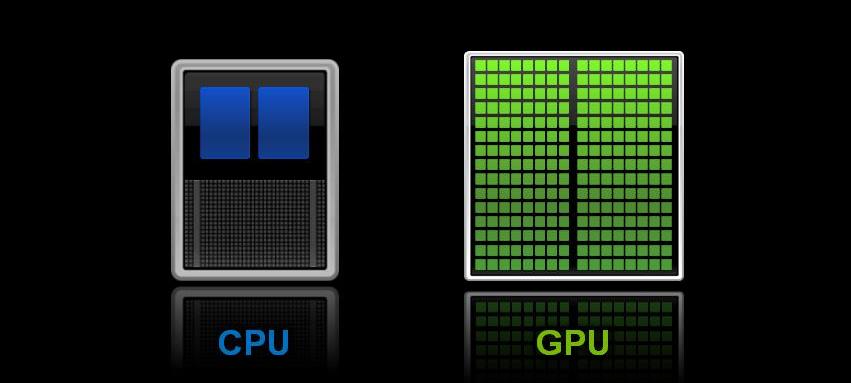
    A Graphics Processing Unit (GPU) is a special purpose processor, optimized for calculations commonly (and repeatedly) required for Computer Graphics, particularly SIMD operations.

    A Central Processing Unit (CPU) is a general purpose processor - it can in principle do any computation, but not necessarily in an optimal fashion for any given computation. One can do graphics processing on a CPU - but it likely will not produce the result anywhere nearly as fast as a properly programmed GPU.

    The reasons one has at least one of each in the typical computer these days is:
    • Computers that interact directly with people (i.e. not servers) typically use computer graphics extensively to do so, and the calculations involved are numerous and must be done in Real Time;
    • By having at least one of each, one gains parallelism & greater performance from throughput of the computer system: while your GPU is doing calculations for graphics, your CPU can be doing other non-graphics calculations at the same time.
    • Moore's Law has given us such an embarrassment of riches in silicon chip area and capability at such low prices that it's cheap to add special purpose processors of various types nearly everywhere in a computer system these days – often multiple of them, to achieve better throughput & performance.
    A GPU generally has a large number of slow and weak processors. By weak I mean lower operating frequency, lower number of registers, simpler ALU's etc. GPU's come strapped with lots of memory and generally have high Memory bandwidth to support  the hundreds of small processors that make up the GPU. GPUs are special purpose and can compute vector maths, matrix maths, pixel transforms and rendering jobs about 10-100x faster than the equivalent CPU performance as all these tasks are embarrassingly parallel, although it should be noted that incredibly optimized CPU code can come close to GPU code. 


    However, the amount of work required is not worth the time when GPUs can do the same calculations with significantly less work, and not requiring a programmer with an excellent background in computer architecture.

    A CPU generally has higher operating frequency and is designed for general purpose use. They excel in serial tasks, branching operations and file operations. CPUs, traditionally, have been easier to program and more versatile for general purpose usage. Most office computers have rudimentary GPUs as they don't have to perform such highly parallel/ specialized tasks. But a gaming PC or a workstation PC would generally have a powerful GPU(s).
  • Google Glasses: All we need to know

     1. How Google Glass Works

    Glass is a headset with a small display that rests over your right eye. The headset can be worn independently, or attached to prescription glasses. The display keeps you informed about any incoming emails, calls, or other notifications. The Glass interface is not designed to work alone: you will need to sync it with a smartphone to use it properly.


    2. Google Glass Commands & Controls

    There are two main ways to control your Glass interface. You can control some things from a touchpad on the side of the device. Additionally, you can use voice commands to instruct Glass. You simply say “Okay, Glass,” followed by your request. You can ask Glass to launch an app, record a video, take a snapshot, or call someone, for example.

    3. Features and Apps of Google Glass

    In addition to helping you take calls and review emails, Glass has a number of apps that are quite useful. Glass-Apps.org has a full list of apps for Glass. Some of the best include WatchMeTalk, which provides live captioning for the hard-of-hearing; AR Glass, which pulls info from Wikipedia into an augmented reality display of your current surroundings; and Homework for Glass, which lets you figure out what homework you have to worry about by simply asking Glass, “What’s new?”


  • WHAT WE DO

    We've been developing corporate tailored services for clients for 30 years.

    CONTACT US

    For enquiries you can contact us in several different ways. Contact details are below.

    RUDER FINN INDIA

    • Street :Unit 001A, Tower B, Ground Floor, Global Business Park, MG Road, Gurgaon – 122002, INDIA
    • Person :Radha Roy
    • Phone :91 124 388 2870
    • Country :India
    • Email :royr@ruderfinnasia.com

    Radha Roy.

    Radha Roy Country Head 91 124 388 2870 royr@ruderfinnasia.com Unit 001A, Tower B, Ground Floor, Global Business Park, MG Road, Gurgaon – 122002, INDIA