ABOUT US

Our development agency is committed to providing you the best service.

OUR TEAM

The awesome people behind our brand ... and their life motto.

  • Radha Roy

    Country Head

    I long for the raised voice, the howl of rage or love.

  • Shruti Das

    GM,India

    Contented with little, yet wishing for much more.

  • Divya Narayan

    Branch Head, Banglore

    If anything is worth doing, it's worth overdoing.

OUR SKILLS

We pride ourselves with strong, flexible and top notch skills.

Marketing

Development 90%
Design 80%
Marketing 70%

Websites

Development 90%
Design 80%
Marketing 70%

PR

Development 90%
Design 80%
Marketing 70%

ACHIEVEMENTS

We help our clients integrate, analyze, and use their data to improve their business.

150

GREAT PROJECTS

300

HAPPY CLIENTS

650

COFFEES DRUNK

1568

FACEBOOK LIKES

STRATEGY & CREATIVITY

Phasellus iaculis dolor nec urna nullam. Vivamus mattis blandit porttitor nullam.

PORTFOLIO

We pride ourselves on bringing a fresh perspective and effective marketing to each project.

Showing posts with label Data. Show all posts
  • Tips to Save Internet Data Pack

    When 3G/4G services were coming to India, we thought we might finally have an alternative to cable broadband with high-speeds and reliable connections. What most users never thought was that even the biggest data plans run out especially if you get very high internet speeds.


    If it’s unlimited, it’s throttled and you don’t get the full potential of you 3G/4G connection. We have made a list of tips that will help you save your megabytes and make your internet data limit last longer.

    Get Opera Max for Going Online

    If you want to save data, Opera Max Data Manager is a must. It can handle data savings single-handedly. Opera Max provides system wide data compression so that data can be saved while all the apps using mobile data in the foreground as well as the background connect to the internet. The creators of Opera Max built this tool based on the Turbo-mode in the Opera Browser. All data communications go through the Opera servers and get compressed to save data. Opera Max promises over 50 percent data savings for common apps.


    Opera Max comes with advanced data management tools too. Users can select which apps can use the internet, blacklisting apps to save more data. For example, if you have a package plan that gives you free WhatsApp, you can blacklist all other apps and use WhatsApp without worrying that other apps will cost you money by connecting to the internet automatically. Data management is very easy, once you turn on Opera Max over mobile data, you get details to which apps uses how much data and disable their internet access accordingly. You can activate data compression over Wifi too. A permanent notification lets you view your data usage and savings in real-time.


    Onavo Extend has iOS users covered

    Onavo is similar to Opera Max but comes with iOS support. It may not be as well-known as Opera Max but it can get the task done. It allows users to measure and save data just like Opera with a greater focus on control over apps’ internet usage. Onavo also employs advanced data caching to reduce data usage.

    Enable Data Compression in Google Chrome

    If you have an Android phone, there is a very high probability you are using Google Chrome browser. Yet, most people would be unaware that Chrome has a built-in data saving feature that needs to be enabled manually.

    According to Google, you can save about 50 percent in data consumption by utilizing this feature. The user won’t even feel the difference in web experience. In fact, browsing over mobile data might even get faster. The way this works is, all your data passes through the Google servers, gets compressed and sent to your device.

    To activate the feature, tap on the 3-dot menu button and go to Settings. Click on Data Saver and toggle the option in the top right corner and you’re done. This will help you save data when you are browsing using Chrome.

    Restrict Background Data

    When you aren’t using mobile data, some apps continue to use it in the background. Social networking apps, messaging apps and other real-time info apps keep using data in the background. Even the Android OS services keep connecting to the internet using your precious mobile data.
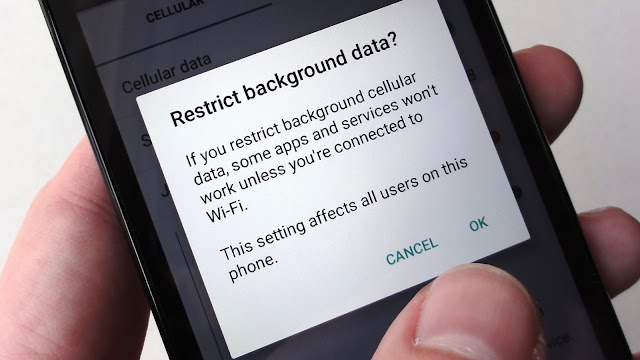
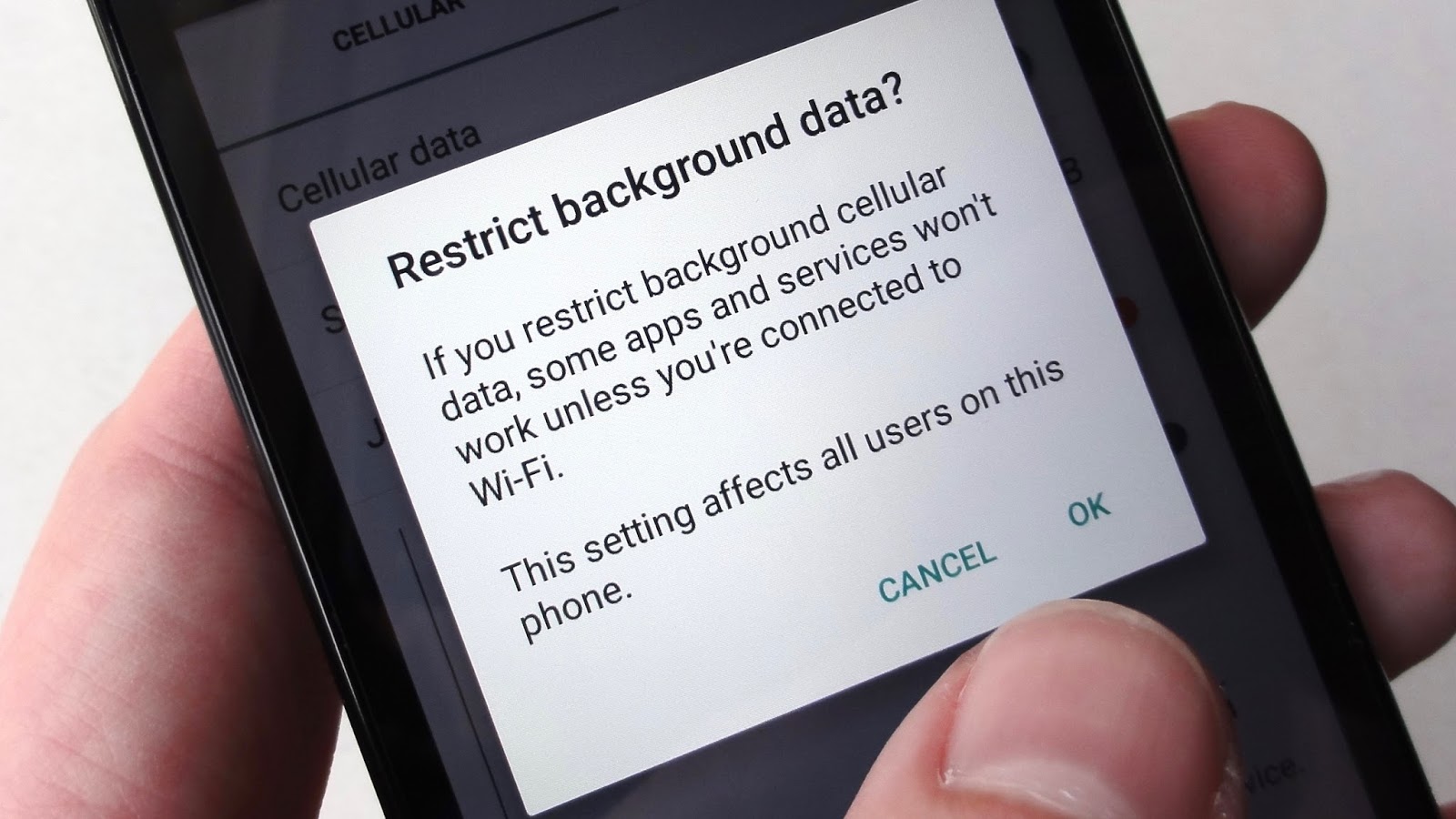

    To prevent this from happening, you can go to Settings > Data Usage and select the apps you want to restrict manually. In the stats, you will also get information on how much data each app is using in the foreground and how much of it gets used up in the background. The process isn’t as simple and easy as Opera Max but it’s an alternative to get the detailed stats and restrict data usage.

    If you want to go the extreme route, you can disable background data usage altogether but keep in mind that you won’t get any real-time notifications.

    Set the Play Store to Update Apps Over Wi-Fi Only

    The heading pretty much explains what we mean here. Most users keep getting app updates over mobile data, using your precious data without your permission. Huge amounts of data gets wasted on continuous updates.

    To save data, go to Play Store and open the side menu. Go to Settings and select “Auto-Update apps” button and check (tick) “Auto-Update apps over WiFi only”.

    If you don’t get access to WiFi, you can still update apps manually by opening the Play Store and starting the update process by going to the My Apps section.

    Go Deep Into Sync Settings to Save Some Data

    Everybody wants to get instant email notifications and get their info synced with all the accounts they have signed-in on their Android smartphone. The first thing you can do is to manually turn on and turn off the sync service.

    The next thing is to go to Settings > Accounts and have a look at all your accounts that use the sync services. There are some services that you never use but they keep syncing and using data. For example, when you select a Google account, you will sync enabled for App data, Calendar, Chrome, Contacts, Docs, Drive, Gmail, Google Fit, Opinion Rewards, Photos, Play Music, Google+, and even more stuff. Most users don’t use half of these services so it’s best to disable sync for the useless services.

    You can do the same thing for other accounts as well.

    Streaming is the Enemy of Mobile Data

    Streaming videos, music, looking at high quality images and GIFs burns through your data before you can realise it. Unless you have a very big data package, you must keep an eye on your data usage (Opera Max can help with that too).

    Limit you data streaming since avoiding it must be impossible for most people. Another thing you can do is set the video or sound quality to a bit lower. This will help reduce data consumption.

    When Going Outside WiFi range, Cache Data

    Some apps clean cache to save space. It does clean up space but the cached data reduces data consumption by huge amounts. Browser and other internet oriented apps need cache to make them load faster and save on data.

    Some apps allow local storage, like the Google Maps (and some other map apps), Play Music and Google Translate. Some apps can download the data you need which can be done while using a WiFi connection. You can stream or load the content that you might need before you leave your house. That content will get cached and save you some money on your internet usage.

    Wrap up

    We hope our list of tips will help you save a lot of data and make better use of those packages that only allow you to get connected with only a certain few apps at cheaper costs. These tips certainly won’t hinder your smartphone without internet but they will make it use less data. Besides what is a smartphone without an internet connection?

    If you have any other tips, suggestion or questions, ask them in the comments below.

  • FBI Unlocks iPhone Without Apple

    Soon, Apple users might have to face big security threat. As second time FBI has unlocked iPhone without Apple's assistance. Firstly, iPhone discovered in connection with the San Bernardino terror attacks was unlocked last month. Now, FBI has managed to crack a second device – this time, it was an iPhone 5S used by a drug dealer in New York. 


    Now FBI has drop the case, which involved demanding Apple’s help to open an iPhone used by Syed Rizwan Farook, a gunman in the December shooting in San Bernardino terror attack. The case had become increasingly contentious as Apple refused to help the authorities, inciting a debate about whether privacy or security was more important.

    However, unlike the San Bernardino incident in which the agency had to spend over a million dollars to crack the device, the government said in a court filing that it had obtained a passcode that it used to unlock the iPhone in the Brooklyn case. Due to which FBI has withdrew its request for a court order to get Apple’s assistance in the matter.

    It’s worth noting that FBI didn't specify "an individual" from which they got passcode. There are still more than 1,000 iPhones in police custody that law enforcement can’t break into US has demanded Apple’s help in at least 10 more cases to break into iOS devices.

    While the FBI may indeed have been able to gain access to the data on two iPhones this year, it’s not likely that it will let Apple off the hook in the ongoing legal battle over people’s right to privacy and the company’s duty to grant backdoor access to its devices.

    In a statement issued to Reuters, Justice Department spokeswoman Emily Pierce said that the cases have “never been about setting a court precedent; they are about law enforcement’s ability and need to access evidence on devices pursuant to lawful court orders and search warrants.”

    Yet law enforcement’s ability to now unlock an iPhone through an alternative method raises new security threats. The development can also creates new conflicts between the government and Apple about the method used to open the device and whether that technique will be disclosed. Lawyers for Apple have previously said the company would want to know the procedure used to crack open the smartphone.
  • WhatsApp End to End Encryption is illegal ? At Least Report Suggest so

    WhatsApp could have accidentally entered into troubled waters here in India by enabling its end-to-end encryption for all. The new security feature by WhatsApp is not what is required by the Indian telecom rules and WhatsApp could face a ban, if the rules are not adhered to. But not yet.


    After Apple’s problems with the FBI over unlocking an iPhone for retrieving encrypted data splat all over the internet, tech giants such as Apple and Google backed Apple’s decision on refraining to help the FBI to unlock the device. The major reason for Apple not helping the FBI was user’s data privacy and security norms. But the FBI managed to crack open the phone without any help from Apple, which is not a big question if the user’s data is even secure and private anymore.

    In India, companies need to follow the country’s rules and adhere to specific types of encryption, which WhatsApp does not currently use. WhatsApp’s end-to-end encryption on its chat service means that WhatsApp or anyone else won’t be able to crack open its contents.  Only the sender and the recipient are able to read the encrypted data. WhatsApp uses a 256-bit key for encryption of all chat messages, which is only known to the sender and the recipient.


    Why is it not possible for WhatsApp to help decrypt users’ messages? "No one can see inside that message. Not cybercriminals. Not hackers. Not oppressive regimes. Not even us," WhatsApp founders Jan Koum and Brian Acton wrote on their blog.

    However, as for the Indian rules, online services are only permitted to use up to 40-bit encryption. If they need to use higher encryption standards, they need to seek permission from the government, and the way WhatsApp is setup, it seems a bit too difficult to obtain the same. In order to get the required permissions and green flags from the Indian Government, WhatsApp needs to submit the keys, which sadly, they too actually don’t have.

    Hence, indirectly, all those who are currently using the updated WhatsApp app in India are actually using it illegally, says the report.

    A report by The Independent  that the Indian government has not yet decided whether they will take any action on the issue and deal with WhatsApp to come to a conclusion.

    However, according to the Indian encryption rules, OTT services, such as WhatsApp, do not require encryption standards like telecom operators do. Telecom service providers and internet service providers in India require a license from the DoT to provide encrypted services in India. These include internet telephony and chat services and a usage of up to 40-bit encryptions, only after depositing the decryption keys to the Telecom Authority. Since WhatsApp, Skype, Viber and such services are (over-The-Top) OTT-based and not telecom operations, they are not yet regulated in the country as they do not come under the encryption requirement laws.

    The TRAI had released an OTT consultation paper back in 2015, but are yet to issue any such regulations in the matter. In the absence of such regulations, OTT services with such encryptions are presently free to operate legally in the country. However, things could change, citing lack of decryption keys and possibility of illegal activity with terrorist groups and alike on such OTT services.

    In other countries, such as France, Skype was made to register with a telecom service provider in order to operate with the encryption standards it holds in place. Similarly, many other countries, including China, Germany and a few others, have also put regulatory systems in place. OTT services are well regulated in countries overseas.

    Firstpost mentions Asheeta Regidi, an Indian cyber law specialist, stating, ‘WhatsApp, being an intermediary, is expected to comply with directions to intercept, monitor and decrypt information issued under Section 69 of the Information Technology Act, 2000. Complying with such a direction will now be impossible for WhatsApp in view of its end-to-end encryption. Even before the introduction of this, since WhatsApp is not a company based in India, it may have been able to refuse to comply with such directions. In fact, compliance by such companies in regard to data requests from the Indian government has been reported to be very low.’

    The Independent further reported that countries like India are currently looking to pass new policies on the new encryption standards. But it is presently unclear whether these new policies will bring new requirements on WhatsApp.

    The big question now is that, will India allow WhatsApp to continue in India or will it enforce a new OTT regulation which will put encrypted services like WhatsApp, Skype, Viber and others into the grey zone?

    Do tell us what you think about this story in comment section below... Be brave and Keep Reading
  • WhatsApp introduces end-to-end encryption feature : Everything Till now

    WhatsApp has a new end-to-end encryption feature feature few days ago , and it promises a more secure and private communication between users.In its official website, WhatsApp reiterated its dedication to privacy and providing a secure line of messaging among its 1 billion users worldwide ever since its release in 2010.


    Available on the latest version of the app, users will no longer have to worry about their messages being pried into by hackers or the similar-minded people.

    “When end-to-end encrypted, your messages, photos, videos, voice messages, documents, and calls are secured from falling into the wrong hands,” the website reads.End-to-end encryption simply means the message sent through WhatsApp can only be read by the sender and the recipient, no one in between, not even the app.

    WhatsApp’s owes its new privacy measure to Open Whisper Systems, the company that developed Signal Protocol.According to the company’s website, integration of the new security protocol started last year and was completed last April 5 across all platforms of WhatsApp.

    These include “chats, group chats, attachments, voice notes, and voice calls across Android, iPhone, Windows Phone, Nokia S40, Nokia S60, Blackberry, and BB10.”

    WhatsApp’s encryption is turned on by default for all users

    Users so far have no choice to opt out of the encryption for now (considering the number of encryption cases popping up worldwide, we are pretty sure nobody would want to opt out). As long as you have an updated version of the WhatsApp app on your supported mobile platform, you and your friends can now enjoy the perks of secure and end-to-end encrypted conversations turned on by default without any extra taps.

    How do I know that encryption is switched on?

    Well you simply tap on the profile or the info page(tap on the name in the header) of your contact, where you will find a section describing the status of the encryption of your chats and calls.The latest version of Whatsapp app

    No matter which platform you are on, you may have noticed a slew of updates (like on iOS) that claimed “Bug fixes” coming in the past few days. Indeed, this was the WhatsApp team making a couple of tweaks, with most of it coming from the server side and some for a user’s smartphone. With that said, you and your friends will need update their respective WhatsApp apps on their respective smartphones that run different mobile operating systems (Android, iOS etc.). If your friend has not updated their app to the latest version you will be notified about the same in the info page under encryption.

    The verification mess

    Upon accessing the info page, you will be able to check on the status of your encryption. The point to be noted here is that it is turned on by default, meaning you do not need to go any further.

    Only those who updated their app later or changed their smartphone after the time the encryption was rolled out who will need to access this area to verify (or check) whether their encryption is working or not (in all probability it will be, but more on that in our next pointer). So for the most of us, we will not need to tap on the Encryption section.

    It is still a bit of a mess

    Even though most will not need to access the Encryption section on the info page, users may have noticed that some of their friends even with their updated versions of the app still show that their messages are not encrypted. While the WhatsApp states that their apps may not be updated to the latest one, we think that this is a bug. We tested out the same in our office and with one iOS user connecting to an Android user, things worked fine.

    WhatsApp Encryption problems

    With another Android user however, it kept showing encryption turned off even though the iOS user was greeted with a chat encryption turned on message. This could either be a bug, or its just that the feature is gradually rolling out server side, so there is absolutely no indeed no need to panic.

    End-to-end encryption

    End-to-end encryption on WhatsApp applies to everything or every feature that is available on WhatsApp. Whether it’s calls, messages, photos, videos, files, and even voice messages, all of them will be encrypted. So technically nobody apart from you or your friend will be able to understand them. In transit from one device to another the data will only appear to be garbled text without the keys to put that text together, which resides on devices being used to communicate. Moreover, there are separate keys for each conversation or chat so WhatsApp has provided something really secure indeed.
  • 7 Tips to Make Your Phone Secure

    Today’s internet-connected world brings with it several security and privacy issues. Smartphones have become our primary medium of accessing the internet. Whether at home or at work, our smartphones are especially vulnerable to these issues.


    We have listed 7 ways which can help you protect your smartphone from a potential hack or virus.
    Get an Antivirus App
    Downloading an antivirus application can secure your device, but it’s not the only safeguard you need. Usually, any files transferred from other devices, like PCs can also contain malware and viruses. While mobile antivirus can protect against such viruses, the best course of action would be to avoid moving files directly between devices or scan each file using a high-rated antivirus before sending it to your smartphone.
    Avoid Public Wi-Fi
    Connecting to public Wi-Fi networks is just like inviting intruders into your private life. It is one of the most unsecure things in the world. A huge majority of people still use it because it’s free. But the fact is that with public hotspots, even a novice hacker can eavesdrop on your private emails, passwords and account details with a little bit of tinkering.

    If you do need to use the internet outside your home and have to do anything remotely sensitive, you’re better off using your mobile internet. If you don’t have access to that, then you will be better off using a VPN app in conjunction with public wifi. These VPN apps come with built-in data encryption to keep your activities secure.
    Turn Off Bluetooth Unless Required
    Bluetooth is often used for short-range device communication. Whether you are transferring data or connecting to a multimedia device over Bluetooth, you are exposing your device to hackers. While using this technology at home may not pose much of a threat, but when Bluetooth is activated away from home, your device can be bluejacked (remote hijacking).

    In short, your device can be accessed by hackers even if you are using the latest iterations of Bluetooth i.e. BT versions 4.1 or even 4.2. To prevent hijacking and snooping risks, Bluetooth should always be off when not in use.
    Keep IP and MAC addresses hiddenPeople are often unaware that IP address is a gateway to their device. These are like digital addresses, since IPs can be used to locate any device. There are many softwares or apps which can be used to keep your IP address hidden over the world wide web. However, devices are exposed when connected to the same local area network.

    Each connected device is recognized by its MAC Address (name). When in a public place or when using an internet connection that is being shared by others, you are potentially open to remote attacks. Anyone with your MAC address can specifically target your device if they desire.

    The only way around this is to keep your digital identity hidden by using VPNs and a reliable Firewall app which can protect against any hacking attempts.

    Never Trust Apps From Unknown Sources

    All smart devices come with their own respective app stores. Android devices usually come with Google Play Store, iOS devices come with Apple App Store, and Windows devices have their own store. Despite that, users often choose to install apps from different websites and other unknown sources.

    The first thing to do is to avoid unknown sources for apps. There’s no guarantee that the app you have downloaded hasn’t been tempered with already or if it’s actually a malware app. It’s better to avoid apps from outside the official app stores. However, if it is really necessary, then download the app from its official website. Even then you should read app reviews to know what you are getting into.

    Use a Numeric Password rather than a Pattern Lock

    Pattern locks are very easy to bypass. If you consider privacy to be important, use pins or passwords. While patterns may be easy to unlock repeatedly, pins and passwords offer far greater security. You can double your security by using third party security apps which offer changing pins. They protect you even when you unlock your phone in front of somebody.
    Another alternative would be to get your hands on a phone with a fingerprint scanner. Smartphones with such security features are difficult to fool and ordinary people will stand little chance if they attempt to pry into your personal files.

    Jailbreaking or Rooting

    Some of you might not understand terms such as jailbreaking or rooting. To describe these terms simply, Jailbreaking or Rooting is the process of gaining advanced access to your device’s software and hardware via an OS vulnerability. This allows you to increase your phones functionality, customizability and gives you access to a realm of developer mods.

    However, it’s not all that great. With such advanced access, you risk your device’s security. Hackers can make use of any flaws in your device security and take control of your device in a manner which is not possible otherwise. Other than that, you void your warranty and risk bricking your device.

    In short, it’s not something you should meddle with unless you are comfortable with the risks. Even then, you should read about your device on public forums, if you don’t understand anything better leave it or try it out on a spare device to get some hands-on practice.

    Hopefully, these 7 fundamental tips will help you keep your smartphone better protected against hackers and attackers. They may sound like common-sense tips, but they can ensure that your data remains safe and secure at all times.
  • अब कोई नहीं बना पाएगा आपके नाम से नकली फेसबुक अकाउंट

    अब किसी ने आपके नाम से नकली फेसबुक अकाउंट बनाने की कोशिश की तो उसका अलर्ट तुरंत आपको मिल जाएगा। गौरतलब है कि 4 फरवरी 2004 में हुई Facebook इस समय दुनिया की सबसे पॉपुलर सोशल नेटवर्किंग वेबसाइट है। लेकिन इस वेबसाइट पर यूजर्स के लिए खतरे भी कम नहीं। क्योंकि करोड़ो लोगो की जिंदगी का एक अहम् हिस्सा बन चुकी इस वेबसाइट पर यूजर्स के नाम से कई Fake Facebook Account बनाए जाते हैं जिनका इस्तेमाल गलत कामों के लिए किया जा सकता है। लेकिन चिंता की कोई बात नहीं, क्योंकि फेसबुक पर अब कोई आपके नाम से नकली अकाउंट बनाने की कोशिश करेगा तो वो तुरंत पकड़ में जा जाएगा

    तुरंत पकड़ा जाएगा नकली अकाउंट बनाने वाला
    खबर है कि फेसबुक अब जल्द ही एक ऐसा फीचर लाने जा रही है जिससे आपके नाम और फोटो को यूज कर नकली अकाउंट बनाने वाला व्यक्ति तुरंत पकड़ा जाएगा। फेसबुक के मुताबिक यह फीचर महिला उत्पीडऩ को रोकने के लिए लाया जा रहा है। फेसबुक के इस नए और अनोखे फीचर से यह पता लगाया जा सकेगा कि अगर कोई अन्य यूजर आपके नाम और फोटो का इस्तेमाल कर अकाउंट बनाएगा तो यह आपको तुरंत अलर्ट दे देगा। इसके अलर्ट के तहत फेसबुक आपको नोटिफिकेशन भी भेजेगा।


    ऐसे पकड़ा जाएगा नकलची

    फेसबुक को यदि किसी व्यक्ति पर शक होता है कि वो किसी अन्य यूजर की फोटो और नाम यूजर नकली अकाउंट बना रहा है तो उसकी प्रोफाइल सवालों के घेरे में आ जाएगी। क्योंकि इससे फेसबुक यह पता लगाएगी कि वह आपकी निजी सूचनाओं के आधार पर बनी है या वह किसी अन्य से जुड़ी है। फेसबुक की यह नोटिफिकेशन प्रोसेस ऑटोमेटिक होगी। इसके बारे में फेसबुक टीम उन सभी प्रोफाइल्स की मेनुअली समीक्षा करेगी जो सवालों के घेरे में होंगी। बता दें कि फेसबुक ने इस फीचर को सबसे पहले नवंबर के महीने में टेस्ट किया था और हाल ही में यह फीचर 75 फीसदी दुनिया में लाइव हो चुका है। फेसबुक के ग्लोबल सेफ्टी प्रमुख एंटिगोन डेविस के मुताबिक इस फीचर को दुनिया भर में एक्सपेंड किया जाएगा।

    खासतौर पर महिलाओं के लिए 

    फेसबुक का यह नया फीचर खासतौर पर महिलाओं के लिए लाया जा रहा है ताकी इस प्लेटफॉर्म पर होने वाले महिला उत्पीडऩ को रोका जा सके तथा इसे यूज करते समय महिलाएं खुद को सेफ फील करें।

    तो दोस्तों ये  हमारा पहला लेख है हिंदी में , अगर आप को पसंद आया तो शेयर करे, और हमे जरूर बताये आप और क्या पढ़ना पसंद करेंगे।
  • Record : 57Gbps data transfer rate achieved on fiber-optic cables

    Scientists send data at a record 57Gbps through fiber optic lines
    Engineers at the University of Illinois have created record-breaking speeds for fiber-optic data transmission, breaking previous theories that fiber optics have a limit in how much data they can carry. The engineers transmitted 57 gigabits-per-second (Gbps) of error-free data at room temperature.

    Graduate researcher Michael Liu presented the research team’s developments in oxide-VCSEL technology, which underpins fiber-optic communications systems, at the Optical Fiber Communication Conference and Exposition in Anaheim, CA. The research team was led by electrical and computer engineering professor Milton Feng — who is in attendance at the conference — and also included professor emeritus Nick Holonyak Jr. and graduate researcher Curtis Wang.

    The need for a high-speed data transmission infrastructure has increased as big data has gotten bigger with the need for accommodating the ever-growing volume of bits transferred from one place to another.

    “Our big question has always been, how do you make information transmit faster?” Feng said. “There is a lot of data out there, but if your data transmission is not fast enough, you cannot use data that’s been collected; you cannot use upcoming technologies that use large data streams, like virtual reality. The direction toward fiber-optic communication is going to increase, because there’s a higher speed data rate, especially over distance.”

    Feng’s group has been pushing VCSEL technology to higher speeds in recent years. In 2014, it was the first group in the U.S. to achieve error-free data transmission at 40 Gbps.

    What’s more interesting is that the engineers were still able to transmit 50 Gbps speeds at higher temperatures up to 85 degrees Celsius (185 degrees Fahrenheit). This is significant because for data center builders “achieving high speeds at high temperatures is very difficult,” Feng said. However, computing components grow warm over extended operation, as anyone who has worked on an increasingly heated laptop can attest. “That’s why data centers are refrigerated and have cooling systems.”

    He added, “For data centers and for commercial use, you’d like a device not to carry a refrigerator. The device needs to be operational from room temperature all the way up to 85 degrees without spending energy and resources on cooling.”

    Feng hopes that the conference presentations and papers will prove that high-speed operation at high temperatures is scientifically possible and useful for commercial applications.

    “This type of technology is going to be used not only for data centers, but also for airborne, lightweight communications, like in airplanes, because the fiber-optic wires are much lighter than copper wire,” Feng said. Shedding any weight off a plane where possible can help conserve fuel. “We believe this could be very useful for industry. That’s what makes the work so important to us,” he added.
  • Average Internet Connection Speed Increases By 23 Percent

    New Delhi: The global average internet connection speed increased 23 per cent to 5.6 Mbps in the quarter ended December 2015 compared to the same period of 2014, a report said on Wednesday. to 5.6.

    The report “Fourth Quarter, 2015, State of the Internet Report” was released by Akamai Technologies Inc., a global leader in content delivery network services.
     

    “From a global perspective, the average connection speed increased 8.6 per cent quarter-over-quarter and 23 per cent year-over-year to 5.6 Mbps, while the global average peak connection speed increased 1 per cent QoQ, and increased 21 per cent YoY to 32.5 Mbps,” it said.

    South Korea had the highest average connection speed in the Asia-Pacifi­c region at 26.7 Mbps, while India had the lowest at 2.8 Mbps.

    “This quarter’s (October to December 2015) report shows great YoY growth in average connection speeds and overall broadband adoption,” said David Belson, editor of the report.

    South Korea (95.3 Mbps) and Macao (83.1 Mbps) were the only countries/regions to post double-digit quarterly gains in average peak connection speed at 10 percent and 13 per cent, respectively.

    “This is particularly important as consumer expectations rise and many high-profile events, like the summer games in Rio, will be streamed this year.

    “The progress we are seeing across our key metrics shows that, while there’s still work to be done, more parts of the world are increasingly able to support the delivery of broadcast-quality video content online,” he added.

    The report also showed each of the top 10 countries/regions saw double-digit growth in 25 Mbps broadband adoption except Hong Kong, which posted a 9.8 per cent change quarter-over-quarter. Norway and Denmark saw the greatest yearly gains, the report cited.

    On a global basis, close to 70 per cent of the countries/regions saw a QoQ increase in unique IPv4 address counts in the last three months of 2015, up 10 per cent from the July-September period of 2015.

    The report also pointed out that 43 countries/regions saw IPv4 address counts grow 10 per cent or more in the quarter ended December 2015 while 13 saw counts decline 10 per cent or more compared with the July-September quarter of 2015.

    The report also showed Britain had the fastest average mobile connection speed at 26.8 Mbps with Spain in second place at 14 Mbps. Iran had the lowest average connection speed, at 1.3 Mbps, followed by Vietnam with an average connection speed of 1.8 Mbps.(IANS)
  • WhatsApp Decided to Apply Encryption Scheme on Voice Calls

    WhatsApp has decided to expand its encryption scheme to voice calls, as the fight between the U.S. government and Apple expands to include other major technology firms.


     WhatsApp, Snapchat, Facebook and Google are now all working on their own systems to increase user privacy and keep government hands off of messaging data. As the court battle between Apple and the U.S. Department of Justice rages on, many major Silicon Valley companies -- supporters of Apple in its resistance to handing over encryption backdoors to U.S. law enforcement -- have announced their own projects to increase the privacy and encryption of data exchanged on their platforms as well.

    Google is considering enforcing other products with the end-to-end encryption used for Gmail. Snapchat has said it's working on its own security measures. And Facebook's WhatsApp messenger has announced plans to encrypt voice calls and group messages this week, according to an exclusive report by The Guardian.
    Lines Drawn
    Virtually every technology firm has at least explored, if not implemented, encryption schemes for data exchanged on their platforms, but the wave of new data security measures can -- without question -- be seen as a response to the fight between Apple and the FBI.

    As Latin Post previously reported, the FBI attempted, through a court order, to compel Apple to create a modified, less secure version of its iOS operating system. The agency wanted to use the custom version of iOS to bypass security features on the encrypted iPhone owned by one of the San Bernardino shooters.

    But Apple balked at the order, saying that it amounted to compelling a company to create a so-called backdoor that could make any iPhone insecure. The company claimed this would open a veritable Pandora's Box that could undermine the privacy of all Apple users -- and likely the company itself -- if it were to ever leak from the agency's control.

    Beyond that practical argument, the fight between Apple and the Department of Justice has gotten uglier and more personal recently, with prosecutors questioning Apple's motives and honesty. At the same time, Facebook, Google and other heavyweights have joined in publicly on Apple's side.
    Battle Brewing

    If Facebook, Google and others filing amicus briefs on behalf of their Cupertino rival wasn't enough to show the growing divide between the government and Silicon Valley, announced expansions to encryption programs certainly is.

    Of particular note in the growing encryption battle is WhatsApp, one of the world's most popular free messaging services, which is owned by Facebook. The app already encrypts users' messages by default, but the company has made a major, costly move by extending encryption to voice calls. WhatsApp isn't expanding encryption as just a show of support for Apple, though.
    It Could Get Ugly
    In fact, WhatsApp, and Facebook by extension, has been locked in its own battle with a government ordering it to decrypt user messages. That controversy has already gotten much more unpleasant than anything between Apple and the FBI.

    This year, Brazil's federal government has repeatedly ordered WhatsApp to decrypt user messages that police forces say will provide key evidence against drug traffickers and other unsavory criminal elements in the country.

    WhatsApp has responded to the Brazilian government much as Apple has to the FBI, saying it literally had no technical ability to provide those messages. Twice this year, Brazil has blocked WhatsApp from operating in the country as a result, though only temporarily after Brazilians protested because they depend on the app for daily communication.

    Beyond temporary blocks, and beyond anything Apple has experienced with the U.S. government, Brazilian federal police actually arrested Facebook's VP for Latin America in early March for "repeated non-compliance" with government decryption orders. That, too, was only temporary. The executive's detention was reversed only hours later, after a higher court found the arrest to be "extreme and disproportionate."

    But it ominously shows where the encryption battle between technology companies and governments may be headed, even more so now that Silicon Valley is beefing up its security and closing ranks with Apple.
  • Cryptographic system lets users control access to their data

    Most people with smartphones use a range of applications that collect personal information and store it on Internet-connected servers -- and from their desktop or laptop computers, they connect to Web services that do the same. Some use still other Internet-connected devices, such as thermostats or fitness monitors, that also store personal data online.


    Generally, users have no idea which data items their apps are collecting, where they're stored, and whether they're stored securely. Researchers at MIT and Harvard University hope to change that, with an application they're calling Sieve.
    With Sieve, a Web user would store all of his or her personal data, in encrypted form, on the cloud. Any app that wanted to use specific data items would send a request to the user and receive a secret key that decrypted only those items. If the user wanted to revoke the app's access, Sieve would re-encrypt the data with a new key.
    "This is a rethinking of the Web infrastructure," says Frank Wang, a PhD student in electrical engineering and computer science and one of the system's designers. "Maybe it's better that one person manages all their data. There's one type of security and not 10 types of security. We're trying to present an alternative model that would be beneficial to both users and applications."
    The researchers are presenting Sieve at the USENIX Symposium on Networked Systems Design and Implementation this month. Wang is the first author, and he's joined by MIT associate professors of electrical engineering and computer science Nickolai Zeldovich and Vinod Vaikuntanathan, who is MIT's Steven and Renee Finn Career Development Professor, and by James Mickens, an associate professor of computer science at Harvard University.
    Selective disclosure
    Sieve required the researchers to develop practical versions of two cutting-edge cryptographic techniques called attribute-based encryption and key homomorphism.With attribute-based encryption, data items in a file are assigned different labels, or "attributes." After encryption, secret keys can be generated that unlock only particular combinations of attributes: name and zip code but not street name, for instance, or zip code and date of birth but not name.
    The problem with attribute-based encryption -- and decryption -- is that it's slow. To get around that, the MIT and Harvard researchers envision that Sieve users would lump certain types of data together under a single attribute. For instance, a doctor might be interested in data from a patient's fitness-tracking device but probably not in the details of a single afternoon's run. The user might choose to group fitness data by month.
    This introduces problems of its own, however. A fitness-tracking device probably wants to store data online as soon as the data is generated, rather than waiting until the end of the month for a bulk upload. But data uploaded to the cloud yesterday could end up in a very different physical location than data uploaded by the same device today.
    So Sieve includes tables that track the locations at which grouped data items are stored in the cloud. Each of those tables is encrypted under a single attribute, but the data they point to are encrypted using standard -- and more efficient -- encryption algorithms. As a consequence, the size of the data item encrypted through attribute-based encryption -- the table -- is fixed, which makes decryption more efficient.
    In experiments, the researchers found that decrypting a month's worth of, say, daily running times grouped under a single attribute would take about 1.5 seconds, whereas if each day's result was encrypted under its own attribute, decrypting a month's worth would take 15 seconds.
    Wang developed an interface that displays a Sieve user's data items as a list and allows the user to create and label icons that represent different attributes. Dragging a data item onto an icon assigns it that attribute. At the moment, the interface is not particularly user friendly, but its purpose is to show that the underlying encryption machinery works properly.
    Blind manipulation
    Key homomorphism is what enables Sieve to revoke an app's access to a user's data. With key homomorphism, the cloud server can re-encrypt the data it's storing without decrypting it first -- or without sending it to the user for decryption, re-encryption, and re-uploading. In this case, the researchers had to turn work that was largely theoretical into a working system.
    "All these things in cryptography are very vague," Wang says. "They say, 'Here's an algorithm. Assume all these complicated math things.' But in reality, how do I build this? They're like, 'Oh, this group has this property.' But they don't tell you what the group is. Are they numbers? Are they primes? Are they elliptic curves? It took us a month or so to wrap our heads around what we needed to do to get this to work."
    Of course, a system like Sieve requires the participation of app developers. But it could work to their advantage. A given application might provide more useful services if it had access to data collected by other devices. And were a system like Sieve commercially deployed, applications could distinguish themselves from their competitors by advertising themselves as Sieve-compliant.
  • Alert: Mobile Phones with Fingerprint Scanner Are Not Safe

    ALL IT TAKES IS TWO ITEMS (printer ink and paper) TO HACK mobile phone with fingerprint scanner, RESEARCHERS AT MICHIGAN STATE UNIVERSITY REVEAL.
     
    Kai Cao and Anil Jain, researchers from Michigan State University, have devised a way to trick two Android phones with fingerprint locks into opening by using two simple items: printer ink and paper.

    By scanning a fingerprint at 300dpi and printing it on an inkjet printer, Cao and Jain were able to unlock both a Samsung Galaxy S6 and Huawei Honor 7 with little effort.


    Although they use a special kind of paper (AgIC paper) and ink (conductive silver ink), both are widely available online.

    Cao and Jain have only tested this on two smartphones, but everything from iPhones to home security systems use very similar fingerprint scanning technology.

    So, it’s not outside the realm of possibility that someone could James Bond you out of your life savings if, like many of us, your bank allows you to sign in via your phone’s fingerprint scanner. So, become aware and develop ways to prevent from such security attack.

    Watch the video of experiment.


  • How to Choose Better Password

    There's always debate online about which kinds of passwords are really the most secure, but one universal truth always seems to be that you should change your passwords often. The reasoning behind that is presumably if someone gains access to your account they won't be able to get into it for long. So you're effectively constantly changing it to keep those pesky wannabe hackers guessing.

    But apparently the IT department's obsession with changing up our passwords could be all wrong. According to FTC Chief Technologist and Carnegie Mellon computer science professor Lorrie Cranor, research suggests that if you have to change your password all the time you'll put much less effort into picking a secure one.


    She explains her findings from one particular study:
        “[People] tended to create passwords that followed predictable patterns, called ‘transformations,’ such as incrementing a number, changing a letter to similar-looking symbol (for example changing an S to a $), adding or deleting a special character (for example, going from three exclamation points at the end of a password to two), or switching the order of digits or special characters (for example moving the numbers to the beginning instead of the end).”

    Sound familiar? Exactly. That's why changing your password a lot just isn't smart when it comes to security. In fact, Cranor suggests that those who really want to hack into accounts can do so quite easily via offline attacks that guess a large number of passwords. So your constant changing isn't really going to slow them down that much anyway.

    A strong password is your first line of defense against intruders and imposters.

    Never give out your password to anyone.*
    Never give it to friends, even if they’re really good friends. A friend can – maybe even accidentally – pass your password along to others or even become an ex-friend and abuse it.

    Don’t just use one password. It’s possible that someone working at a site where you use that password could pass it on or use it to break into your accounts at other sites.

    Create passwords that are easy to remember but hard for others to guess.
    When possible, use a phrase such as “I started 7th grade at Lincoln Middle School in 2004” and use the initial of each word like this: “Is7gaLMSi#2004.” And make them at least a little different (by adding a couple of unique letters) for each site. On some sites you might even be able to type in the entire phrase.

    Make the password at least 8 characters long. The longer the better. Longer passwords are harder for thieves to crack.

    Include numbers, capital letters and symbols. Consider using a $ instead of an S or a 1 instead of an L, or including an & or % – but note that $1ngle is NOT a good password. Password thieves are onto this. But Mf$J1ravng (short for “My friend Sam Jones is really a very nice guy) is an excellent password.

    Don’t use dictionary words:  If it’s in the dictionary, there is a chance someone will guess it. There’s even software that criminals use that can guess words used in dictionaries.

    Don’t post it in plain sight: This might seem obvious but studies have found that a lot of people post their password on their monitor with a sticky note. Bad idea.  If you must write it down, hide the note somewhere where no one can find it.

    Consider using a password manager.
    Programs or Web services like RoboForm (Windows only) or Lastpass (Windows and Mac) let you create a different very strong password for each of your sites. But you only have to remember the one password to access the program or secure site that stores your passwords for you.

    Consider using multi-factor authentication.
    Many services offer an option to verify your identity if someone logs on to your account from an unrecognized device. The typical method is to send a text or other type of message to a mobile device registered to you with a code you need to type in to verity it’s really you.  In most cases, you will not be required to use this code when logging on from a known device such as your own computer, tablet or phone.

    Don’t fall for “phishing” attacks.
    Be very careful before clicking on a link (even if it appears to be from a legitimate site) asking you to log in, change your password or provide any other personal information. It might be legit or it might be a “phishing” scam where the information you enter goes to a hacker. When in doubt, log on manually by typing what you know to be the site’s URL into your browser window.

    Make sure your devices are secure.
    The best password in the world might not do you any good if someone is looking over your shoulder while you type or if you forget to log out on a cybercafe computer. Malicious software, including “keyboard loggers” that record all of your keystrokes, has been used to steal passwords and other information. To increase security, make sure you’re using up-to-date anti-malware software and that your operating system is up-to-date.

    Use a “password” or fingerprints for your phone too.
    Most phones can be locked so that the only way to use them is to type in a code, typically a string of numbers or maybe a pattern you draw on the screen. Some new phones allow you to register fingerprints, which are quite secure. Sometimes when people with bad intentions find unlocked phones, they use them to steal the owners’ information, make a lot of calls, or send texts that look like they’re coming from the owner. Someone posing as you could send texts that make it look like you’re bullying or harassing someone in your address book with inappropriate images or words.

    * Some parents ask their kids to share their passwords with them.
    This might be OK with young children, but you might want to respect your teen’s privacy and not ask. Also, if you do ask your children for their passwords, make sure they understand that this is a rare exception to the “do not share password” rule.


  • Everything You Need To Know About USB type C

    What is USB-C and why is it such a big deal?
    USB is the single most important connection type we use in electronics today. It connects our keyboards and mice to our computers, our phones to their chargers and our USB memories sticks to our laptops. The first word that makes up its acronym couldn’t be more apt – it truly is universal.

    USB Type C

    In fact this became even more the case in 2013 with the latest update to the USB 3.1 standard and the introduction of the new USB-C connector. For example Apple's latest MacBook uses just a single USB-C socket to not just connect to all its peripherals but provide power too. Google uses the connector on its current flagship phones, the Nexus 6P and Nexus 5X.

    But just what is USB-C? Let's take a closer look.
    USB-C - it is not a new standard
    The first thing to realise about USB-C is that it's not a new USB standard in the same way as USB 1.1, USB 2.0, USB 3.0 or the very latest USB 3.1. Those upgrades focus on defining what the connection can do in terms of speed and feature improvements whereas USB-C is all about the physical connection, like with microUSB and miniUSB.

    The crucial difference here, though, is that unlike micro and miniUSB, USB-C is aimed at being a replacement for both ends of the cable. To better understand what we mean you first need to understand the differences between the existing versions of USB and the various Type-A and Type-B connections.


    USB Type-C
    Thunderbolt 3 will use the USB Type-C connector

    USB Type-C received another big boost in the form of Thunderbolt 3. In June 2015, Intel revealed that its latest version of the port would piggyback on the new USB Type-C connector, giving it all the benefits and a new reversible look. It's not all smooth sailing though - as Thunderbolt requires circuitry in the cable itself, it won't be fully interoperable with Type-C.

    Thunderbolt 3

    Thunderbolt is a lot faster - well, four times - than the USB 3.1 standard which Type-C is built upon, which will obviously give plenty of benefit to those who need to transfer lots of big files very quickly.
    It's already making its way to phones


     OnePlus, the exciting young Chinese smartphone manufacturer, went with USB-C for its second flagship phone, the OnePlus 2. Google also implemented it into its latest flagship phones, the Nexus 6P and Nexus 5X. This is telling, as Nexus phones typically act as reference designs for other Android manufacturers.

    Sure enough, rumour has it that the Samsung Galaxy S7 will sport a USB-C port, as will the LG G5. Pretty soon, it will be interesting to see a decent Android phone released without one.

    USB Versions

    USB versions refer to the overall standard and they define the maximum speed of the connection, the maximum power and much more besides. They theoretically could be applied to any shape of connector so long as the computer and device are connected up correctly.

    USB 1.1

    Although USB 1.0 is technically the first version of USB it never really made it to market so USB 1.1 is the first standard we all used. It could deliver data at 12Mbps and maximum current draw of 100mA.

    USB 2.0
    The second version of USB arrived in April 2000 and it provided a massive boost in maximum data throughput, up to 480Mbps. Power draw was also increased to a maximum of 1.8A at 2.5V.

    USB 3.0

    USB 3.0 was a big change as it brought new connector types to allow for its extra speed and power draw, with them often coloured blue to denote their prowess. USB 3.0 can run at up to 5Gbps, delivering 5V at 1.8A. It arrived in November 2008.

    USB 3.1


    The latest and greatest version of USB was released in July 2013, though uptake is still almost non-existent. It can deliver 10Gbps of throughput while up to 2A can be drawn over 5V, and optionally either 5A over 12V (60W) or 20V (100W). This is the reason the new MacBook can be powered just by its USB connection.

    USB Type C

    USB plug types

    USB Type-A

    Type-A is the classic USB plug as we have long known it. The chunky rectangular plug was the original design and it remains the standard plug for use at the host end of the USB cable.

    Now Type-A has gone through a number of changes to accommodate different versions of USB, with more pins added to allow for the faster speeds of USB 3.0 for instance. However the fundamental design of the plug has remained the same, with the new connections incorporated in such a way that all USB Type-A plugs and sockets are compatible no matter which version of USB they use.

    It’s not always the case that whatever you plug in will work, as the newer standards of USB also deliver more power, which may be required by whatever device you’re plugging in, but for the most part they’re completely interchangeable.

    There are also some variations of Type-A including Mini Type-A and Micro Type-A but these were never widely adopted due to the complicating nature of having different types of USB socket on host devices. They are now deprecated.

    USB Type-B

    Although there are some uses for Type-A to Type-A USB cables, typically the other end of a USB cable uses a Type-B connector. This denotes the device attached at this end as being the client and because these types of device can vary so much we see much more variation in plug/socket types used.

    The original type-B plug is the odd tall plug with the sloping top corners that you typically find on printers. This was extended for the USB 3.0 standard to include an extra bump for some new connections.

    The classic miniUSB and microUSB are also variations of Type-B, along with the clunky microUSB 3.0, which uses a normal microUSB connection with an extra plug that carries more power connections.

    Variations on Type-B have been far more widely adopted due to the sheer necessity of having smaller plugs at the client device end. Indeed there are many devices that use entirely proprietary shape Type-B USB sockets, such as many of the odd shape plugs used on older mobile phones.

    USB Type-C

    This brings us to USB-C. Where Type-A and Type-B have had to work within the framework of being backwards compatible, Type-C is intended to replace both and is designed to be small enough to not need any mini or micro variants. The intention is that it will completely replace all types of USB on both host and client devices.

    What's more its headline feature is of course that it's reversible. This means you no longer have to get the plug the right way round - or even the cable the right way round - but instead, like Apple's Lightning connection, it'll work whichever direction you try – no more USB superposition.
    To enable this USB-C cables actually require circuitry to tell which way round they are and route power and data in the right way, just like on Apple's Lightning connection. This is unlike all existing USB standards which are just 'dumb' cables.

    USB-C also builds on the new USB 3.1 standard so to all intents and purposes is the connection type that brings in the new power and speed advantages of USB 3.1.

    USB-C is still backwards compatible with existing USB variants, but that of course requires adapters.

    Concerns have been raised about the physical design of USB-C as the connector seems a litle fragile with its hollow plug and a delicate tab in the socket. In contrast Lightning uses a sturdy thick metal plug that is far more resilient. We'll have to wait a little longer to see how well Type-C devices hold up to wear and tear over a year or more.

    All told, USB-C is definitely a step in the right direction and we can't wait for more devices to start adopting it. We'd prefer to have more than one on the next MacBook, though, please Apple.
  • WHAT WE DO

    We've been developing corporate tailored services for clients for 30 years.

    CONTACT US

    For enquiries you can contact us in several different ways. Contact details are below.

    RUDER FINN INDIA

    • Street :Unit 001A, Tower B, Ground Floor, Global Business Park, MG Road, Gurgaon – 122002, INDIA
    • Person :Radha Roy
    • Phone :91 124 388 2870
    • Country :India
    • Email :royr@ruderfinnasia.com

    Radha Roy.

    Radha Roy Country Head 91 124 388 2870 royr@ruderfinnasia.com Unit 001A, Tower B, Ground Floor, Global Business Park, MG Road, Gurgaon – 122002, INDIA