Showing posts with label web. Show all posts
A new research by the Massachusetts Institute of Technology’s Computer Science and Artificial Intelligence Lab and Harvard University has developed a tool that will reportedly allow webpages to load up to 34% faster. Named ‘Polaris’, the tool creates a virtual map of all elements that are required to load on a webpage, including all fonts, javascripts and page formatting.
This then allows for simultaneous downloading of similar content, thereby saving the browser time spent on mapping the objects and downloading them without a specific structure, often leading to redundancy. Polaris, the developers claim, is built in Javascript and can run on almost any functional browser.
The idea is to create a simplified route for browsers to load pages based on systematic priority. For instance, this is similar to creating a travel route based on shortest travel times, thereby cutting down on repeated routes. The researchers are looking to further work on Polaris to fine tune its operations, but are enthusiastic about opening it to the public for wider opinions.
As of now, they have stated that Polaris shows its best results when tried out on websites with very heavy traffic. We wait to see how it really performs in everyday usage, and how much of a difference does it really make.
Distributed denial of service attacks have evolved from protest tool to criminal weapon.
More than one in three DDoS attacks are used to plant malware or a virus on company systems, and 40 percent of them result in data theft, according to NeuStar's semiannual DDoS attack and protection report released last week.
"Until two years ago, DDoS attacks were really seen as just a disruption and annoyance tool," said NeuStar Senior Security Manager Joe Loveless.
"There's more purpose behind the attacks now than simply to be disruptive," he told TechNewsWorld.
"DDoS attacks are clearly being used for more sinister purposes," Loveless continued. "They're accompanying data breaches, the implementation of malware within an organization, theft of intellectual property, and stealing funds or customer information."
Frequency Increase
As motives behind DDoS attacks have changed, so too has the frequency of the assaults. Half the companies in North America, Europe, the Middle East and Africa have suffered DDoS attacks, NeuStar reported. More than eight of 10 of those companies (83 percent) have been assaulted more than once.
"We're seeing an increase in the pace that companies are being attacked," Loveless said. "They're being attacked repeatedly, as opposed to one-off attacks."
Of the 750 organizations analyzed, more than half were attacked -- and of those that were attacked, more than half had been attacked at least six times, he noted. "It's not so much if an organization will be attacked, it's a matter of how often."
Scrubbing Traffic
A majority of DDoS atttacks now are on the smaller side, but User Datagram Protocol attacks, "which are quite large, continue to be popular," Loveless said. "Large attacks over 5 gigabits are more than 40 percent of the attacks that we've seen."
UDP attacks flood random ports on a target with UDP data. It overwhelms the target and makes it unresponsive to anyone trying to access it.
How are organizations protecting themselves against DDoS attacks? There are network appliances that offer a measure of protection, but they can be overwhelmed, too.
There are also cloud solutions. Cloud-based services can intercept all of an organization's network traffic and reroute it through a scrubbing infrastructure. However, those services need to be accompanied by experts that make sure traffic is being scrubbed and not purged.
"There are tactics where traffic can get so bad that it will be 'black holed.' That's like throwing the baby out with the bath water," Loveless explained.
"That's not a good thing, because you're losing good traffic as well as the bad," he continued. "With a good scrubbing service, you can maintain the good traffic while eliminating the bad."
The Cocoon Browser
Web browsers have become a popular conduit for all kinds of cyberattacks. Net marauders are finding it easier to infect a target with malicious software through a browser than to face an organization's cyberdefenses head-on.
With that in mind, Virtual World Computing has launched a new secure browser called "Cocoon."
Cocoon's security rests in the cloud, which means any nastiness you encounter on the Web will occur on VWC's servers and not on your hard drive. That includes scrutinizing potential threats for malware.
Another benefit of working through the cloud is that all your Web activity is masked to companies trying to track your behavior on the Net by VWC's servers.
In addition, since your browsing behavior is stored in VWC's cloud, you can log into Cocoon from any machine and have access to things like your browsing history and bookmarks.
Safety in Isolation
"We isolate everything from your hard drive," explained Jeff Bermant, CEO of Virtual World Computing. "That way, you don't run the risk of downloading something that might harm your computer."
Bromium does much the same thing with its security solution for enterprises. What is new with Cocoon is that it provides this kind of protection to consumers for the first time.
With most users entrenched in their browsing habits, getting them to try something new, no matter how secure, will be an uphill battle, however. What's more, VWC will be charging an annual subscription fee of US$9.995 for its browser, while all other major browser makers offer their software for free.
Some consumers will find the fee a bargain, though, Bermant believes.
"You're paying us $10 a year to make sure a drive-by doesn't ruin your day, and we won't sell your information to someone else," he told TechNewsWorld. "Other free browsers let people follow you around the Web,. We won't let people follow you around the Web, but you pay us in exchange for that."
Privacy Report
When it comes to privacy, you'd think that industries required by government regulators to fund privacy programs would spend more on those programs than industries not required to spend a dime on them. However, that doesn't seem to be the case.
Spending on privacy programs was higher in unregulated industries than in regulated industries, including the government itself, the International Association of Privacy Professionals said in its annual report released last week.
The median budget for privacy programs in unregulated industries, such as marketing and software, was $300,000. That compares to $250,000 for unregulated industries, such as financial services and healthcare, and $130,000 for government, the IAPP found.
"Government is always fighting resource and budget issues," observed IAPP Vice President of Research and Education Omer Tene.
How government and regulated industries view privacy may be a key to the discrepancies in spending.
"In regulated industries, privacy is still treated as a legal compliance issue, while the less regulated industries treat it as a strategic issue," Tene told TechNewsWorld. "As the recognition that it is a strategic issue becomes broader, we will see it rise in importance despite cost cutting measures."
Breach Diary
- Sept. 29. Oakland Family Services in Pontiac, Mich., notifies 16,000 people their personal information is at risk after an intruder broke into their computer systems on July 14.
- Sept. 29. U.S. District Judge William Keith Watkins adopted recommendations of a magistrate judge to allow a class action lawsuit against Triad of Alabama to continue for failure to properly protect patient data stolen by an employee of one of the company's hospitals.
- Sept. 30. U.S. District Court in Georgia sentences Dmitry Belorossov, 22, to 54 months in prison for conspiracy to commit computer fraud. The Russian was responsible for the proliferation of Citadel, a malware program that infected more than 11 million computers worldwide, according to the U.S. Attorney's office in Atlanta.
- Sept. 30. Kmart Australia alerts an unspecified number of online customers that their personal data is at risk following a breach of its computer systems on Sept. 29.
- Sept. 30. FierceHealthIT reports the Office of the Inspector General has released two reports critical of the U.S. Department of Health and Human Services' Office of Civil Rights oversight of the healthcare providers it regulates.
- Sept. 30. NetDiligence releases annual study of cyberliability claims. Of 160 claims studied, it found the average payout on a claim to be $673,767; for larger companies, $4.8 million; and for the healthcare sector, $1.3 million.
- Oct. 1. U.S. Office of Personal Management sends letters informing some 21.5 million data breach victims of identity theft and credit monitoring services available to them free of charge.
- Oct. 1. Bromium releases survey of mobile users revealing 86 percent of them had accessed their corporate network, corporate files or corporate email account from their personal devices. It also found that 64 percent of users participating in the survey had done likewise from a public network.
- Oct. 2. Experian North America reveals that a breach of one of its servers resulted in theft of personal information of some 15 million applicants for T-Mobile cellphone service.
- Oct. 2. Scottrade, a stock trading service, reveals personal information on 4.5 million customers was stolen from the company's computer systems by data thieves.
- Oct. 2. Trump Hotels warns payment card information for customers who did business with the chain between May 19, 2014, and June 2, 2015, is at risk due to malware infection of the business' payment system.
- Oct. 2. Data thieves post to Internet some 15 million gigabytes of data stolen from Patreon, a crowdfunding site for artists.
- Oct. 2. Australian retailer David Jones reveals personal data of an undisclosed number of online customers is at risk after intruders accessed its computer systems.
Upcoming Security Events
- Oct. 7. What's in Your Incident Response Toolkit? 2 p.m. ET. Webinar sponsored by Lifars and Guidance Software. Free with registration.
- Oct. 9-11. B-Sides Warsaw. Pastwomiasto, Anders 29, Warsaw, Poland. Free with registration.
- Oct. 12-14. FireEye Cyber Defense Summit. Washington Hilton, 1919 Connecticut Ave. NW, Washington, D.C. Registration: before Sept. 19, $1,125; after Sept. 18, $1,500.
- Oct. 13. Protecting Your Users from Online Attackers. 2 p.m. ET. Dark Reading webinar. Free with registration. Oct. 14. Latest DDoS Attacks Trends -- Excerpts from Arbor ATLAS Global Statistics. 10 a.m. ET. Webinar by Arbor Networks. Free with registration.
- Oct. 14. Best Practices in DDoS Defense: Real World Customer Perspectives. 11 a.m. ET. Webinar sponsored by Networks. Free with registration.
- Oct. 14. Arbor Solutions for the Next Decade of DDoS Defense. 9 a.m. ET. Webinar sponsored by Arbor Networks. Free with registration.
- Oct. 14. Securing Cloud Communications for the Enterprise. 2 p.m. ET. Webinar sponsored by Twillo. Free with registration.
- Oct. 15. SecureWorld Denver. The Cable Center, 2000 Buchtel Blvd., Denver, Colorado. Registration: open sessions pass, $25; conference pass, $175; SecureWorld plus training, $545.
- Oct. 15-16. B-Sides Los Angeles. Dockweiler Youth Center and State Beach. Free.
- Oct. 16-18. B-Sides Washington D.C. Washington Marriott Metro Center, 775 12th St NW, Washington, D.C. Free.
- Oct. 17-18. B-Sides São Paulo. Pontifícia Universidade Católica de São Paulo, São Paulo, Brazil. Free.
- Oct. 19-21. CSX Cybersecurity Nexus Conference. Marriott Wardman Park, 2660 Woodley Rd. NW, Washington, D.C. Registration: before Oct. 14 -- member, $1,595; nonmember, $1,795. After Oct. 14 -- member, $1,795; nonmember, $1,995.
- Oct. 28. The Cyber-Centric Enterprise. 8:15 a.m. ET. Virtual conference. Free with registration.
- Oct. 28-29. SecureWorld Dallas. Plano Centre, 2000 East Spring Creek Parkway, Plano, Texas. Registration: open sessions pass, $25; conference pass, $175; SecureWorld plus training, $545.Oct. 28-29. Securing New Ground. Conference sponsored by Security Industry Association. Millennium Broadway Hotel, New York City. Registration: after Sept. 7 -- member, $1,095; nonmember, $1,495; CISO, CSO, CIO, $300.
- Nov. 4. Bay Area SecureWorld. San Jose Marriott, 301 South Market St., San Jose, California. Registration: open sessions pass, $25; conference pass, $175; SecureWorld plus training, $545.
- Nov. 7. B-Sides Dallas/Fort Worth. UT Dallas, Science Learning Center building. Free.
- Nov. 10. FedCyber 2015 Annual Summit. Tyson's Corner Marriott, 8028 Leesburg Pike, Tyson's Corner, Virginia. Registration: $395; academic, $145; government and military, free.
- Nov. 11-12. Seattle SecureWorld. Meydenbauer Center, 11100 NE 6th St., Bellevue, Washington. Registration: open sessions pass, $25; conference pass, $175; SecureWorld plus training, $545.
- Nov. 13-14. B-Sides Delaware. Wilmington University, New Castle Campus, 320 North Dupont Highway, New Castle, Delaware. Free with registration.
- Nov. 24-25. Cyber Impact Gateway Conference. ILEC Conference Centre and Ibis London Earls Court, London, UK. Registration: Before Oct. 9 -- end users, Pounds 1,799 plus VAT; solution providers, Pounds 2,799 plus VAT. Before Oct. 30 -- end users, Pounds 1,899 plus VAT; solution providers, Pounds 2,899 plus VAT. Standard -- end users, Pounds 1,999 plus VAT; solution providers, Pounds 2,999 plus VAT.
- Dec. 12. Threats and Defenses on the Internet. Noon ET. Northeastern University, Burlington Campus, 145 South Bedford St., Burlington, Massachusetts. Registration: $6.
Ip address(network address) is just use for transfering informatiom from one network to an other.travelling of information among networks uses ip addresses.
Mac addresses(physical addresses) is actually uses for distrubution of information.so, the summay is:-
1) carring of information from one network to another.
2) distrubtion of information(resources) is based upon mac address.
example:-
Network A , Network B and Network C are three networks.all network are having 5 nodes(client).if i want to send information to node 3 for network B.
Solution:-
1) first i send infomation to network by the help of IP address of that network(Network B).Ip addresses are unique on network layer(this is the fact).
2)after that i will send infomation to node 3 of network B by the help of mac address which is unique at layer 2(DLL).
IP address (network address) is just used for transferring information from one network to another network. Travelling of information among networks uses IP addresses. It is used to identity the network and host.
A MAC address (physical addresses) is used for distribution of information with in the network segment. The Ethernet uses MAC address to transfer data between hosts. When its used with IP network, the IP address is resolved using ARP protocol to find the MAC address of the end device and the data is transmitted.
Port numbers are used by the TCP/UDP protocol to isolate the traffic which is multiplexed and sent by the user application. For example, the user device, can open multiple applications at the same time like, multiple web browsers, email and FTP. To identify the data individually the port number are used.

In the early '80s, the state-sponsored British Broadcasting Corporation decided that computers were going to be kind of a big deal, and created the BBC Micro desktop PC to promote computer literacy. Now, they're doing it again—this fall, one million UK schoolkids will receive a free Micro Bit.
This time, we're not talking about a Commodore 64-style keyboard PC, though. The Micro Bit is more like a Raspberry Pi. It's a tiny computer roughly half the width of a credit card—according to Wired—that will house a low-power ARM Cortex-M0 processor, Bluetooth, inertial sensors, and the ability to display simple messages with an embedded grid of 25 LED lights. It's got a micro-USB port for programming it from a normal PC, a watch battery for power, and even a safety pin on the back. After all, the BBC's calling it a "wearable device."
The idea is that if one million 11 to 12 year olds receive this device... and some of them are inspired to code... it could help make up for a projected shortage of digital skills in the UK. You know how some US politicians talk about our upcoming STEM (Science, Technology, Engineering and Math) skills shortage? Same thing.
LibreOffice 5.0, The Document Foundation's latest open source office suite, deserves to top the list of contenders for best performance in this category.

The Document Foundation last month released LibreOffice 5.0 for Linux, Mac OS X and Windows. It is the 10th major release since the launch of the project, and the first in the third development cycle. The release coincides with the rollout of Windows 10 and positions the LibreOffice suite head to head with Microsoft Office. This is an important milestone for LibreOffice.
As Microsoft positions its online access to Office as a cross-platform tool, the vast improvements to LibreOffice make using other office apps unnecessary. LibreOffice 5.0 is a full-featured open source office suite that compares head to head with every product in the same category, while it stands out for superior interoperability features.

LibreOffice 5.0 also makes a clear distinction between the more limited features and performance of the OpenOffice suite. LibreOffice forked from OpenOffice when the Apache Foundation stalled in developing its office modules.
LibreOffice 5.0 sports a significantly improved user interface, with better management of the screen space and a cleaner look. Much of its improved interoperability with Microsoft Office and Apple iWork results from new and improved filters to handle nonstandard formats. Improvements are readily seen in every module of the suite: Writer, Calc (spreadsheet), Impress (presentation maker), Draw and Base (database).
Based on user pings for updates, more than 80 million people and large organizations around the globe use LibreOffice, according to The Document Foundation.
The product has undergone three development cycles since 2010.
The first cycle, or 3.x family, involved cleaning up the inherited old source code from its legacy clutter, according to Michael Meeks, a director at the Document Foundation. The 4.x family saw the suite become more responsive. The 5.x family made the suite smarter in terms of its user interface.
Much of the improvement is bolted into place under the hood. I have used LibreOffice since it forked from OpenOffice. I use it on a variety of Linux machines with differing monitor resolutions. The user interface in LibreOffice 5.0 has not changed substantially from earlier versions -- it is just a lot less cluttered and easier to use.
The more I used LibreOffice 5.0, the more familiar I got with the subtle changes. For instance, the Sidebar in Impress uses the available space better, which really improves the content creation workflow. In all the modules, the mouse cursors in windows are more native and modern looking.
Another example of better appearance is the Image and Table context menus, which have been rearranged. Direct formatting entries are gone to eliminate duplication. They are available in Toolbars and Sidebar. The Clipboard functions (Cut, Copy and Paste) are always visible.
In fact, recipients of documents and spreadsheets never know they're opening files that weren't created in Microsoft Office. The improvements in Calc are nice for me. For enterprise users, they are critical upgrades.
These improvements include having the option to repeat item labels in Calc's Pivot Tables. Conditional Formatting allows a solid background and a minimum/maximum bar length. Plus, it can hide underlying values.
Calc now has an engineering notation option for scientific and number formats. It also has several new options for floor and ceiling spreadsheet functions.
The Styles and Formatting tab of the Sidebar now displays a preview of the available styles. This is a smart improvement. So is the Word-compatible text highlighting and shading. They are now preserved during import and export of documents, and there's an option to specify how to export LibreOffice character backgrounds as highlighting or as shading.
Anyone who spends valuable time with page displays and image manipulation will love the new ability to crop images with the mouse by accessing the function via the contextual menu entry. You can save images to disk and exchange them with other images from disk.
It is important to note that most of the feature improvements I have mentioned are not isolated to a particular module. Many of them are available in all relevant modules. So what I just described with image manipulation within Writer is also available in Impress and in Calc.

Similarly, Draw can import ClarisDraw and MacDraft files. Also, the MediaWiki export filter is improved with the additional support of several element properties.
Apple Keynote import filter has several elements that previously were ignored. The Adobe FreeHand import filter now covers formats from FreeHand 3.0 to FreeHand 11.
That means the latest release is easier to develop, maintain and debug. The amount of solved bugs is now over 25,000 and increasing rapidly, according to The Document Foundation's Meeks.
LibreOffice 5.0 is a huge winner. The only drawback is waiting for your distro's package manager repository to process the latest LibreOffice release. You don't have to wait for that, though. You can download the latest release. That gets you a .tar.gz file for your Linux distribution's architecture. Decompress the file and follow the installation directions in the read.me file.
The Document Foundation last month released LibreOffice 5.0 for Linux, Mac OS X and Windows. It is the 10th major release since the launch of the project, and the first in the third development cycle. The release coincides with the rollout of Windows 10 and positions the LibreOffice suite head to head with Microsoft Office. This is an important milestone for LibreOffice.
As Microsoft positions its online access to Office as a cross-platform tool, the vast improvements to LibreOffice make using other office apps unnecessary. LibreOffice 5.0 is a full-featured open source office suite that compares head to head with every product in the same category, while it stands out for superior interoperability features.
The latest release of LibreOffice may not look much different, but it is loaded with changes, fixes and new features. The user interface is greatly modernized with better looking icons and updated menus in all of the modules.
LibreOffice 5.0 sports a significantly improved user interface, with better management of the screen space and a cleaner look. Much of its improved interoperability with Microsoft Office and Apple iWork results from new and improved filters to handle nonstandard formats. Improvements are readily seen in every module of the suite: Writer, Calc (spreadsheet), Impress (presentation maker), Draw and Base (database).
Hefty Upgrade
LibreOffice 5.0 builds on the 4.x family.Based on user pings for updates, more than 80 million people and large organizations around the globe use LibreOffice, according to The Document Foundation.
The product has undergone three development cycles since 2010.
The first cycle, or 3.x family, involved cleaning up the inherited old source code from its legacy clutter, according to Michael Meeks, a director at the Document Foundation. The 4.x family saw the suite become more responsive. The 5.x family made the suite smarter in terms of its user interface.
Much of the improvement is bolted into place under the hood. I have used LibreOffice since it forked from OpenOffice. I use it on a variety of Linux machines with differing monitor resolutions. The user interface in LibreOffice 5.0 has not changed substantially from earlier versions -- it is just a lot less cluttered and easier to use.
Better UI
The user interface provides more space for creating and editing. It now has easier access to formatting options. You can apply that assessment generally to all of the modules.The more I used LibreOffice 5.0, the more familiar I got with the subtle changes. For instance, the Sidebar in Impress uses the available space better, which really improves the content creation workflow. In all the modules, the mouse cursors in windows are more native and modern looking.
Another example of better appearance is the Image and Table context menus, which have been rearranged. Direct formatting entries are gone to eliminate duplication. They are available in Toolbars and Sidebar. The Clipboard functions (Cut, Copy and Paste) are always visible.
Calc Changes
I use spreadsheets and word processing documents a lot -- they are integral to my work and family tasks. I use them for tracking expenses and projects, and for keeping records for organizations I'm involved with. I rarely have to deal with incompatibility issues with word processing documents or spreadsheets. Interoperability generally has not been an issue.In fact, recipients of documents and spreadsheets never know they're opening files that weren't created in Microsoft Office. The improvements in Calc are nice for me. For enterprise users, they are critical upgrades.
These improvements include having the option to repeat item labels in Calc's Pivot Tables. Conditional Formatting allows a solid background and a minimum/maximum bar length. Plus, it can hide underlying values.
Calc now has an engineering notation option for scientific and number formats. It also has several new options for floor and ceiling spreadsheet functions.
Nice Word Play
The word processing module Writer has several excellent improvements. For instance, a new AutoCorrect extension simplifies emoji and other Unicode character input using standard emoji shortcodes and other keywords surrounded by colons.The Styles and Formatting tab of the Sidebar now displays a preview of the available styles. This is a smart improvement. So is the Word-compatible text highlighting and shading. They are now preserved during import and export of documents, and there's an option to specify how to export LibreOffice character backgrounds as highlighting or as shading.
Anyone who spends valuable time with page displays and image manipulation will love the new ability to crop images with the mouse by accessing the function via the contextual menu entry. You can save images to disk and exchange them with other images from disk.
It is important to note that most of the feature improvements I have mentioned are not isolated to a particular module. Many of them are available in all relevant modules. So what I just described with image manipulation within Writer is also available in Impress and in Calc.
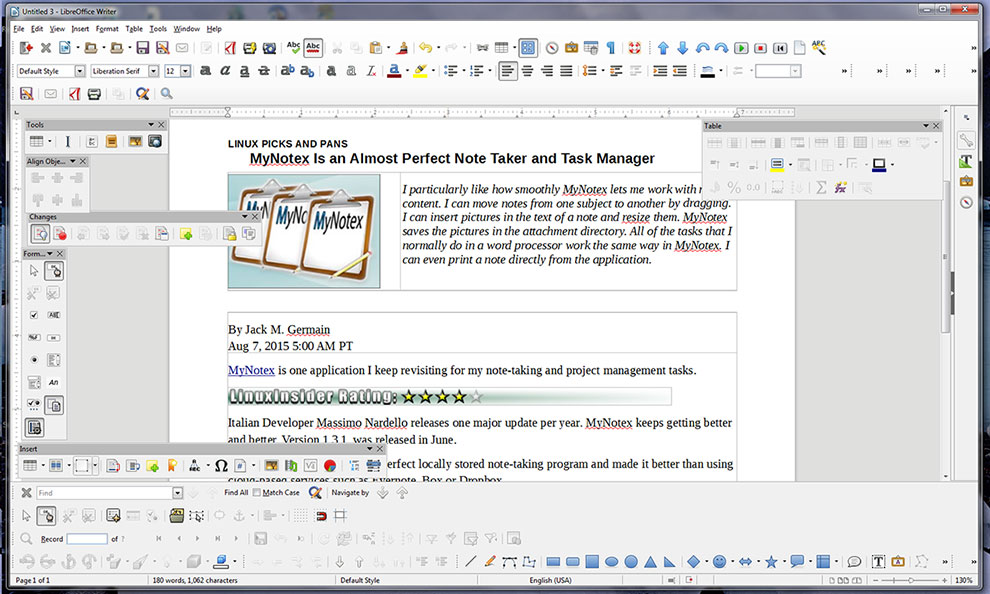
New toolbars and better integrated features offer very customizable view options in LibreOffice 5.0. Writer is shown here, but the improvements on screen and under the hood are plentiful in all of the office suite modules.
Interoperability Excels
The ability to import and export data and objects is greatly improved in LibreOffice 5.0. For example, Writer can import Apple Pages files. Calc can import Apple Numbers, Lotus 1-2-3 (wk3 and wk4) and Quattro Pro (wq1 and wq2) files.Similarly, Draw can import ClarisDraw and MacDraft files. Also, the MediaWiki export filter is improved with the additional support of several element properties.
Apple Keynote import filter has several elements that previously were ignored. The Adobe FreeHand import filter now covers formats from FreeHand 3.0 to FreeHand 11.
Bottom Line
Overall, the code overhaul in LibreOffice 5.0 should bring lots of reliability improvements. The number of defects for 1,000 lines of code is now consistently below 0.001, according to Coverity Scan.That means the latest release is easier to develop, maintain and debug. The amount of solved bugs is now over 25,000 and increasing rapidly, according to The Document Foundation's Meeks.
LibreOffice 5.0 is a huge winner. The only drawback is waiting for your distro's package manager repository to process the latest LibreOffice release. You don't have to wait for that, though. You can download the latest release. That gets you a .tar.gz file for your Linux distribution's architecture. Decompress the file and follow the installation directions in the read.me file.
Researchers for the Security Intelligence Response Team at Akamai on Tuesday issued a high-risk threat advisory for XOR DDoS proliferation.

The XOR DDoS Trojan is used to hijack Linux servers to build a botnet for distributed denial-of-service attacks with SYN and DNS floods, researchers tracking the malware said.The massive Linux-based botnet, which they discovered last year, can take down websites under a flood of DDoS traffic exceeding 150 Gbps using heavy volumes of junk network traffic.The malware compromises Linux systems using network routers and other embedded devices to apply brute-force attacks to gain Secure Shell access, Akamai SIRT said."How severe is the risk? The risk for infection depends on if root authentication is enabled using a weak password," said Tsvetelin "Vincent" Choranov, security response engineer at Akamai SIRT."Though this process has been widely spoken about, the XOR DDoS botnet is a prime example of how security best practices are still being disregarded," he told LinuxInsider.
Attack Vectors
The bandwidth of the DDoS attacks from the XOR DDoS botnet ranges from a few gigabits per second to more than 150 Gbps, Akamai SIRT said. It attacks up to 20 targets per day, mostly gaming websites and educational institutions.Akamai SIRT mitigated two DDoS attacks orchestrated by the XOR DDoS botnet in August. One of the attacks measured nearly 50 Gbps, and the other was almost 100 Gbps, researchers said.The malware's origin is Asian, based on the command-and-control IP addresses and source IP addresses of the attack payloads, according to Akamai SIRT. About 90 percent of the attacks have occurred in Asia.News of the XOR DDoS Secure Shell login vector used to distribute malware is especially troubling since the attacks come on the heels of a series of high-profile hacks and breaches caused by insufficiently secured credentials, said Matthew McKenna, chief commercial officer for SSH Communications Security."The explosion of IoT-style devices is only broadening the attack surface further," he told LinuxInsider.
How It Works
The botnet's attack methods are pretty significant. It spreads by using SSH brute force as its point of entry, then executes commands to download itself to a computer, said Tom Gorup, security operations leader at Rook Security."If the password is long and complex or PEM (Privacy Enhanced Mail) keys are being used, the chances of infection are low. This reinforces best practices," he told LinuxInsider.The malware doesn't spread via a host vulnerability. Instead, it populates via Secure Shell services that are susceptible to brute-force attacks because of weak passwords, Akamai SIRT's researchers said. Once the attackers gain login credentials, they use root privileges to run a Bash shell script that downloads and executes the malicious binary.
Persistent Perp
The malicious binary code creates two copies of itself. One is in the /boot directory with a filename composed of 10 random alpha characters. The second copy is in /lib/udev with a filename of "udev."The copy in /boot allows reading, writing and execution. The copy in /lib/udev only has read permissions. Only the root user only can access both copies.To ensure persistence, the malware executes multiple short-lived processes. That determines whether the main process is running. If not, it creates and executes a new copy in /boot using a new randomized 10-character name.That process is hidden using common rootkit techniques. Using tools that show running processes, the malware masks itself using the name of a common Linux tool such as "top," "grep," "ls" or "ifconfig," with an assortment of randomized flags to further blend in on a busy system.Persistence is maintained after reboot. The bot creates a startup script in /etc/init.d directory using the same filename as the malware dropped in /boot.
Risk Factors
The primary risk from an XOR DDoS attack is being taken offline, noted Akamai SIRT's Choranov.Another concern is the availability of computing resources, said Rook Security's Gorup.This type of cyberattack is so successful largely because of careless password management, according to Brad Hibbert, chief technology officer at BeyondTrust. To simplify administration, many IT teams use the same local password across multiple servers, service accounts and applications and rarely, if ever, change them en masse."This problem can lead to a variety of malicious activities and can result in an increased success rate for these types of brute-force attacks," he told LinuxInsider.IT departments often ignore the type of help already available to mitigate DDoS attacks, said Jim McMurry, CEO of Milton Security Group."DDoS is the bane of the Internet. There are whole businesses out there to help you mitigate these types of risk. If your Web presence is not behind a service like these, then you need to move to one immediately if you want your Web presence to stay operational," he told LinuxInsider.
Prevention Better Than Fix
Several cloud or on-site DDoS mitigation solutions can protect an organization from the damage this botnet can potentially cause.Akamai SIRT included recommended remediations for malware infection and detection against the DDoS attack payloads in its advisory, said Choranov."We recommend network assessments to be conducted regularly, as well as constant monitoring of network traffic and the implementation of strong security policies," he said.Companies should purchase redundant connections or get a DoS protection provider to ensure that actions can be taken outside of their networks, added Rook Security's Gorup.Plus, companies need to be careful when relying on firewalls as a method of blocking these types of attacks, he said. "Most companies see availability as the highest concern and therefore fail over if the firewall gets overutilized."Unfortunately for a website chosen as a target of the botnet, defending against DDoS attacks can be difficult.The sheer size of the botnet can overwhelm most high-speed Internet connections, and it may require the cooperation of multiple network operators and service providers to mitigate a DDoS attack launched by the botnet, said Patrick Tiquet, director of network security and architecture for Keeper Security."Sites with network devices or firewalls that can recognize and mitigate against a DDoS attack have a better chance at weathering an attack without requiring outside assistance," he told LinuxInsider.Passwords Prevent ProblemsTo reduce exposure to this malware, Linux administrators should ensure that all passwords are complex and unique.Remote SSH logins should be restricted by a firewall to only those IP addresses that are authorized to access, added Tiquet. If remote SSH is not required, the service should be blocked and disabled."It also is recommended that Linux administrators enable for interactive remote SSH logins a two-factor authentication mechanism, such as Google Authenticator, which is available as an optional package for many popular Linux distributions," he said. "Additionally, Linux administrators should scan their systems regularly for malware."
PHP was conceived sometime in the fall of 1994 by Rasmus Lerdorf. Early non-released versions were used on his home page to keep track of who was looking at his online resume. The first version used by others was available sometime in early 1995 and was known as the Personal Home Page Tools. It consisted of a very simplistic parser engine that only understood a few special macros and a number of utilities that were in common use on home pages back then. A guestbook, a counter and some other stuff. The parser was rewritten in mid-1995 and named PHP/FI Version 2. The FI came from another package Rasmus had written which interpreted html form data. He combined the Personal Home Page tools scripts with the Form Interpreter and added mSQL support and PHP/FI was born. PHP/FI grew at an amazing pace and people started contributing code to it.
It is difficult to give any hard statistics, but it is estimated that by late 1996 PHP/FI was in use on at least 15,000 web sites around the world. By mid-1997 this number had grown to over 50,000. Mid-1997 also saw a change in the development of PHP. It changed from being Rasmus' own pet project that a handful of people had contributed to, to being a much more organized team effort. The parser was rewritten from scratch by Zeev Suraski and Andi Gutmans and this new parser formed the basis for PHP Version 3. A lot of the utility code from PHP/FI was ported over to PHP3 and a lot of it was completely rewritten.
Today (end-1999) either PHP/FI or PHP3 ships with a number of commercial products such as C2's StrongHold web server and RedHat Linux. A conservative estimate based on an extrapolation from numbers provided by NetCraft (see also Netcraft Web Server Survey) would be that PHP is in use on over 1,000,000 sites around the world. To put that in perspective, that is more sites than run Netscape's flagship Enterprise server on the Internet.
Also as of this writing, work is underway on the next generation of PHP, which will utilize the powerful Zend scripting engine to deliver higher performance, and will also support running under webservers other than Apache as a native server module.
It is difficult to give any hard statistics, but it is estimated that by late 1996 PHP/FI was in use on at least 15,000 web sites around the world. By mid-1997 this number had grown to over 50,000. Mid-1997 also saw a change in the development of PHP. It changed from being Rasmus' own pet project that a handful of people had contributed to, to being a much more organized team effort. The parser was rewritten from scratch by Zeev Suraski and Andi Gutmans and this new parser formed the basis for PHP Version 3. A lot of the utility code from PHP/FI was ported over to PHP3 and a lot of it was completely rewritten.
Today (end-1999) either PHP/FI or PHP3 ships with a number of commercial products such as C2's StrongHold web server and RedHat Linux. A conservative estimate based on an extrapolation from numbers provided by NetCraft (see also Netcraft Web Server Survey) would be that PHP is in use on over 1,000,000 sites around the world. To put that in perspective, that is more sites than run Netscape's flagship Enterprise server on the Internet.
Also as of this writing, work is underway on the next generation of PHP, which will utilize the powerful Zend scripting engine to deliver higher performance, and will also support running under webservers other than Apache as a native server module.
I would argue Python is the most important programming language in the world as of 2015. First, let's start with semantics––what does "important" mean? Importance, as defined by multiple dictionaries, is the quality of having the most significance and value. In terms of programming, here's what significance and value can translate into (obviously, this list is short, but it gives you a general idea of my argument):
Python
JavaScript
Java
Even for non-programmers, one can pretty much just take a good look at the Python code and get a general idea of what it's doing. There's no need to explain what a "console" is just yet when you get to JavaScript, and definitely NO need to get into the details of what
,
,
, and
mean for the Java code. Don't even get me started with C++. Logical operators are usually common in programming languages. JavaScript and Java both use the and
, or
, and not
operators. In Python, you literally just type,
,
, and
, respectively. Did your code not compile because you forgot a semicolon at the end of your statement? Python doesn't even use semicolons.
Next is usability. Truth be told, I think Python is one of the most versatile and efficient programming languages in the world because of the infinite number of things you can do with it. I have compiled a list of some of the amazing things you can do with Python and its applications.
Web applications
Data analysis and statistics
Desktop and GUI programming
Game development
Testing/QA
Don't just take my word for it. Here are some great graphics and visualizations that show you how Python is faring among students, programmers, companies, and universities today.
Data Analysis
Higher education

Programmers

And finally, we have community. The Python community is already relatively large and comparable to other large programming language communities like Java, C/C++, JavaScript, and Ruby. Check out Python's community website for more details if you're not already convinced by seeing the wonderful infographics above. Hope this helps!
- Syntax – How is the learning curve for beginners? Is it easy to read? Is it comparatively easier to debug code when compared to other languages? How about the names for functions and libraries?
- Usability – How can this language be utilized for various situations and circumstances? Does the language have to be replaced by other languages when used in particular scenarios?
- Community – How many people are contributing to the language? Is it open-source or maintained by an organization? How many tools and resources are available for beginners that want to get their hands dirty and begin coding?
Python
print "Hello World"JavaScript
console.log("Hello World");Java
1 | public static void main(String[] args) { System.out.println("Hello World");} |
Even for non-programmers, one can pretty much just take a good look at the Python code and get a general idea of what it's doing. There's no need to explain what a "console" is just yet when you get to JavaScript, and definitely NO need to get into the details of what
publicstaticvoidmain&&||!andornotNext is usability. Truth be told, I think Python is one of the most versatile and efficient programming languages in the world because of the infinite number of things you can do with it. I have compiled a list of some of the amazing things you can do with Python and its applications.
Web applications
- Django, Pyramid, Flask, Bottle
- Plone, django CMS
- HTML and XML, JSON, socket interface
- Requests, BeautifulSoup, Feedparser
- Paramiko, Twisted Python
Data analysis and statistics
- SciPy, Pandas, IPython
- MDP, mlpy, pybrain
Desktop and GUI programming
- wxWidgets, Kivy
- pyqt, pyside
Game development
- simplegui, pygame
- Ren'Py, pyglet, cocos2d
- Gloopy, PyOpenGL, SPyRE
Testing/QA
- SCons
- Buildbot, Apache Gump
- Roundup, Trac
Don't just take my word for it. Here are some great graphics and visualizations that show you how Python is faring among students, programmers, companies, and universities today.
Data Analysis
Programmers
And finally, we have community. The Python community is already relatively large and comparable to other large programming language communities like Java, C/C++, JavaScript, and Ruby. Check out Python's community website for more details if you're not already convinced by seeing the wonderful infographics above. Hope this helps!
Microsoft was desperate for relevance in late 1999 at the height of the dot com mania. There were about a dozen technical committees that were supposed to be figuring out the future (the company leaked that Bill was personally chairing the user experience committee) which would be laid out at a press event with the grandiose name of Forum 2000. The committees were pretty much a bust in terms of delivering anything but the company still felt it had to demonstrate it had a future, so there was some furious sausage-making.
Originally scheduled for January 2000 to lay out a prompt vision for the new century, it kept being delayed because of adverse rulings in the DoJ case. Forum 2000 finally happened in Redmond in June of 2000 and that was where the .NET brand debuted. Bill painted a broad overview of the coming decade that would stand up very well, even if Microsoft wasn't necessarily the company to deliver on the vision (I think it was where the Tablet PC was first unveiled). There also were specific presentations for different audiences. The developer session also stood up well and Microsoft largely delivered on it. The information worker session was pretty weak, as was the consumer session (Windows Me anyone?), though the consumer scenario video did directly lead to HailStorm as an enterprising engineer assumed it was his job to make that video a reality. Ballmer ended the event with a very reactive and competitively focused talk that was very much of the dot com moment. It took another three months or so before it was clear the bubble had popped and the world had changed dramatically (much to Microsoft's advantage).
The CLR and .NET Framework were announced at the PDC in Orlando a month later (which was notable because nothing leaked in advance so Microsoft platform developers had their entire world rocked and wandered around the event in a daze).
As for where .NET came from, the branding people presented SteveB with 3-4 options (the only one I remember was something like "Microsoft AXP") which he rejected and then bellowed out "How about dot net?" except it was both a question and a directive. Sun Microsystems was not only still around then but had lots of mindshare with its "we're the dot in dot com" campaign which Steve clearly had on the brain.
The tension with the Windows brand was palpable from the start (and it probably only got out the door because the leader of the Windows group was on sabbatical at the time). But the company rallied around .NET as employees desperately sought "a new parade" (even to a fault - the brand was immediately appropriated and misused by almost every product group, a mess that took a couple years to clean up). And it didn't hurt that the rest of the industry was imploding along with the dot com bubble.
FWIW, Next Generation Windows Services was just Next Generation Services until the night before it was discussed publicly, whereupon Windows has hastily jammed into the name.
Originally scheduled for January 2000 to lay out a prompt vision for the new century, it kept being delayed because of adverse rulings in the DoJ case. Forum 2000 finally happened in Redmond in June of 2000 and that was where the .NET brand debuted. Bill painted a broad overview of the coming decade that would stand up very well, even if Microsoft wasn't necessarily the company to deliver on the vision (I think it was where the Tablet PC was first unveiled). There also were specific presentations for different audiences. The developer session also stood up well and Microsoft largely delivered on it. The information worker session was pretty weak, as was the consumer session (Windows Me anyone?), though the consumer scenario video did directly lead to HailStorm as an enterprising engineer assumed it was his job to make that video a reality. Ballmer ended the event with a very reactive and competitively focused talk that was very much of the dot com moment. It took another three months or so before it was clear the bubble had popped and the world had changed dramatically (much to Microsoft's advantage).
The CLR and .NET Framework were announced at the PDC in Orlando a month later (which was notable because nothing leaked in advance so Microsoft platform developers had their entire world rocked and wandered around the event in a daze).
As for where .NET came from, the branding people presented SteveB with 3-4 options (the only one I remember was something like "Microsoft AXP") which he rejected and then bellowed out "How about dot net?" except it was both a question and a directive. Sun Microsystems was not only still around then but had lots of mindshare with its "we're the dot in dot com" campaign which Steve clearly had on the brain.
The tension with the Windows brand was palpable from the start (and it probably only got out the door because the leader of the Windows group was on sabbatical at the time). But the company rallied around .NET as employees desperately sought "a new parade" (even to a fault - the brand was immediately appropriated and misused by almost every product group, a mess that took a couple years to clean up). And it didn't hurt that the rest of the industry was imploding along with the dot com bubble.
FWIW, Next Generation Windows Services was just Next Generation Services until the night before it was discussed publicly, whereupon Windows has hastily jammed into the name.
1. In BFS the root node is expanded first, then all the successors of the root node are expanded, and in next step all the successors of every node are expanded, the process continues till the goal is achived. while
In DFS we explore the root node and traverse as far as possible from the root node untill the goal is achived.
2.In BFS the space complexity is more critical as compared to time complexity. while
In DFS has lesser space complexity, because at a time it needs to store only single path from the root to leaf node.
3.Breadth First Search can be done with the help of queue i.e, FIFO(First In First Out) while
Depth First Search can be done with the help of stack i.e. LIFO(Last In First Out).
4.BFS is slower than DFS while
DFS is more faster than BFS.
5.BFS requires more memory compare to DFS while
DFS require less memory compare to BFS.
6.BFS is useful in finding shortest path while
DFS in not so useful in finding shortest path.
BFS Example

DFS Example

In DFS we explore the root node and traverse as far as possible from the root node untill the goal is achived.
2.In BFS the space complexity is more critical as compared to time complexity. while
In DFS has lesser space complexity, because at a time it needs to store only single path from the root to leaf node.
3.Breadth First Search can be done with the help of queue i.e, FIFO(First In First Out) while
Depth First Search can be done with the help of stack i.e. LIFO(Last In First Out).
4.BFS is slower than DFS while
DFS is more faster than BFS.
5.BFS requires more memory compare to DFS while
DFS require less memory compare to BFS.
6.BFS is useful in finding shortest path while
DFS in not so useful in finding shortest path.
BFS Example
DFS Example