Showing posts with label TOP 5. Show all posts
The smartphone industry till few years ago was dominated by Nokia, LG and Sony. But with the arrival of Google's android whole scene has changed. Now, Samsung and Apple emerged as the strongest players in the smartphone segment.
However, while Apple and Samsung still rule the industry there are other key players too, having the potential to upset the party for the two tech giants anytime.
Here are the 5 biggest smartphone brands of the world, as per a research by Gartner. Note: The ranking is based on the global sales of smartphones in the first quarter of 2016.
1. SAMSUNG
Samsung is a South Korean smartphone manufacturing company. Samsung also produce other household products like AC, Washing Machine, Refrigerator etc. Samsung rules the market in first quarter of 2016 with 81,186,900 units sold. The company held 23.2% market share, marginally down from 24.1% it held during the same quarter last year.
The company extended its lead over Apple during the first quarter. According to Gartner's research director Anshul Gupta, "Samsung's Galaxy S7 series phones and renewed portfolio positioned it as a strong competitor in the smartphone market, and more so in the emerging markets where it has been facing fierce competition from local manufacturers."
2. APPLE
Although Apple managed to retain its second position in the smartphone market, still company has suffered loss in double-digit. Apple has double digit decline year on year, with iPhone sales down by 14%.
Apple is still planing to recover this loss by exploring ways to refarm second-hand iPhones coming through the program in emerging markets.
3. HUAWEI
At no. 3 position is Chinese smartphone maker Huawei. Huawei major markets cover China, Europe, the Americas and Africa.
In first quarter of year 2016 company has sold 28,861,000 units to stand at 3rd position. according t Huawei’s market share during the quarter stood at 8.3%.
4. OPPO
Oppo had the best performance in the first quarter of 2016, with unit sales growing by 145%. Like Huawei and Xiaomi, Oppo saw strong growth in China, taking share from other players like Lenovo, Samsung and Yulong.
The company’s smartphone sales in the emerging Asia-Pacific region rose by 199%, with 16,112,600 units sold during the quarter.
5. XIAOMI
At no. 5 is Chinese smartphone maker Xiaomi. Just like Huawei and Oppo, Xiaomi too witnessed strong growth in China. The company also experienced good demand for its smartphones in the emerging Asia-Pacific region.
The company's total smartphone unit sales during the quarter stood at 15,048,000 units. Its global market share during the year stood at 4.3%.
This year is turning out to be most heated summer for entry level smartphones in Indian market. Companies like Xiaomi, Coolpad, LeEco, Qiku and Meizu have launched some great product under 10 thousand Rupees. In order to low your nerves we have taken these smartphones and compared then in terms of performance, design, build quality, camera and availability in market.
In our last post we have we talked about Qiku N4 and Coolpad Note 3 Plus, now we will raise the bar and include some high end most demanded phones of budget level smartphone.
3. Meizu M3 Note
Meizu M3 Note have 1.8GHz Helio P10 octa-core processor clubbed with Mali T860 GPU, and it comes with 3GB RAM and 32GB internal storage. Users have the option of expanding the available storage by installing micro SD cards of up to 128GB. It also has a 4100 non-removal battery.
![]() |
| Meizu M3 Note |
Meizu M3 Note comes with price of Rs 9,999, it feature all metal body along with 5.5 inch screen, and have 13 MP rear & 5MP front camera. As we get chance to spent few time along with this device, here is our initial impression about it.
Buy Meizu M3 Note from Amazon at Rs 9,999
Why should you buy Meizu M3 Note?
It comes with 3GB of RAM and all the features that entry level smartphone holds, it have most beautiful design.
Why should you not buy Meizu M3 Note?
Meizu do not have better service centers in India, it also have some minor issues with camera in dark and artificial light. That means if you are a photo freak then this probably not most suited device for you. It also have lower hand in terms of performance.
2.Xiaomi Note 3

Buy Xiaomi Redmi Note 3 from amazon for Rs 9,999
This means that it have a better camera, battery life, display and design.. you can buy this device as it is most powerful, stylist and beautiful .
2.Xiaomi Note 3
Powered by Snapdragon 650 processor, the first Qualcomm Technologies’ chipset equipped with ARM’s top-end Cortex-A72 performance cores, Redmi Note 3 is exceptionally fast with an Antutu score of over 77,000. It features the latest Qualcomm ® Adreno™ 510 GPU, which provides impressive graphics performance for an unparalleled gaming experience.

Redmi Note 3 packs a 690Wh/L high-density 4050mAh battery that is incredibly thin.
Buy Xiaomi Redmi Note 3 from amazon for Rs 9,999
This means that it have a better camera, battery life, display and design.. you can buy this device as it is most powerful, stylist and beautiful .
1. LeEco Le 1s Eco
Le 1s Eco is powered by 1.85GHz octa-core MediaTek Helio X10 octa-core processor and have RAM and storage of 3GB and 32GB, respectively. Le 1s Eco also comes with 5TB of cloud storage.
Buy LeEco Le 1s Eco from Flipkart for Rs 9,999
Le 1s Eco is powered by 1.85GHz octa-core MediaTek Helio X10 octa-core processor and have RAM and storage of 3GB and 32GB, respectively. Le 1s Eco also comes with 5TB of cloud storage.
With 3 GB of RAM and Helio X10 octa core processor, overall performance of Le 1s Eco was good, we don't feel lag or any heating issue.
![]() |
| LeEco Le 1s Eco |
Le 1s Eco features 3000 mAh of battery that support rapid charging, thanks to its SuperCharge feature that can provide up to 3.5 hours of talk time in just 5 minutes of charging. There is USB type C support for this device
Buy LeEco Le 1s Eco from Flipkart for Rs 9,999
This year is turning out to be most heated summer for entry level smartphones in Indian market. Companies like Xiaomi, Coolpad, LeEco, Qiku and Meizu have launched some great product under 10 thousand INR. In order to low your nerves we have taken these smartphones and compared then in terms of performance, design, build quality, camera and availability in market.
5. Qiku N4:
This is first device ever to have 4GB of internal storage and priced below 10k. It went on sale in China for the 899 CNY which is approx. 9200 rupees. Quiku N4 is powered by a 64-bit 2.3GHz Helio X20 deca-core processor paired with 4GB of RAM. It have a 13 MP rear and 5 MP front Camera.
It have a 13-megapixel rear camera with LED flash, f/2.0 aperture, Sony IMX258 sensor, and 1080p video recording capabilities for selfies it have 5-megapixel front facing camera.
Quiku N4 comes with a 3080 mAh battery with the fast-charging feature, which is enough for daily use, it also have fingerprint scanner.
Why should you buy Qiku N4?
It comes with 4GB of RAM and all the features that entry level smartphone holds. If you love doing multitasking than this smartphone might give you a very smooth experience. For record we feel it have most beautiful design.
Why should you not buy Qiku N4?
Qiku do not have better service centers in India, it also have some minor issues with camera in dark and artificial light. That means if you are a photo freak then this probably not most suited device for you.If you want to buy device in this month, then you need to explore your options too as it isn't expected to land in Indian market soon.
4.Coolpad Note 3 Plus:
Coolpad Note 3 Plus comes with a 5.50-inch touchscreen display with a resolution of 1080 pixels by 1920 pixels at a PPI of 401 pixels per inch. Coolpad Note 3 plus is powered by 1.3GHz octa-core MediaTek 6753 processor and it comes with 3GB of RAM.
It is packed with 16GB of internal storage that can be expanded up to 64GB via a micro SD card. As far as the cameras are concerned, the Coolpad Note 3 plus packs a 13-megapixel primary camera on the rear and a 5-megapixel front shooter for selfies. The Coolpad Note 3 plus runs Android 5.1 and is powered by a 3000 mAh non removable battery.
Coolpad Note 3 Plus comes with a 5.50-inch touchscreen display with a resolution of 1080 pixels by 1920 pixels at a PPI of 401 pixels per inch. Coolpad Note 3 plus is powered by 1.3GHz octa-core MediaTek 6753 processor and it comes with 3GB of RAM.
![]() |
| Coolpad Note 3 (right) and Coolpad Note 3 Plus ( left) |
It is packed with 16GB of internal storage that can be expanded up to 64GB via a micro SD card. As far as the cameras are concerned, the Coolpad Note 3 plus packs a 13-megapixel primary camera on the rear and a 5-megapixel front shooter for selfies. The Coolpad Note 3 plus runs Android 5.1 and is powered by a 3000 mAh non removable battery.
Why should you buy Coolpad Note 3 Plus?
Coolpad is quite similar name in India now, its previous devices were great hit and we can expect same for it. With a price of 9000 INR this one is cheapest smartphone that we have compiled in our list, yet it have all the features including Fingerprint sensor.
Why should you not buy Coolpad Note 3 Plus?
Gaming experience in Coolpad Note 3 Plus is just at par, in term of performance this device also have a lower hand. But despite of these two drawback you can still buy Coolpad Note 3 Plus as it great value for money.
Buy Coolpad Note 3 Plus : From Amazon at Rs 9000
Next three devices in our list are Meizu M3 note, Xiaomi Redmi Note 3 and LeTv Le 1s Eco.We will soon bring them out in next part of series. Meanwhile if you have any question, then as us in comment section below, and if you feel we missed some this device that deserve to be in this list than do let us know. Till than keep reading.
Like us on Facebook to get live tech updates : https://www.facebook.com/tecphlie
Gaming experience in Coolpad Note 3 Plus is just at par, in term of performance this device also have a lower hand. But despite of these two drawback you can still buy Coolpad Note 3 Plus as it great value for money.
Buy Coolpad Note 3 Plus : From Amazon at Rs 9000
Next three devices in our list are Meizu M3 note, Xiaomi Redmi Note 3 and LeTv Le 1s Eco.We will soon bring them out in next part of series. Meanwhile if you have any question, then as us in comment section below, and if you feel we missed some this device that deserve to be in this list than do let us know. Till than keep reading.
Like us on Facebook to get live tech updates : https://www.facebook.com/tecphlie
Virtual Reality is one of the hottest gadget of the market. It is a fantastic innovation which can demonstrate the cutting edge of what technology is capable of today.
Many tech giants and small companies are working to bring the VR to masses. Today, the market is flooded with VR devices that are affordable, impressive, fun, and phone-powered. So here are a few pocket friendly virtual reality headsets available in India.
1. PTron VR Headset
PTron VR headset has elegant design for impressive viewing experience. We can indulge in high definition gaming with eye-tracking that uses your glances as a type of controller. We can also watch movie from our smartphone, using this VR headset. The PTron VR headset comes at an attractive price of Rs 1,499 and is exclusively available on LatestOne.com.
2. Zebronics VR Headset
Zebronics VR headset is compatible with Google Cardboard apps. The Chennai based startup Zebronics has launched the Zeb VR, it has thick foam padding and pair of focus-adjusting lenses that makes it very comfortable for user. It is available at Rs 1,400 only. The Zeb VR headset can be used with any smartphone up to 6 inches in size. The headset is available on Snapdeal.
3. Agnus VR Headset
It is a most viable VR headset available in market. It is designed, taking care of user comfort. It is available in market with a price tag of Rs 2,499. Agnus VR has soft faux-leather padding, focus adjustments, a headphone jack and high-quality optical lenses. It could be a viable alternative to Google Cardboard. It’s available directly from the company website or on Amazon India.
4. Irusu PlayVR Headset
Irusu uses Advanced Production Technology Lenses with Vacuum Ion Plating refining. The PlayVR headset has a comfortable headband and adjustable super foam protector. It is designed for all type of people, as it has an adjustable focus, so even myopic users shouldn’t have a problem. The product is priced at Rs 2499 and is available from the company website and Amazon India.
5. DOMO nHance VR Headset
The DOMO nHance VR2 is 3D Virtual Reality Headset. It is designed specially to allow user to explore world of 3D. The nHance VR2 uses the sensors in your phone for the head tracking technology. The VR2 is inspired by the Google Cardboard and works with all the cardboard apps and it is compatible with most phones. It is available on Amazon India for Rs 745.
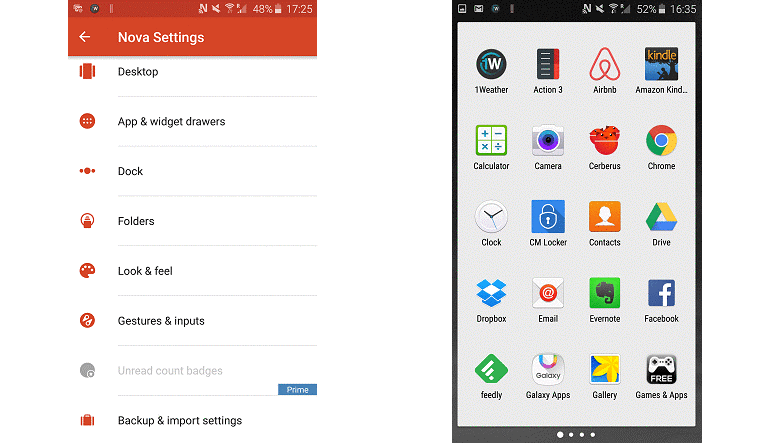
Launcher Apps – What’s the point of having it? There are hundreds of launchers available for android and only a few can be considered efficient – which one will suit your phone? To answer these questions, Let us take a look at the 5 best Android Launchers for your smartphone or tablet which you can try without a second thought.
These Apps helps the customers to customize their smartphone and tablet to have a better experience that fit into their daily usage. Launcher Apps can work to every aspect of the phone’s looks and performance like changing screen transitions, icons, fonts, themes and wallpapers. Few apps acts very similar to the one that is present as default in your phone, few others can entirely change the way you interact with your device. So with this Launcher Apps you can have your screen as simple or as complicated as you wish. Here it goes…
1. Buzz Launcher - Personalisation
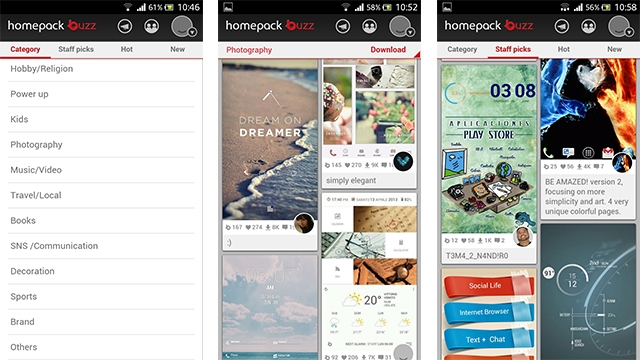
Buzz Launcher is one of the popular launcher which showcases some versatile functionality and rich community of themes. It has 17 categories for themes including Music/Video, Sports, Photography, Education and so on.
![]() |
| Buzz Launcher |
Download it here:
https://play.google.com/store/apps/details?id=com.buzzpia.aqua.launcher&hl=en
2.Hola Launcher – Simple and feature-rich
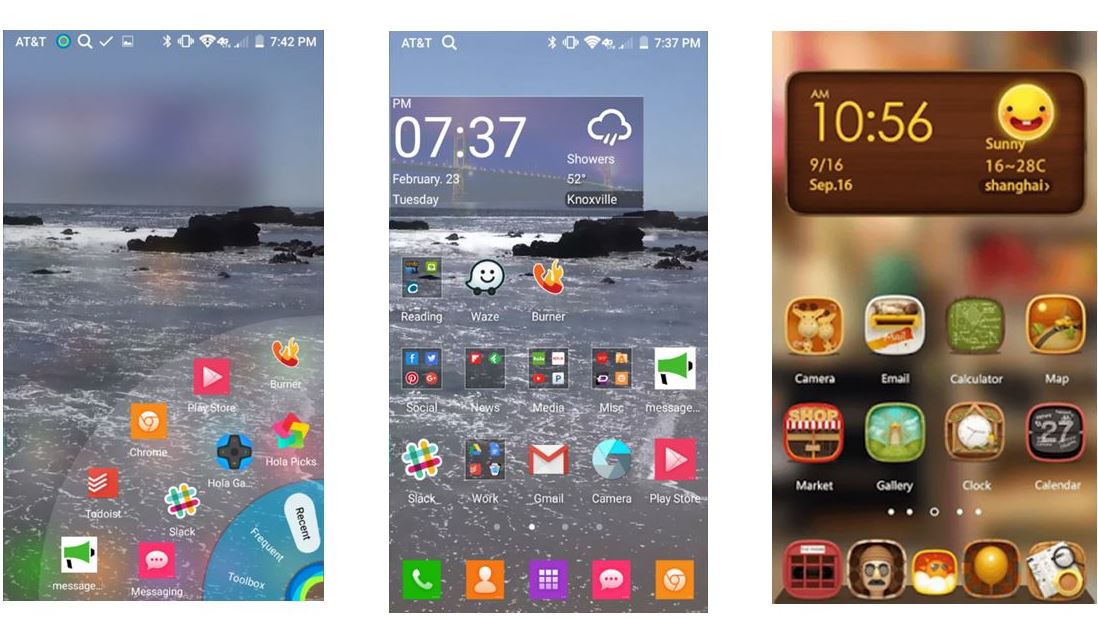
Hola Launcher is new on market targeted for low space consumption apps, it just requires 1 MB for installation. May be it takes low space but when it comes to features, it doesn’t go any low when compared to other custom launchers.
| Hola Launcher |
Download it here:
https://play.google.com/store/apps/details?id=com.hola.launcher&hl=en
3.Go Launcher EX
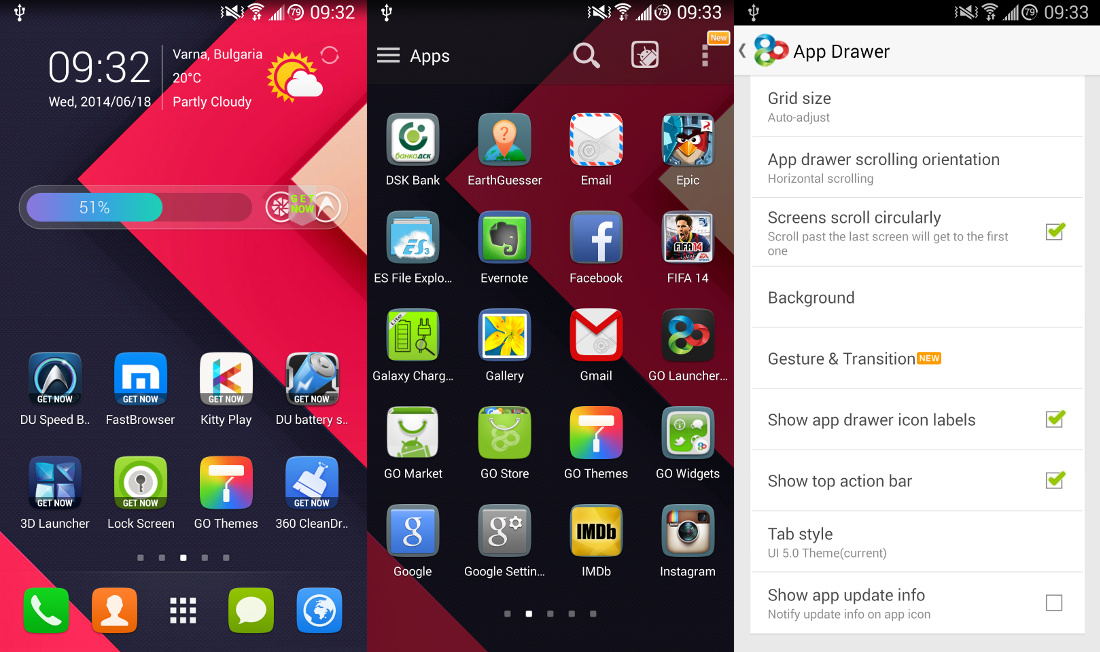
Go Launcher Ex is a completely free Android app which has tons of options like having a customised app drawer like you can have vertical or horizontal app drawer, changing the transition effect, editing background by changing themes and wallpapers, kills the running apps to boost the speed of the device, it can even lock and hide the apps, Uninstall and install apps, search apps within app drawer and so on.
![]() |
| Go Launcher FX |
Download it here:
https://play.google.com/store/apps/details?id=com.gau.go.launcherex&hl=en
4. Apex Launcher – Hardcore App installer
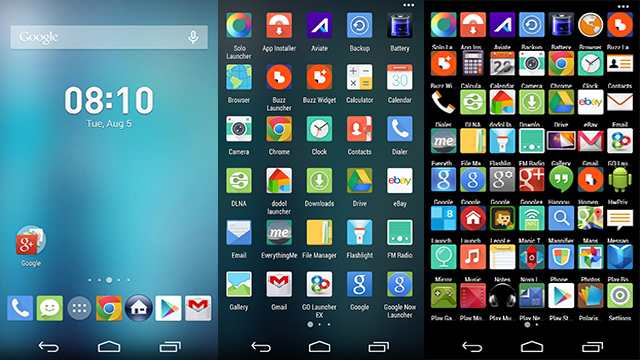
Apex Launchers is quite different from other launchers, means it just holds more important on the control you have over your home screens and the apps menu. See, this app can ridiculously hold a 10 x 10 grid of icons in a single screen (looks like teeny-tiny icons)and lets you seriously supercharge how much you can make use of your phone or tablet’s screen pixels.
![]() |
| Apex Launcher |
Download it here:
https://play.google.com/store/apps/details?id=com.anddoes.launcher&hl=en
5. Nova Launcher
Nova Launcher is the most customizable launcher ever available in the play store. This is said so because we can choose different colored themes, icons, app drawers and more, if you don’t like any of the nova icon then you can apply Go launcher or other launcher’s theme to this launcher. Along with this, it has fun scroll effects, scrollable docks and infinite scrolling features.
![]() |
| Nova Launcher |
Download it from here:
https://play.google.com/store/apps/details?id=com.teslacoilsw.launcher
There are few other Launchers like Google Now Launcher, Smart Launcher, Next Launcher which is also worth a try. I have shared my Views on these apps, if you have another best apps based on your experience please do share.
Subscribe to Our YouTube Channel for watching these launchers in action.
https://www.youtube.com/channel/UCOKK7q3ylDVPZ_kw4eF93dg
Google has been a integral part of our society.Any information under the sun can be found in google.It stands a way in-front of other searching websites.Google has been the ultimate 'guru' (teacher in Indian language) of the Indians.It finds us perfect solutions for our problems like finding your favorite food in some locality,doubts in different topics,queries regarding day to day problems and current affairs.Certainly there is no doubt in the topmost potion of google in top visited websites in India.
2.YouTube ( Category : Video Streaming)
Another most visited website is YouTube.It stands in the top position when it comes to watching videos,sharing videos and online video streaming.It is place where most of teasers and trailers of movie is released.Certainly we can say YouTube is the 'google' of websites considering videos only.As per new adaptations we can watch YouTube videos offline too.This makes it one of the most popular website in India.
3.Facebook ( Category : Social Media )
Facebook is the website where Indians like to spend their leisure time.It is place where they share photos,videos and major events with their friends.It has been the most popular social networking site in the country.This addictive nature of Facebook makes it the one of the most visited website in the country.
4.Filpkart ( Category : Online Shopping )
Filpkart is the major online store in India.It sells a variety of products like mobile phones and its accessories,laptops,footwear,clothing etc on Flipkart.The variety of options for a single product and trust in the company have grabbed the minds of common people in India. The trend have changed to finding the products in online market rather than opting for a local market. This makes filpkart a most visited website in India.
5.Wikipedia.org ( Category : Education & Wiki )
Wikipedia has been the most informative website for the people whom seek for knowledge.It consists of all the information about all the major things that exist in this world.It contains plenty of article on science,famous people,history and arts.Students finds this as the perfect solution for day to day projects.With all this Wikipedia also occupy a position in top 5 most visited websites in India.
Wiki is defined as a website or database developed collaboratively by a community of users, allowing any user to add and edit content.Origin
Wikipedia has been the most informative website for the people whom seek for knowledge.It consists of all the information about all the major things that exist in this world.It contains plenty of article on science,famous people,history and arts.Students finds this as the perfect solution for day to day projects.With all this Wikipedia also occupy a position in top 5 most visited websites in India.
Wiki is defined as a website or database developed collaboratively by a community of users, allowing any user to add and edit content.Origin
When 3G/4G services were coming to India, we thought we might finally have an alternative to cable broadband with high-speeds and reliable connections. What most users never thought was that even the biggest data plans run out especially if you get very high internet speeds.
If it’s unlimited, it’s throttled and you don’t get the full potential of you 3G/4G connection. We have made a list of tips that will help you save your megabytes and make your internet data limit last longer.
Get Opera Max for Going Online
If you want to save data, Opera Max Data Manager is a must. It can handle data savings single-handedly. Opera Max provides system wide data compression so that data can be saved while all the apps using mobile data in the foreground as well as the background connect to the internet. The creators of Opera Max built this tool based on the Turbo-mode in the Opera Browser. All data communications go through the Opera servers and get compressed to save data. Opera Max promises over 50 percent data savings for common apps.
Opera Max comes with advanced data management tools too. Users can select which apps can use the internet, blacklisting apps to save more data. For example, if you have a package plan that gives you free WhatsApp, you can blacklist all other apps and use WhatsApp without worrying that other apps will cost you money by connecting to the internet automatically. Data management is very easy, once you turn on Opera Max over mobile data, you get details to which apps uses how much data and disable their internet access accordingly. You can activate data compression over Wifi too. A permanent notification lets you view your data usage and savings in real-time.
Onavo Extend has iOS users covered
Onavo is similar to Opera Max but comes with iOS support. It may not be as well-known as Opera Max but it can get the task done. It allows users to measure and save data just like Opera with a greater focus on control over apps’ internet usage. Onavo also employs advanced data caching to reduce data usage.
Enable Data Compression in Google Chrome
If you have an Android phone, there is a very high probability you are using Google Chrome browser. Yet, most people would be unaware that Chrome has a built-in data saving feature that needs to be enabled manually.
According to Google, you can save about 50 percent in data consumption by utilizing this feature. The user won’t even feel the difference in web experience. In fact, browsing over mobile data might even get faster. The way this works is, all your data passes through the Google servers, gets compressed and sent to your device.
To activate the feature, tap on the 3-dot menu button and go to Settings. Click on Data Saver and toggle the option in the top right corner and you’re done. This will help you save data when you are browsing using Chrome.
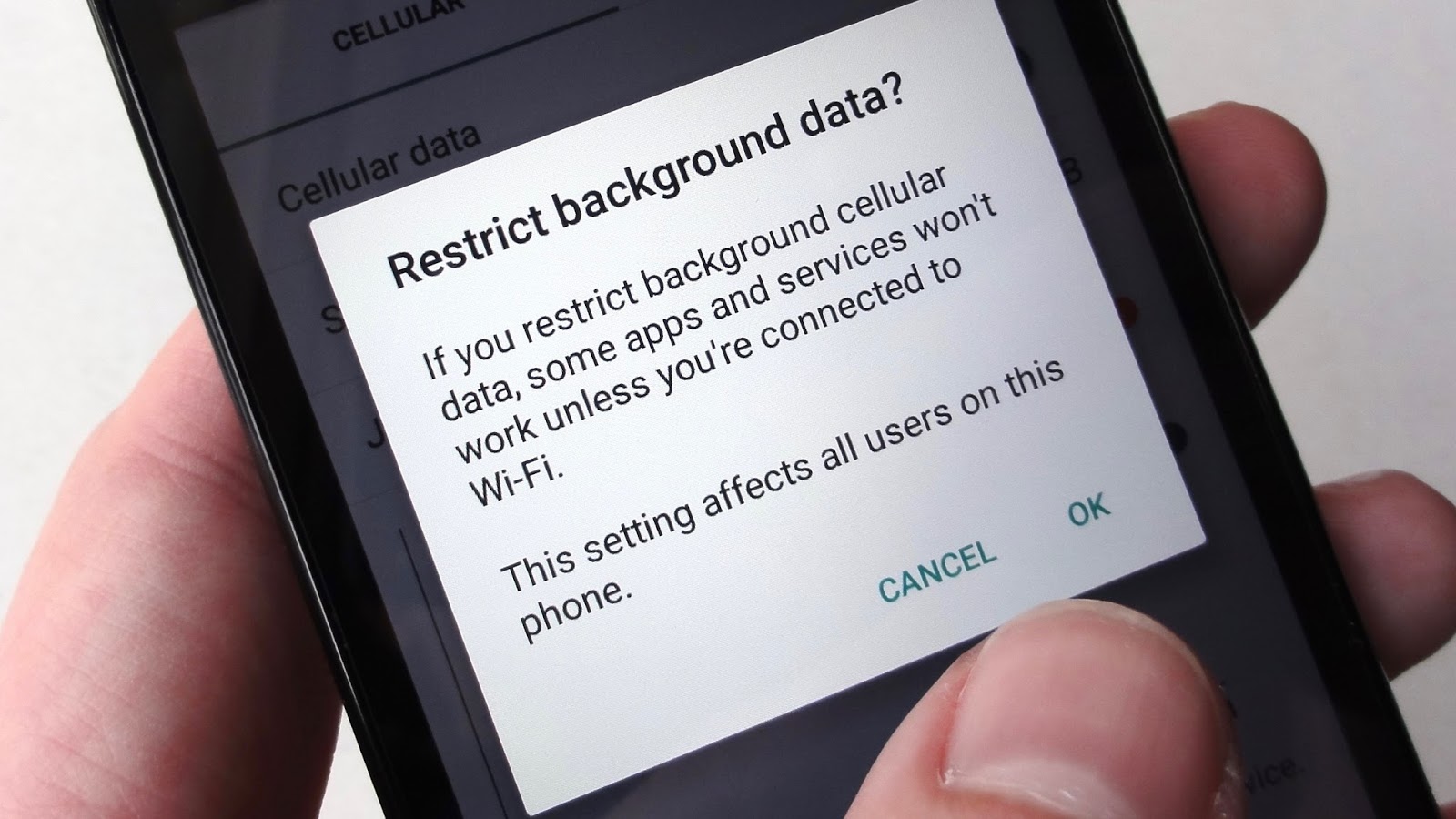
Restrict Background Data
When you aren’t using mobile data, some apps continue to use it in the background. Social networking apps, messaging apps and other real-time info apps keep using data in the background. Even the Android OS services keep connecting to the internet using your precious mobile data.
To prevent this from happening, you can go to Settings > Data Usage and select the apps you want to restrict manually. In the stats, you will also get information on how much data each app is using in the foreground and how much of it gets used up in the background. The process isn’t as simple and easy as Opera Max but it’s an alternative to get the detailed stats and restrict data usage.
If you want to go the extreme route, you can disable background data usage altogether but keep in mind that you won’t get any real-time notifications.
Set the Play Store to Update Apps Over Wi-Fi Only
The heading pretty much explains what we mean here. Most users keep getting app updates over mobile data, using your precious data without your permission. Huge amounts of data gets wasted on continuous updates.
To save data, go to Play Store and open the side menu. Go to Settings and select “Auto-Update apps” button and check (tick) “Auto-Update apps over WiFi only”.
If you don’t get access to WiFi, you can still update apps manually by opening the Play Store and starting the update process by going to the My Apps section.
Go Deep Into Sync Settings to Save Some Data
Everybody wants to get instant email notifications and get their info synced with all the accounts they have signed-in on their Android smartphone. The first thing you can do is to manually turn on and turn off the sync service.
The next thing is to go to Settings > Accounts and have a look at all your accounts that use the sync services. There are some services that you never use but they keep syncing and using data. For example, when you select a Google account, you will sync enabled for App data, Calendar, Chrome, Contacts, Docs, Drive, Gmail, Google Fit, Opinion Rewards, Photos, Play Music, Google+, and even more stuff. Most users don’t use half of these services so it’s best to disable sync for the useless services.
You can do the same thing for other accounts as well.
Streaming is the Enemy of Mobile Data
Streaming videos, music, looking at high quality images and GIFs burns through your data before you can realise it. Unless you have a very big data package, you must keep an eye on your data usage (Opera Max can help with that too).
Limit you data streaming since avoiding it must be impossible for most people. Another thing you can do is set the video or sound quality to a bit lower. This will help reduce data consumption.
When Going Outside WiFi range, Cache Data
Some apps clean cache to save space. It does clean up space but the cached data reduces data consumption by huge amounts. Browser and other internet oriented apps need cache to make them load faster and save on data.
Some apps allow local storage, like the Google Maps (and some other map apps), Play Music and Google Translate. Some apps can download the data you need which can be done while using a WiFi connection. You can stream or load the content that you might need before you leave your house. That content will get cached and save you some money on your internet usage.
Wrap up
We hope our list of tips will help you save a lot of data and make better use of those packages that only allow you to get connected with only a certain few apps at cheaper costs. These tips certainly won’t hinder your smartphone without internet but they will make it use less data. Besides what is a smartphone without an internet connection?
If you have any other tips, suggestion or questions, ask them in the comments below.
Got a new smartphone. Worried of what type of apps to install first (obviously no one need to tell us to install the Facebook, twitter, Instagram kind of apps which we automatically do). The number of available apps in the Google Play Store is almost around 2 million apps in February 2016. So it is really confusing to get the best out of that 2 million apps.
Here I have a list of 5 android apps that can help you change the way you interact with your phone. It probably will not change the performance of the phone but still it will give you a better interface with your phone and make it more enjoyable. These are going to be free so you can give it a try with no doubt.
1. DRUPE – Manage contacts
Drupe’s Tagline “Contacts made easy”. It goes well with the tagline like it helps the users to access their contacts easily. See, for the past few years with the advent of technology communication have become so easier, right from chatting to playing everywhere you communicate with other humans. But the real complication started is when you have to switch between apps to communicate to different friends like few use WhatsApp, few Viber etc.
The developers of this app got an alternative to this complication of switching between apps. Drupe, this helps you get rid of all contacts and apps mess with one simple gesture. All you have to do is just look for the drape dot to communicate (call, email, calendar invite, WhatsApp) to any of your contacts. Everything is just a swipe away. It works well with groups also by bringing all your contacts and communicating apps together in one place which is accessible from all your screens. So why to wait, just swipe the contact to the right app and get in touch! Simple. Time for a change get drupe today.
Download it here : https://play.google.com/store/apps/details?id=mobi.drupe.app&hl=en
2. ES File Explorer – Manage Files
You have a few choices when it comes to browsing your files on Android, but few apps are as powerful as ES File Explorer, which we consider the best of the bunch. It has varied features like copy, paste, cut, move, create, delete, rename, share and send files stored on your SD card or internal memory, Manage applications (install, uninstall, backup, and more), Compress, decompress, and encrypt ZIP files, as well as decompress RAR files, View certain files without leaving the manager, like photos, documents, and videos,
Access files in your Dropbox, as well as edit documents in your Dropbox and lot more features. It has a pretty good interface and it is one of its kind and there is no need to think of second fil manager if you have ES.
3. FOCUS – Manage photos
One of the prime use of smartphones today is clicking photos. We have our gallery but organising and searching the pics can be kind of difficult. So there is a wonderful app developed by one of the developer from the Nexus developer community.
We have a bunch of apps but Focus stands out in the crowd which is very simple, yet provide advanced features. This starts working as soon as you install the app. Every single image in your phone will be listed neatly under a specific name. One best feature is that we don’t need to spend time in labelling the pics from where it has been downloaded, focus will do it for us.
You can add our own tag also. You can check the photos’ details like the resolution, which phone the photo was taken and more. Also there is a swipe lock to avoid strangers to access other photos.
Download it here: https://play.google.com/store/apps/details?id=com.franco.focus&hl=en
4. 360 Security - Antivirus
Antivirus apps, usually they do just to protect you from malware attacks, that’s it. But here is 360 security app which is an interesting and unique antivirus app which does all the activities from optimising your device to keeping it safe and secure.
This app comes with a bunch of features like real time scanning of apps and files, provides cleanup function to clear old, useless, forgotten files which provides space, it help us conserve battery by identifying the app that consumes more battery, boost function to close all running apps.
Apart from this, it has app locking, you can configure which apps have the lock and which ones do not, it also allows you to block notifications from various apps, you get a call and SMS filter that will automatically block incoming SMS and phone calls from numbers and contacts you’ve assigned, Data monitor, find my phone feature integrated with Google.
It’s true that not everyone will find every single feature useful, but with the giant list of things available, there’s something in there for just about everyone.
5. ShareIt – For sharing
Lenovo’s Shareit is one of the most powerful and wonderful application to transfer files between two mobiles or mobile to pc or pc to pc. It works like Bluetooth but at a very unimaginable high speed (x40 times faster than Bluetooth).
You can transfer a 800 MB file merely in few minutes. You can share anything like pictures, videos, audio files, documents and even apps. It supports group sharing of upto 5 devices at the same time. Share without the need for Bluetooth, phone network or active Wi-Fi network…you don’t pay a cent for network charges. Devices wirelessly connect directly.
1. The Best HTC ever ?
The HTC seems to have overtaken LG G5 and now is the second best android phone in the market after Galaxy S7. Having 4 gigs of RAM and Snapdragon 820 processor, HTC has declared its rivalry to any top Android device company in the market challenging the likes of Samsung and LG. Despite not having an AMOLED display, there is frivolous difference between the display of S7 and HTC 10.
The quality of the camera has also been uprgraded as compared to HTC's previous releases, the highlight being the front camera which is the first in the world to have optical image stabilization.
2. Bold New Design
No other HTC phone looks as good as this. Period. Diverting from their previous designs, HTC has delievered a dazzling device which has sharp, oblique edges combined with sleek and aluminium body. The look is quite innovative in its own while maintaining the HTC legacy.

3. HTC Sense : Reborn
The way HTC built Sense into Android 6.0 sets a new bar for how slick and seamless an Android skin can be. It does a pretty good job of enhancing Marshmallow with stuff like the Blinkfeed news app and the fun new freestyle layout feature, but without getting in your way like Samsung's TouchWiz tends to do.

HTC even worked with Google to prevent having redundant apps, so you won't get multiple web browsers or calendars apps. Overall, this new version is clean, fast and functional.
4. Touch Fingerprint Sensor
In the modern world, you can't call a phone exceptional if it doesn't have a fingerprint sensor. HTC went a step furthur and removed the physical button, which is the common norm, and developed a particular mark to put your finger at.

5. BoomSound
In a perfect world, every phone would come with front-facing stereo speakers. But given the location of the HTC 10's fingerprint sensor, that wasn't going to be an option on this phone. Instead of completely giving up, HTC turned the phone's earpiece into a single front-facing speaker, then synced it up to another downward-facing speaker on the phone's bottom edge.

This gives you a more balanced, and quite loud speaker setup, with audio quality that trumps the Galaxy S7, LG G5 and even the Nexus 6P (front-facing speakers and all).
1. SPEED YOUR START UP
If an entire pot of coffee can brew in the time it takes for your computer to boot, it’s time to make some changes. Most likely your computer is not slow – it’s the dozens of programs turning on during startup that are slowing it down. Download a comprehensive tool easily disable certain programs during your startup.

2. CLEAR IT UP
If painfully slow surfing is your main problem, there are a couple quick changes you can make. Google Chrome is the best browser on the market now, known for speedy surfing. Under Chrome, go to Clear Browsing Data and check the boxes of temporary Internet files like cookies, cache, download history and browsing history.
3. SLIM DOWN
This involves more than just uninstalling programs you don’t use anymore. If you’re not totally committed to the usual suspects, like Windows Media Player and Microsoft Office, switch to something that requires less computing power. Free applications can easily replace go-to programs, while speeding up your PC and giving you additional features at the same time.
4. AUTOMATE YOUR UPDATES
Updates are annoying. It’s easy to click “remind me later” and avoid the notifications, until you’re so frustrated with your computer that you finally set aside an entire afternoon to update everything. Let’s solve this. Go to My Computer > Properties > Automatic Updates. Make sure this is set to Download and Install Automatically.
5. MAKE YOUR UPGRADES
If you’re into gaming, a graphics card might be worth your while. Forewarning: You’ll have to toy with your motherboard to make this upgrade happen, but there are a lot of online tutorials you can follow. Finally, the most effective way to speed up your PC – which also requires tinkering – is to add more RAM (random access memory).
Apple's latest smartphone from their bandwagon is the iPhone SE, and it's sleek to say the least. Sporting a 4-inch screen, the iPhone SE is reminiscent of the iPhone 5S because it is exactly the same phone. With flagship internals, though.
The iPhone SE has launched in India this week with a hefty price tags of Rs. 39,000 for the 16GB variant and Rs. 49,000 for the 64GB model. It is Apple's 'desperate' attempt at regaining the loyal audience it lost with their shift towards bigger screens in 2014.
iPhone SE may be the latest smartphone from Apple, but not generally the best. Here's 5 reasons why you should not get the iPhone SE.
The price
![]() |
| iPhone SE is priced at 39,000 INR |
Starting at $399 or Rs. 28,000 in the US, Indian audiences were expecting the iPhone SE to be priced not more than 30-33,000 rupees in India. Coming as a shocker, the 16GB variant starts in India at a price of Rs. 39,000. This price tag not only puts iPhone SE out of reach for a large number of buyers in India but also puts it in direct competition with the bigger iPhone 6S as well as flagship Android options like the Google Nexus 6P and the HTC One M9.
A tiny screen
![]() |
| iPhone SE features 4" Screen |
Another major problem with the iPhone SE is its tiny 4-inch screen, which is contrary to the trend of buying larger screen phones in India. Considering that other models in the price bracket feature much larger display sizes, iPhone SE may find struggle to find buyers in the Indian market. They have got the Nexus 6P with a huge 5.7-inch display at an even lower price.
16 storage is too low
16GB storage for Rs. 39,000 should not even be a thing in 2016, but that's what Apple is offering with the iPhone SE. Users will get around 11-12GB to store their data, which usually leads to Low Storage pop-ups on the screen within just a few days of usage. Apart from that, Live Photos and 4K videos are the new additions that take up too much space, so buyers will have to be very conservative while taking photos too.
No 3D Touch
iPhone SE oddly does not have the headlining feature of iPhone 6S and 6S Plus; 3D Touch. The lack of 3D Touch means that iPhone SE users will not be able to use the innovative hardware interface that Apple has integrated into its flagship smartphones. This becomes an even sadder deal when you see than iPhone 6S with 3D Touch can be bought at a little over Rs. 40,000 on most e-commerce sites in India.
Same old design
| iPhone SE looks similar to iPhone 5S |
Move on Apple, this is not the kind of innovation Jobs expected from you. iPhone SE sports the same design language as the older iPhone 5 and 5S, except for matte finish on the edges and a rose gold colour option. So unless you buy the rose gold colour option, there's no point getting the same design for that hefty price tag.
Two bonous reason in case you still want to buy it
No mind-blowing new features
For the first time, Apple is rolling out an iPhone that does not have any feature that separates it from the plethora of competition from Android OEMs. Instead, iPhone SE features design and hardware found in earlier iPhone models, like the processor and camera of iPhone 6S and design of iPhone 5S.
Poor battery performance
iPhone SE is expected to deliver the same battery life as iPhone 5S, which needs to be charged atleast twice a day to keep running. This may be a deal-breaker for a lot of buyers, especially power-users who need their phones to not run out of juice at critical moments. You may to need to strap a power bank on to you, at all times.
Do let us know what you think about this variant of iPhone and will it be successful in comment section below.. Till then be brave and Keep Reading
5 movies that were so ahead of time that they lead to advancement in technology to help them achieve it.
#1 AVATAR: Fusion Camera System
To immerse audiences in the Pandora, James Cameron developed a hi-def 3D camera system that fused two Sony HDC-F950 HD cameras 2½ inches apart to mimic the stereoscopic separation of human eyes.
#2 THE LORD OF THE RINGS: Massive Software
The grand battle scenes in “The Lord of the Rings” films called for new technology. New Zealander Stephen Regelous created MASSIVE (Multiple Agent Simulatin System in Virtual Environment) to populate scenes with bigger, realistic and dynamic crowds.
#3 GRAVITY: Light Box
“Gravity,” no one had attempted to make an entire film that takes place in zero gravity. The authentic look of zero gravity in Earth’s orbit simulating the sun’s light that bounces off the dayside of Earth, so the filmmakers needed a way to rapidly move light sources. The film’s effects team created an LED light box that was 20 feet tall and 10 feet wide, and the interior walls were constructed of 196 panels, each containing 4,096 tiny LED lights.
#4 UPSIDE DOWN: Master an Slave Camera Technology
Sturgess and Timothy Spall would be on separate sets on one stage, with a monitor positioned about each actor’s head displaying their co-star. Both cameras on the twin sets remained in sync with new technology that had a “master” camera on a dolly linked to and controlling a “slave” camera on the other set, so the cameras could have identical movements in real-time.
#5 STAR TREK V: THE FINAL FRONTIER : Previsualization
Digital previsualization is used throughout the film industry today to plan and visualize scenes before filming, much like storyboarding, though typically it's used for complex action and effects scenes. “Star Trek V: The Final Frontier” was an early pre-viz pioneer.