ABOUT US

Our development agency is committed to providing you the best service.

OUR TEAM

The awesome people behind our brand ... and their life motto.

  • Radha Roy

    Country Head

    I long for the raised voice, the howl of rage or love.

  • Shruti Das

    GM,India

    Contented with little, yet wishing for much more.

  • Divya Narayan

    Branch Head, Banglore

    If anything is worth doing, it's worth overdoing.

OUR SKILLS

We pride ourselves with strong, flexible and top notch skills.

Marketing

Development 90%
Design 80%
Marketing 70%

Websites

Development 90%
Design 80%
Marketing 70%

PR

Development 90%
Design 80%
Marketing 70%

ACHIEVEMENTS

We help our clients integrate, analyze, and use their data to improve their business.

150

GREAT PROJECTS

300

HAPPY CLIENTS

650

COFFEES DRUNK

1568

FACEBOOK LIKES

STRATEGY & CREATIVITY

Phasellus iaculis dolor nec urna nullam. Vivamus mattis blandit porttitor nullam.

PORTFOLIO

We pride ourselves on bringing a fresh perspective and effective marketing to each project.

Showing posts with label Asus Chromebook Flip. Show all posts
  • Second - generation smartwatches: Apple Watch vs Moto 360 (2) and others

    Second-generation smartwatches are already here, and while you might have resisted the lure of such technology so far, you might find yourself asking yourself every now and then, "Is it time for one?" Here we tell you about four new smartwatches available here. So go and take your pick...

    Apple Watch 


    Apple's wearable ­ simply called the Watch ­ only works with iPhones running iOS 8.2 and later. Connecting it to the phone is simple and painless: Choose your language of choice and then ­ through the Watch app on your handset ­ use the camera to scan the graphic that appears on your smartwatch screen. There. You're done.

    After you connect the watch to your iPhone, it stays connected. No repeat pairing required. To see the time, just lift your wrist ­ and its screen lights up to display the watch face, time after time, without fail. As far as apps go, the Watch has a bouquet to choose from in categories such as fitness, weather, productivity , news, photography, astrology, education and reference that are customized for its smaller display . To interact with the device, swipe for notifications and for features like heart-rate monitor, activity tracker, weather report and more. A rotatable crown on the right side of its screen lets you customize watch faces, or scroll through options. Press this once, and you are presented with a beehive-like view of all your Watch apps. Long press, and Siri is activated. A button just below this crown gives you quick access to your favourite contacts, allowing you to send messages and initiate phone calls. The watch face is just as receptive to taps and touches.

    It can remotely ­ but within Bluetooth range ­ trigger the camera app on your phone to shoot photos or a video. You can set it up to display alerts for your messages, appointments, e-mail, social networks and phone calls. And you can even dictate replies to messages. The Watch understands punctuations when you say “full stop“ and “comma“, and this makes all the difference when composing messages by voice. Of course, triggering Siri is as simple as saying “Hey Siri“, and it understands Indian accents.

    Its microphone lets you answer calls, while its speaker is capable of sound that's amply loud to carry out short phone conversations. Take it off your wrist, and it locks up to protect your data, and can only be unlocked by the passcode you have set.

    Simply put, the Apple Watch is by far the best smartwatch there is. It works flawlessly. It lets you get quite a few things done: `like' Instagram pics, see recent tweets, reply to SMS, check your calendar, heart rate, measure your physical activity and more.

    On the downside, you have to charge it every day , and it costs a pretty penny.


    Moto 360 (2nd gen) 


    The Moto 360 is designed to be an extension to the Android smartwatch in your pocket. And connecting the two devices to each other is rather effortless: Install the ndroid Wear app and enable Blue Android Wear app and enable Bluetooth on your phone; then, follow the on-screen instructions to complete set up. As soon as a link is established, all the apps on your device that support the Android Wear platform appear in a list on the smartwatch.


    Google's services like Maps, Alarm, Calendar and more, can also be accessed and configured from the Moto 360 with a few taps or voice commands. Built-in Wi-Fi lets you receive notific tions with minimal lag even when Bluetooth is off.

    You can even store songs on the Moto 360 via the Google Music app on your phone. Just pair it with a Bluetooth headset when you want to listen to music from the watch.

    For the health conscious, it comes with an optical heart rate monitor ­ just like the ones on the Apple Watch and the Samsung Gear S2 ­ ­ and its functions are tightly integrated a with Moto Body and Google's Fit app. i Besides, its motion sensor records physical activity on the watch itself, so you can step out for a walk without your phone. Data gets synced automatically when it is in the vicinity of the handset.

    You can use voice commands to send messages and e-mails, and you can also use it to initiate a call, but you will need your phone to have a conver sation because the watch is not equipped with a speaker. All in all, the Moto 360 is a decent acquisition for early adopters of technology . You will be able to send texts, reply to e-mails, set appointments, mark off items from your to-do list and more from the watch itself. But it does suffer a few drawbacks: While voice-to-text is fairly accu rate for varying accents, it is not perfect. We also had trou ble getting the Moto 360 to under stand punctuations, making it slightly cumbersome when it came to dictating messages, making calendar appoint ments and personal notes. Besides ­ like all smartwatches presently available ­ you will need to charge its battery every single day.

    ASUS Zenwatch 2


    Like the Moto 360, the ZenWatch 2 is also based on the Android Wear platform, so it comes with similar stock features: You get access to supported apps on the Play Store, pattern lock on its display and notification cards on sports, weather, stock markets and flight schedules from Google Now; you can view notifications, create to-do lists, and send messages. All these features work without a hitch.


    As part of its customizations, Asus lets you choose from over fifty watch faces; it lets you remotely control and take photos with your phone's snapper, listen to music from the watch with a Bluetooth headset and monitor personal fitness. Most of these apps work well with Asus handsets, but users of other brand phones could face certain operational issues. For instance, the camera app when used with a non-Asus device worked sluggishly and its performance was rather inconsistent.

    Additionally, the budget ZenWatch 2 is the only wearable in this review that does not include a heart rate sensor. But it comes with built-in motion sensors to count your steps, calculate distance covered, calories burned, etc for detailed activity analysis via third-party fitness apps.

    You can expect to get a day's worth of service from this wristwatch, and if you overlook its smallish screen, you'll even manage to get a fair amount of tasks done with it (especially if you own an Asus phone). Besides, you won't find too many (branded) competitors for the ZenWatch 2 at its price.

    Samsung Gear S2 Classic 


    The S2 works with Android smartphones, but it runs on Samsung's Tizen platform and this makes it quite different from watches based on Android Wear. For navigation, you get a rotatable dial around the watch face, which lets you scroll through apps, menu options and long messages. You also get two buttons on the side that let you go to the home screen or return one-step back with every press.


    Unlike its predecessor, the S2 can be used with non-Samsung Android phones. For this, install the Gear app; then follow a few steps to install a plug-in and a connectivity tool from the Play Store.

    The Gear app is also the place from where you'll find Tizen apps for your watch, and it will even let you sync photos and music with the S2. On the downside, this also means you can't just install Android apps like you would with the Moto 360 and ZenWatch 2.

    That said, the S2 comes pre-loaded with apps like Flipboard, Bloomberg, ESPN and CNN.Here, the rotatable dial makes it easy to navigate through news categories and summaries.Apart from these, the S2 can be used as a standalone music player (when paired with a Bluetooth headset), to scroll through photos synced from the phone, record voice memos, view appointments, track your activity with Samsung's fitness app (S Health), and more.

    Like the Moto and Asus watch, the S2 comes with Wi-Fi capabilities that updates you with notifications even when you're not within Bluetooth range of your phone.

    Voice recognition was found to be slow at times, but worked fairly well for most part.However, since the watch does not natively support Android apps on your phone, it is not possible, for instance, to set reminders on Google Keep, or initiate WhatsApp conversations.The Gear 2 will still let you receive notifications from these apps and respond to them.Simply , the Gear 2 is full of promise. Navigating the device is simple, it comes with some lovely watch-face customizations, health tools and almost two-day battery life. All it needs now is greater support for apps and tools that every Android user relies upon.

    For a closer view, you can refer to the following video comparing all the above mentioned smartwatches 


  • Apple planning an iPhone with 5.8-Inch OLED display, rumoured to launch in 2017-2018: Report

    Apple might now go the Samsung way and may reportedly manufacture a 5.8-inch iPhone featuring rigid AMOLED display panels in 2018 or even earlier in 2017.


    Samsung Display has been picked as Apple’s first candidate to supply AMOLED (Active-Matrix Organic Light-Emitting Diode) panels while LG Display and Japan Display will be added later as AMOLED suppliers. All three companies already supply Apple with mobile screens.
    It is believed that Apple might be prepping a major switch to OLED screen technology for iPhones by 2018, which indicates that one should not expect  an (AM)OLED iPhone before an ‘iPhone 8’ refresh in 2018. The report states that Apple is estimated to ship about 50 million AMOLED iPhones in the first year of availability.

    Apple is reportedly planning to release two variants of its large-screen iPhone 7 Plus this year out of which, one will be with a single-lens camera and one with a dual-lens camera. The dual-lens variant has been rumoured to be marketed as the iPhone Pro respectively.

    In addition, we’ve so far known that Apple is working on a new 4-inch iPhone called 5se, as it toted to be an upgraded 2013 5s model. According to a report by 9To5Mac, the upcoming 4-inch iPhone will be called SE and not iPhone 5se. The company has decided to drop ‘5’ from the name. This means, the iPhone SE will be the first ever upgraded model without a number in its name
  • Best of 2015 : Top 10 Laptops

    Laptops had a banner year in 2015, and all signs point to an even better selection in 2016. It’s also potentially a more confusing one, too: There’s an ever-growing number of choices to navigate. Picking your form factor (traditional, 2-in-1, or convertible) only begins your run through a gauntlet of decisions.
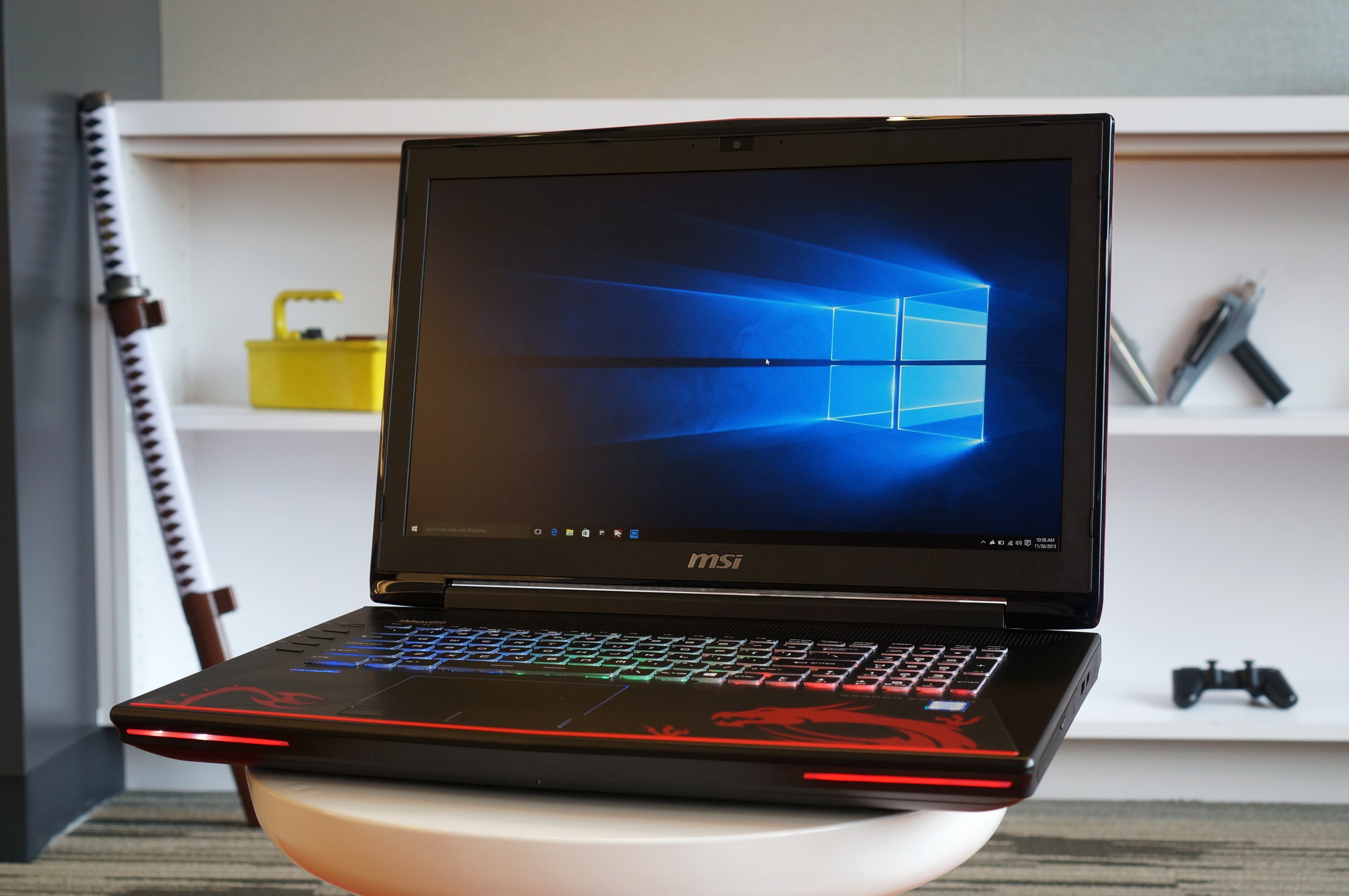
    But whether you’re trying to choose between old stock featuring Intel’s 5th-gen Broadwell processors and new models sporting 6th-gen Skylake hardware, or hunting for a worthwhile luxury laptop, it promises to be a great year for anyone buying a new system. To help you with your decision, we’ve rounded up our top picks from all the current laptops out right now, with newly crowned winners for Best Budget Surface Clone (HP's Spectre x2) and Best Gaming Laptop (MSI's GT72S Dominator Pro G Dragon). 

    Best Ultrabook: Dell XPS 13


    xps 13 5
    Dell’s XPS 13 packs a big display into a tiny form factor and is arguably the best Ultrabook of the year.
    We’ve had a long time to think about this one, and Dell's XPS 13 gets the well-deserved pick for the best Ultrabook. Its aluminum exterior and carbon fiber top exude quality. The most innovative leap forward is its “InfinityEdge” display—that’s a fancy way of saying it has nearly no bezel. This lets Dell pack a 13-inch screen into the body of a laptop that’s not much bigger than a typical 11-inch laptop. 
    The XPS 13 has consistently been one of the faster Ultrabooks we’ve seen, our benchmark against which all others have been judged. Most of our experience is based on the previous Intel Broadwell iteration, which Dell still sells, but it’s now being supplanted with Intel’s newer Skylake CPUs.
    If we had to complain about anything, it would the small keyboard. It’s far from being a deal-breaker, but we wish the keys were just a little bigger. 
    We have the updated XPS 13 in-house for review. So far we can say it’s incrementally faster thanks to the Skylake CPU and its full PCIe SSD. Regardless of the generation, you can’t lose with the XPS 13, a truly compact Ultrabook with a screen that punches out of its class.

    Best 2-in-1 laptop: HP Spectre x360


    hp spectre x360 laptop
     
    HP’s Spectre x360 is beautiful and easily the best 2-in-1 laptop of the year.
    HP's Spectre x360 is our pick for the best 2-in-1 Ultrabook, and a close competitor to Dell's XPS 13. With a body milled out of solid aluminum, the Spectre x360 is beautiful and talented—you can flip the screen around for tablet mode or tent mode when needed. The Spectre x360's keyboard is luxurious next to the cramped Dell XPS 13 too, but the HP laptop is also wider as a result. 
    Performance is top-notch, but we took issue with HP’s decision to control thermals by throttling CPU speed. HP has since updated its BIOS to keep the performance ticking along under heavier loads. The cost is slightly more fan noise, but you get the performance you’re paying for. You also get great audio, awesome battery life, and touch support on all models.We have high hopes for the Skylake model that's coming down the pike. 


    Best Budget Ultrabook: Asus UX305


    ux305 black front open135
     
    Asus gives you a ton of value for the money and arguably the best budget ultrabook.
    Enter Asus’ UX305, the best budget Ultrabook in town. It packs in 8GB of RAM and a 256GB SSD for the low price of $700. You’d think Asus would skimp in build quality or sneak in a lousy screen, but it didn’t. The body is aluminum, and the display is a 1920x1080 IPS screen with anti-glare finish. It’s also one of the thinnest Ultrabooks today, at roughly 12mm thick and weighing just 2.6 pounds.
    The CPU isn’t a Core i5-class, but rather than step down to Atom, Asus stepped sideways, with Intel’s Core M in the original UX305 and the new Core m3 in the updated UX305. We’re actually in the middle of testing the updated Core m3 UX305. The early results say it’s comparable in every way except perhaps performance.
    There are some compromises. There’s no backlighting on the keyboard, which is pretty standard in any Ultrabook today. The trackpad, while not horrible, is a tad bit springy. Still, it's one hell of a deal in a price range that usually nets you thick, ugly and plastic.

    Best luxury laptop: Microsoft Surface Book

    surface book
     
     
    Microsoft’s Surface Book is expensive but fast and unique, and a radical re-thinking of a laptop.


    There’s no way to describe Microsoft's Surface Book as anything but a luxury item. The configuration you want—the one with the GPU under the keyboard—isn’t even available until you slam $1,900 onto Satya Nadella’s desk. But what you get is glorious.
    Start with the beautiful, high-resolution 13.5-inch screen, a discrete GeForce option, Skylake dual-core and exceptional battery life. That you can remove the screen to use as a tablet—err, clipboard—with the included pen is just a major bonus.
    Performance in general is near the top of the heap. On graphics loads, including video-accelerated encoding, it can’t be touched by anything in its class.
    Those who can afford it are going to get what they want: a beautiful laptop that’ll probably start conversations in the first-class cabin as you fly from Dubai to London.

    Best Surface: Microsoft Surface Pro 4


    Microsoft Surface Pro 4
    The Surface Pro 4 is an evolved Surface Pro 3 and better in everyway.
    We know, you think we’re biased with a category named “Best Surface,” but Microsoft’s Surface series is really an evolutionary step beyond the typical “convertible” devices that physically separate from the keyboard to run independently as tablets. Surface clones have arisen that are also light, yet still very capable: Lenovo has its new Miix 700, HP has its Spectre 12 X2. We expect the clone wars to keep heating up in the coming months.
    The best one today, however, is the Surface Pro 4. It has a top-rated display, great performance, and its keyboard and trackpad are miles ahead of competing designs (*cough* iPad Pro). We choose it over the Surface Pro 3 for its performance and better thermals (with less fan noise) compared to the older model.
    The only caveat: It’s expensive—and the essential keyboard adds $130 to the price. That means the mid-range Surface Pro 4 with 256GB of storage, 8GB of RAM and Core i5 is a $1,430 computer. Ouch.
    Still, for those who really valuable portability (it really is laptop performance in a tablet) and will actually use it as a tablet on occasion, you’d be hard pressed to beat the Surface Pro 4 today. 

    Best Budget Surface Clone: HP Spectre x2


    dsc02622
     
    The kickstand on the Spectre x2 folds back to 150 degrees and pops out with a switch.
    If you’re thinking that the Surface 3 is the Surface Pro 4's affordable alternative, think again. For $800, HP's Spectre x2 gives you 128GB of storage, 4GB of RAM, and Intel’s Core m3 series—the company’s latest Skylake CPU, tuned for low power. It’s also LTE-ready, so you can easily add it to your cellular plan for untethered working (that’s a $100 option for the Surface 3). Oh yeah, and you get the keyboard, too.
    That's a heck of a package, especially given that a comparable Surface 3 bundled with its optional type cover costs $830—and sports an Atom processor. About the only places that the Surface 3 shines are in battery life and portability: The Spectre x2 died a little more than an hour sooner in our battery rundown test, and it's well over a half-pound heavier.
    But the Spectre x2's larger display and solid performance put it far ahead of the Surface 3 for office and home tasks. Relative to the Surface Pro 4, there are compromises it makes in the display (which has a larger bezel, skews blue, and is slightly less bright), as well as with its kickstand design, but you still get tremendous bang for your buck.

    Best Gaming Laptop: MSI GT72S Dominator Pro G Dragon


    msi gt72s dragon
     
    MSI’s GT72S Dominator Pro G Dragon features a G-Sync panel and GeForce GTX 980 card.
    We love our desktop gaming rigs, but there are times when a full-tilt boogie semi-portable laptop just makes more sense. Take the MSI GT72S Dominator Pro G Dragon, which packs a GeForce GTX 980—Nvidia’s top-dog GPU for laptops that offers 1:1 performance with its desktop counterpart. Yes, you read that right. A laptop that performs every bit as fast as a top-of-the-line gaming desktop rig with a $550 GPU in it. In fact, our review unit even slightly outperformed the desktop we compared it against.
    But the MSI GT72S Dragon isn't just a one-trick pony. Across the board, it held its own against comparable desktop systems, and even edged out the desktops in certain tasks when we overclocked its Core i7-6820HK processor from 3.2GHz to 4.0GHz.
    The only drawback to this system isn't its weight, though with a 17.3-inch IPS panel it's certainly heavy. Our review model pushes $3,100, thanks to its quad-core Skylake CPU and G-Sync 75Hz display. MSI throws in a free backpack to lessen that price tag’s sting, and honestly, a comparable desktop setup isn’t astronomically cheaper—but it's still a good chunk of cash. You get what you pay for, though, and that’s true desktop performance in a laptop.

    Best high-end Chromebook: Dell Chromebook 13


    dell chromebook 13 front
     
     
    Dell's Chromebook 13 is the first built expressly for business, with a wide range of configurations and prices from $399 to $899.
    The best Chromebook in someone's dreams is the Chromebook Pixel. For the rest of us, Dell's new Chromebook 13 is attainable and a noticeable cut above most other models.
    Whereas many lower-end Chromebooks feel like toys, the Chromebook 13 is made for grown-ups. Its build includes a tough carbon-fiber lid with a rubber gasket for even more durability. It houses a 13.3-inch, 1920x1080 IPS display—either anti-glare (as with the unit we're testing), or a Gorilla Glass touchscreen. Inside the magnesium-alloy body you'll find a Broadwell Celeron CPU. Our review unit's Celeron 3205U is looking peppy in our performance tests, and battery life seems close to Dell's promise of 12-13 hours. 
    Dell's Chromebook 13 is no bargain at $429 as configured. We know most people like Chromebooks costing $300 or even far less. For a category that's hitting its stride, however, with growth in education and the enterprise, the Chromebook 13 is a laptop that looks and acts like it means business.

    Best low-end Chromebook: Asus Chromebook Flip


    asus chromebook flip both modes cropped
     
    The Asus Chromebook Flip has a 360-degree hinge and will take advantage of upgrades to Chrome OS specifically to improve the touch UI.
    We have low-end Chromebooks to thank for bringing web productivity to the masses—budget-minded individuals, and of course, cost-conscious schools. The cheapest model we've seen, the Hisense Chromebook at Wal-Mart, costs just $149. Go there if you want or need to, but our pick for the best low-end model is a little more expensive—and a lot more versatile. That would be the Asus Chromebook Flip, the first mainstream Chromebook convertible and a solid deal at $249. 
    The Flip boasts an aluminum chassis and a superior-quality IPS touchscreen display. Granted, that display is a diminutive 10.1 inches compared to the 11-or-so inches you'll get with other units in this price range, but that's a tradeoff for the machine's 360-degree talents. A low-power Rockchip 3288 CPU helps keep the Chromebook Flip in bargain territory—and saves on battery life, which we clocked at over ten hours.  

  • WHAT WE DO

    We've been developing corporate tailored services for clients for 30 years.

    CONTACT US

    For enquiries you can contact us in several different ways. Contact details are below.

    RUDER FINN INDIA

    • Street :Unit 001A, Tower B, Ground Floor, Global Business Park, MG Road, Gurgaon – 122002, INDIA
    • Person :Radha Roy
    • Phone :91 124 388 2870
    • Country :India
    • Email :royr@ruderfinnasia.com

    Radha Roy.

    Radha Roy Country Head 91 124 388 2870 royr@ruderfinnasia.com Unit 001A, Tower B, Ground Floor, Global Business Park, MG Road, Gurgaon – 122002, INDIA